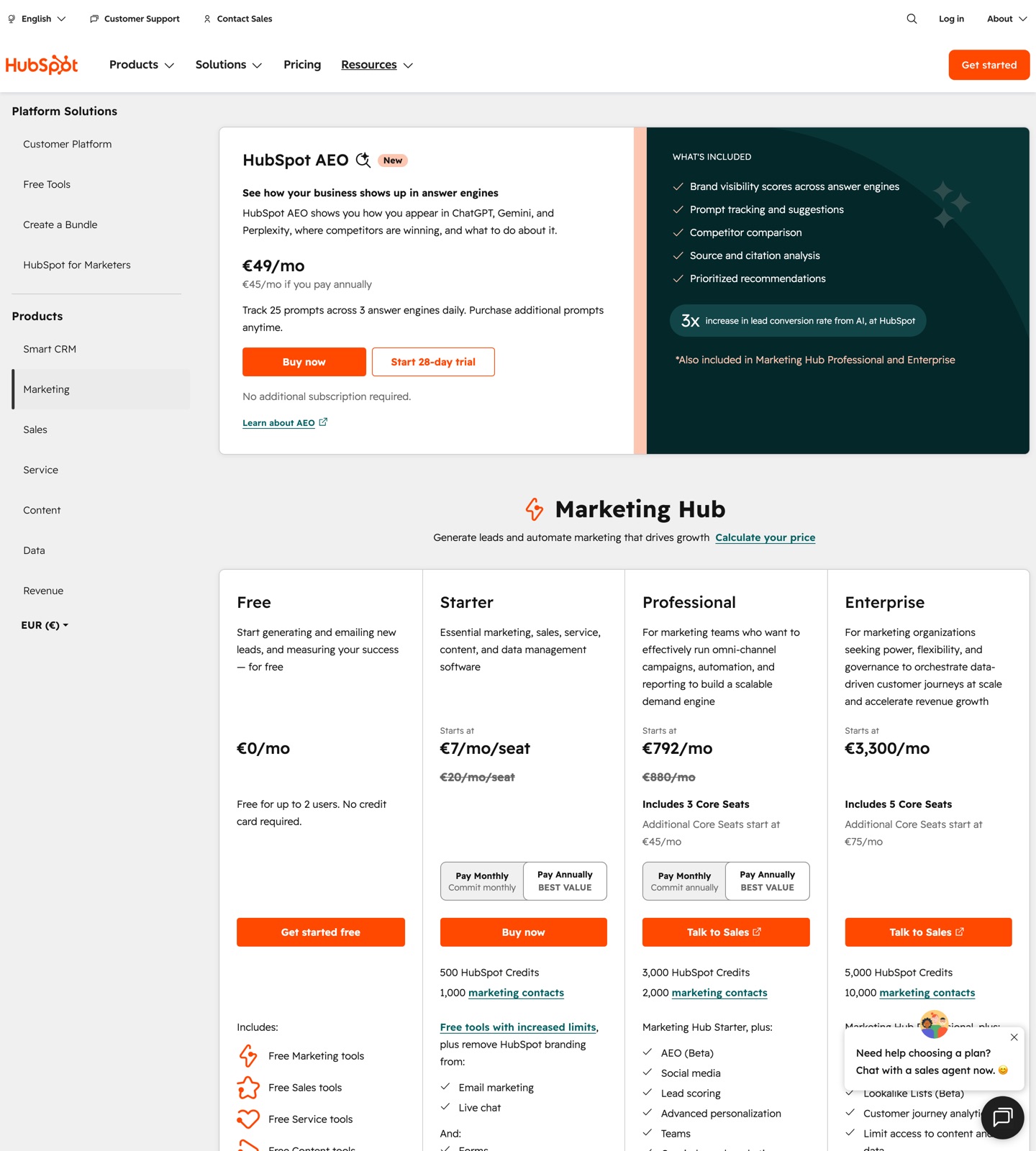
HubSpot's pricing page
Captured from hubspot.com. Pricing changes often, so confirm the current numbers on the live page.
Buying shortcut
Which HubSpot plan should you choose?
Start here
Free tools
Small teams testing HubSpot's CRM and basic marketing surface. It is the first tier to check when you only need the core HubSpot workflow. Watch for: Advanced automation and reporting are limited
Public price
$0
Free CRM and starter tools with limits.
Main upgrade
Starter
Growing businesses that need basic paid marketing and CRM tools. Inspect this tier when the lower tier starts blocking reporting, automation, collaboration, or support needs. Watch for: Limited workflow automation
Public price
$20/seat/mo
$20/seat/month billed annually (includes 1,000 marketing contacts). Promotional pricing from $7/seat/month may apply for new customers for a limited time. Additional contacts from $50/month per 1,000.
High-volume or advanced
Enterprise
Larger teams with complex reporting, governance, and security needs. Treat this as the serious-operations tier, especially if the first two plans leave key limits or add-ons unresolved. Watch for: Usually too heavy for email-only needs
Public price
From $3,600/mo
$3,600/month billed annually. Includes 10,000 marketing contacts and 5 Core Seats. Additional Core Seats from $75/month. Requires a one-time $7,000 onboarding fee. Pricing is sales-assisted at this tier.
What HubSpot costs at your size
The cheapest plan that covers each size, from HubSpot's published pricing. Check the sources below for the date it was verified.
Cost scenarios
Pricing pages show the entry point. These scenarios show what the plan means in real buying situations.
Sales-led company needing CRM plus marketing automation
HubSpot: HubSpot Professional may be justified. Sequenzy: Lower, but not a CRM operating system. HubSpot is better when CRM and sales process are central.
SaaS founder needing onboarding and churn emails
HubSpot: Too much platform for the job. Sequenzy: Focused lifecycle email pricing. Sequenzy is simpler and more directly aligned.
Multi-team go-to-market organization
HubSpot: HubSpot can consolidate tools despite higher cost. Sequenzy: Not a full customer platform replacement. HubSpot wins when consolidation matters more than email-specific simplicity.
What to watch for
HubSpot costs can rise through seats, marketing contacts, add-ons, and higher hub tiers.
Serious workflow automation and reporting typically require higher tiers.
It is often more platform than an early SaaS team needs for lifecycle email.
Costs beyond the headline price
- Only contacts marked as marketing count toward the paid tier, and up to 1,000 non-marketing contacts can be stored free.
- Passing a contact tier upgrades the account to the next tier automatically during the billing period, with a notice as the limit approaches.
- Professional requires a one-time $3,000 onboarding fee and Enterprise requires a one-time $7,000 onboarding fee.
- Extra Core Seats cost from $45/month on Professional and from $75/month on Enterprise.
- Monthly email send caps scale with the contact tier, at 5 times the tier on Starter, 10 times on Professional, and 20 times on Enterprise.
HubSpot pricing is platform pricing
HubSpot is not just an email marketing platform. It is a CRM and customer platform with multiple hubs, seats, workflows, contacts, reporting, and add-ons. That makes pricing harder to compare directly against focused email tools.
If you need one system for sales, marketing, service, CMS, and data operations, HubSpot can justify the complexity. If your main need is SaaS lifecycle email, the platform can feel oversized.
The key budget exercise is to model the whole HubSpot footprint, not just Marketing Hub. Seats, marketing contacts, hub combinations, reporting needs, and automation depth can all move the final price. A sales-led team may happily pay for that because CRM adoption, pipeline hygiene, sales workflows, and marketing attribution live together. A product-led SaaS team may only need event-triggered lifecycle email and find the extra surface area distracting.
Before treating HubSpot as an email tool, compare it with focused options in the HubSpot alternatives guide and the direct HubSpot comparison. Those pages make it easier to decide whether you are buying a customer platform or solving a lifecycle email problem.
HubSpot against store and email tools
The biggest price gaps show up against tools built for one job. At 10,000 contacts, Klaviyo vs HubSpot compares about $150 a month for Klaviyo's store-focused Email plan with about $1,350 for Marketing Hub Professional, and HubSpot vs Mailchimp does the same for newsletters and small-business campaigns. Both show what the extra money buys: pipelines, lead scoring and one record for sales and marketing.
HubSpot vs Sequenzy
HubSpot is better for sales-led go-to-market teams that want CRM and marketing in one place. Sequenzy is better for SaaS teams that want email sequences tied to product and billing events without a large platform rollout.
Choose HubSpot when CRM, sales process, service workflows, reporting, and cross-team operations are part of the same buying decision. Choose Sequenzy when the priority is shipping onboarding, activation, billing, and retention email without adopting a full go-to-market suite.
HubSpot vs Sequenzy
How HubSpot compares with Sequenzy, which bills on emails sent rather than contact count.
How Sequenzy prices the same volume
Sequenzy price per 1k emails
$0.82 / 1k at $49/mo for 60k emails
Verdict
HubSpot is powerful when you want a full go-to-market platform. It is rarely the cheapest or simplest way to run SaaS lifecycle email. Sequenzy is a better fit when the team wants email automation without adopting a large CRM suite.
FAQ
Sources checked · Oct 8, 2026
Written by Nic Polotnianko, co-founder of Sequenzy, which appears in this comparison. How we compare tools