Updated September 29, 2026
PostHog Workflows
ActiveCampaign

PostHog Workflows vs ActiveCampaign

Product analytics automation versus mature contact-based marketing automation

14
Features Compared
5
Key Differences
10
FAQs Answered
TL;DR

PostHog Workflows reacts to what users do inside your product and is free for the first 10,000 messages per channel each month. ActiveCampaign is a contact-priced marketing automation and CRM platform built around tags, lists, deals, and lead scoring. Pick PostHog Workflows when the trigger is product usage and the action is short. Pick ActiveCampaign when marketing and sales need one contact database with pipelines. Sequenzy fits product-led SaaS teams that want lifecycle and billing email without paying per contact.

Product screenshots and test notes

PostHog Workflows · Workflows setup

Tested in-app
1 / 7
PostHog Workflows: Workflows setup
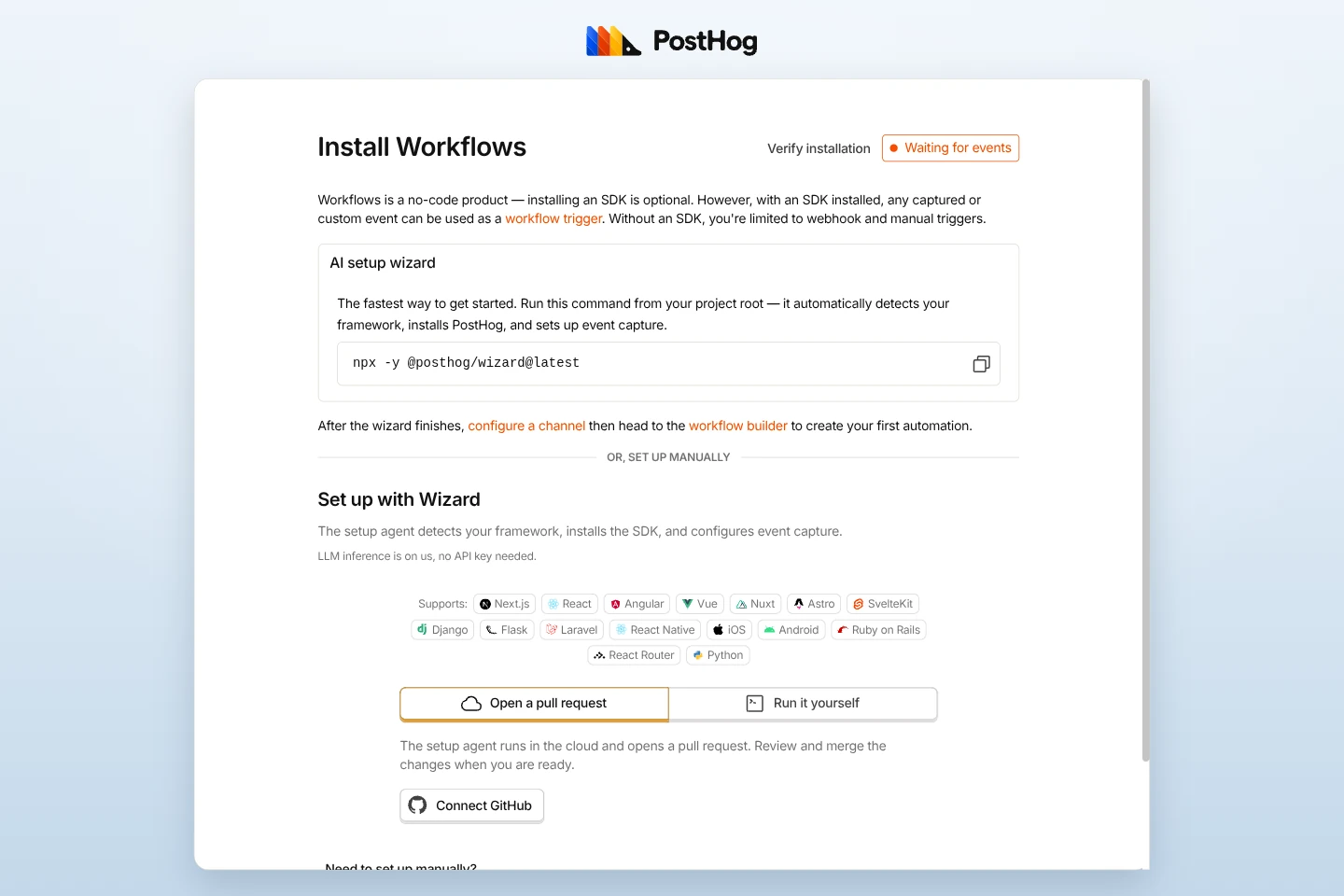
The setup wizard explains which triggers work before you install an SDK.

Explore a welcome sequence and save a draft in PostHog

Tested in-app
  1. Choose Workflows during setup

    Pick Workflows from the product checklist. You can skip SDK installation to reach the builder. The setup explains that an SDK lets you use captured product events as triggers.

  2. Browse workflow recipes

    Open Workflows, then Templates and Workflow templates. The cards tell you which event starts each recipe and the job it is designed to do.

  3. Preview the welcome sequence

    Open Welcome email sequence to see the signup trigger, welcome email, one-day delay and follow-up together on the canvas.

  4. Choose how a new workflow starts

    From a blank workflow, open the Trigger node and select Manual to build in a fresh project. Event triggers can use product activity as the project starts receiving data.

  5. Inspect the email step

    Open the first message node in the welcome preview. The side panel shows the sender, recipient property and subject together, with a separate control to edit the content.

  6. Open the visual email editor

    Choose the content preview to open the block editor. You can insert headings, columns, buttons or HTML, or switch to the plain-text version.

  7. Save a disabled draft

    In the blank workflow, add a Delay after the manual trigger and choose Create as draft. Check the Draft status before leaving. In our test, the manual workflow saved and the welcome template failed to save.

What stood out in testing

We verified a new Cloud account, opened a welcome sequence and saved a separate manual-trigger draft with a delay. The canvas made the sequence easy to follow. Editing an email took two clicks from the canvas, and saving the welcome template in our empty project failed without useful guidance. We left the saved workflow disabled.

Key Differences

The main things that set these tools apart

A PostHog person versus an ActiveCampaign contact
Tie

In PostHog Workflows the audience is people in your analytics project, filtered by events, properties, and cohorts. In ActiveCampaign the audience is contacts organized by tags, lists, custom fields, and deal stages. If your segments are defined by product behavior, PostHog already has them. If they are defined by lead source, campaign engagement, or sales stage, ActiveCampaign already has them.

ActiveCampaign has the CRM and lead scoring
ActiveCampaign wins

ActiveCampaign can move a contact through a sales pipeline, assign a deal owner, score engagement, and branch nurture sequences on that score. PostHog Workflows can update a person property or call a webhook, but it has no pipeline, deal record, or sales task concept.

PostHog Workflows needs no event sync
PostHog Workflows wins

Getting product events into ActiveCampaign means event tracking via its API, site tracking, or an integration, and then keeping names and properties in step. PostHog Workflows triggers from events you already capture, so a new automation can go live without new instrumentation.

Price scales with different units
PostHog Workflows wins

ActiveCampaign prices by contacts and plan tier, so a large free-user base raises the bill even when most of those users rarely get email. PostHog Workflows is priced per message after a free monthly allowance, so cost follows sending volume rather than database size.

ActiveCampaign is built for campaign marketers
ActiveCampaign wins

Broadcast newsletters, forms, landing pages, and nurture sequences are core ActiveCampaign work with years of templates and reporting behind them. PostHog Workflows is a canvas for automated reactions, not a campaign calendar.

Pricing Comparison

Marketing automation comparison

PostHog Workflows
Usage-based/month

10,000 messages per channel free each month, then usage-based pricing per message.

Visit PostHog Workflows
ActiveCampaign
$15+/month

Starter from $15/month at 1,000 contacts billed annually. Plus from $49/month and around $239/month at 10,000 contacts.

Visit ActiveCampaign
Best for SaaS
Sequenzy
$49/month

Marketing automation comparison

60,000 emails/mo, unlimited contacts.

Free plan: up to 2,500 emails/month. Paid plans from $19/month (15,000 emails), unlimited contacts on every plan. See all plans

Start for free

Feature Comparison

14 features compared side-by-side

Feature
PostHog Workflows
ActiveCampaign
Sequenzy
Automation Model
Product event trigger
Native
Possible through tracking or integration
Supported
Contact tags and lists
Limited
Strong
Subscriber segments
Visual automation builder
Workflow canvas
Mature marketing automation builder
SaaS email automation
CRM and Marketing
CRM workflows
Limited
Built in
Limited
Lead scoring
Possible through events
Built in
Lifecycle scoring through segments
Product-led lifecycle email
Good for simple triggers
Possible with setup
Strong
Fit
Best for product teams
Strong
Moderate
Moderate
Best for traditional marketers
Limited
Strong
Email-focused
Non-email dispatches
Slack, SMS, webhooks, destinations
Marketing and CRM actions
Email, push + SMS add-on
Pricing and Data
Pricing unit
Messages per channel
Contacts and plan tier
Emails sent
Free allowance
10,000 messages per channel monthly
No permanent free plan
Free plan
Cost of storing free users
None
Every contact counts
Unlimited contacts
Site and event tracking
Full product analytics
Site tracking and event API
Events via API and integrations
Forms and landing pages
Not offered
Built in
Hosted forms and landing pages

API, CLI and MCP: How AI-Ready Is Each Tool?

What you, or an AI assistant like Claude or ChatGPT, can do in each tool without opening the dashboard. “MCP” means the vendor's own MCP server can do it. Each status links to the doc that confirms it.

PostHog Workflows
MCP server
Official, read and writeHosted

PostHog MCP (mcp.posthog.com/mcp): workflows-* tools create, test, publish, run batch; email templates; opt-outs.

MCP docs
CLIOfficialAPIREST
Through its MCP (11 of 14)

Create and update contacts, Add contacts to lists or tags, Create segments, Create campaigns, Send or schedule campaigns, Build automations, Trigger automations, Create A/B tests, Create and edit templates, Read campaign analytics, View or manage unsubscribes

API only

Send transactional email

Checked September 28, 2026
ActiveCampaign
MCP server
Official, read and writeHosted

Remote MCP: contacts, tags, lists, deals, automation enrollment, campaign message edits. No campaign create/send tools.

MCP docs
CLINoneAPIREST
Through its MCP (5 of 14)

Create and update contacts, Add contacts to lists or tags, Trigger automations, Create and edit templates, Read campaign analytics

API only

Create segments, Create campaigns, Send or schedule campaigns, Create A/B tests, View or manage unsubscribes, Create forms or landing pages

Checked September 28, 2026
Sequenzy
MCP server
Official, read and writeHosted or local

250+ tools. Hosted with OAuth or local with an API key.

MCP docs
CLIOfficialAPIREST
Through its MCP (14 of 14)

Create and update contacts, Add contacts to lists or tags, Create segments, Create campaigns, Send or schedule campaigns, Build automations, Trigger automations, Create A/B tests, Create and edit templates, Send transactional email, Read campaign analytics, View or manage unsubscribes, Set up sending domains, Create forms or landing pages

Checked September 28, 2026

If You Leave Later: What You Can Take With You

Switching is easier when your data comes with you. Unsubscribes matter most: without them, people who opted out get emailed again.

PostHog Workflows
Contacts and custom fields
Yes

Persons and their properties via PostHog API / SQL queries

PostHog Workflows docs
Unsubscribes and bounces
Yes

Messaging preferences API exports opt-outs as CSV; suppressions API lists bounced/manual entries

PostHog Workflows docs
Templates as HTML
Not confirmed

Templates readable via API/MCP in PostHog design format; HTML export not documented

PostHog Workflows docs
Automations
Yes

Workflow JSON (trigger, action graph) via hog_flows API; PostHog-specific format.

Open and click history
Yes

$workflows_email_* sent/opened/clicked events are regular PostHog events, queryable and exportable

ActiveCampaign
Contacts and custom fields
Yes

Contacts > ellipsis > Export to CSV, choose fields; or API list contacts

ActiveCampaign docs
Unsubscribes and bounces
Yes

Contact export status filter: Unsubscribed or Bounced

ActiveCampaign docs
Templates as HTML
Yes

API list templates returns HTML content; UI share links only import into ActiveCampaign

ActiveCampaign docs
Automations
No

No portable file export found; API only lists automations and contact enrollments.

Open and click history
Yes

Campaign report export in UI; API lists opens, clicks, bounces and unsubscribes per campaign

Sequenzy
Contacts and custom fields
Yes

Subscribers > Export downloads a CSV with status, tags and custom attributes, or page through GET /subscribers

Sequenzy docs
Unsubscribes and bounces
Yes

Unsubscribed and bounced contacts carry their status in the CSV export, and GET /suppressions lists them

Sequenzy docs
Templates as HTML
Yes

GET /templates/{id}/render returns the exact email-safe HTML that is sent

Sequenzy docs
Automations
Yes

GET /sequences/{id} returns each sequence's steps, delays and conditions as JSON; other tools cannot import it directly

Sequenzy docs
Open and click history
Yes, on request

Full per-contact open and click history is exported on request; opens and clicks also stream out through webhooks as they happen

Pros & Cons

Honest strengths and weaknesses of each platform

PostHog Workflows

Pros
  • Triggers directly from events and cohorts you already track
  • Free allowance of 10,000 messages per channel each month
  • Can send email, SMS, and Slack messages or call webhooks from one canvas
  • No contact-count pricing for large free-user bases
Cons
  • No CRM, deal pipeline, or lead scoring
  • Not built for newsletters, forms, or campaign calendars
  • Email templates and reporting are basic next to a marketing platform
  • A newer product with a shorter track record than ActiveCampaign

ActiveCampaign

Pros
  • CRM pipelines and deal stages in the same tool as email
  • Built-in lead and engagement scoring
  • Mature automation builder with many recipes and integrations
  • Forms, landing pages, and broadcast campaigns included
Cons
  • Contact-based pricing rises with every stored user
  • Product events require tracking setup and ongoing sync
  • Plus tier is often needed before automation feels complete
  • More setup and ongoing ownership than a lightweight SaaS email tool

What Users Say

Reviews from Trustpilot, linked to the source

Trustpilot

“I've just switched to ActiveCampaign and can't believe how it handles content management, email sequences, and a whole lot of other sophisticated features. The learning curve is a bit steeper than with some other options, but the personal onboarding support was a huge help.”

Michael HawkerView on Trustpilot
Trustpilot

“I signed up for AC and had to wait a week before I could get an integration/onboarding call. I emailed the salesperson who signed me up twice and then left him a voicemail the next day to see if he could help me get a few questions answered so I wouldn't have to wait a week. Guy ghosted me.”

June CamachoView on Trustpilot

Best For

When to choose each tool

Choose PostHog Workflows if you...
  • Sending a nudge when a user skips a key setup step
  • Posting a Slack alert when an account hits a usage threshold
  • Firing webhooks from product events without new tracking
  • Teams whose segments already live as PostHog cohorts
Choose ActiveCampaign if you...
  • Sales-assisted SaaS that needs deals, pipelines, and lead scoring
  • Marketers running newsletters, forms, and nurture tracks
  • Businesses where most contacts are leads, not product users
  • Teams that want one vendor for email marketing and a light CRM
Choose Sequenzy if you...
  • Product-led SaaS with many free users who would inflate contact-based pricing
  • Trial, dunning, and upgrade email driven by Stripe events
  • Transactional and lifecycle email managed in one place
  • Keeping PostHog for analytics without adding a CRM
Start for free

When Sequenzy Beats Both for SaaS Email

No per-contact penalty for free users

ActiveCampaign charges by contact count, which gets expensive when thousands of free or dormant users sit in the database. Sequenzy bills by emails sent with unlimited contacts, so a large user table does not raise the price on its own.

Billing email without CRM overhead

ActiveCampaign's strength is sales pipelines. If you do not run a sales team, that surface goes unused. Sequenzy connects to Stripe so trial ending, failed payment, and upgrade emails can trigger from billing state directly.

More email structure than a workflow canvas

PostHog Workflows sends messages from product events, but templates, transactional email, and campaign reporting are thin. Sequenzy gives lifecycle and transactional email a dedicated home while PostHog keeps the analytics.

Two automation cultures

PostHog Workflows and ActiveCampaign both have a visual canvas where you drag triggers, waits, and branches. That is where the resemblance ends. They come from different teams, solve different problems, and store a different idea of who the customer is.

PostHog Workflows was built by an analytics company. Its trigger is something a user did inside your product: an event, a property change, entry into a cohort. Its actions include sending an email or SMS, posting to Slack, calling a webhook, or pushing data to one of PostHog's real-time destinations.

ActiveCampaign was built by a marketing automation company. Its trigger is usually something that happened to a contact: they joined a list, got a tag, opened an email, submitted a form, visited a tracked page, or moved to a new deal stage. Its actions are mostly marketing and sales operations: send an email, add a tag, adjust a score, create a deal, assign an owner.

If you are a product-led SaaS team, you will probably feel at home in PostHog Workflows. If you run a sales-assisted funnel with a marketer and a couple of reps, ActiveCampaign speaks your language.

Who each tool is really for

PostHog Workflows suits teams that already use PostHog as their source of product truth. A developer or product manager can build "user created a project but never invited a teammate after three days, send a tip" without touching another vendor. It also covers internal work that no email platform handles well, like alerting a Slack channel when a high-value account starts using a new feature.

ActiveCampaign suits businesses where most of the database is leads rather than active users. Think agencies, course creators, B2B services, or SaaS companies with a demo-led motion. The value is that email engagement, lead score, and deal stage live on the same contact record, so a nurture sequence can hand off to a salesperson at the right moment.

Where the workflows actually differ

A few concrete jobs show the split.

Job PostHog Workflows ActiveCampaign
Email users who stall during onboarding Trigger from the missing event directly Needs product events sent in first
Score a lead on email clicks and page visits Not a built-in concept Native lead scoring
Create a deal when a trial account is highly active Webhook to a CRM Native deal creation, once usage data arrives
Post a Slack alert for a usage spike Native Slack action Possible via integration
Send a monthly newsletter to all subscribers Not the focus Core feature

The pattern: PostHog Workflows wins when the input is product behavior. ActiveCampaign wins when the output is marketing or sales process.

Pricing: messages versus contacts

This is the part many SaaS teams underestimate.

PostHog Workflows includes 10,000 messages per channel free each month, then charges per message on a usage basis. A team that emails a few thousand users a month may pay nothing.

ActiveCampaign charges by contact count and plan. Our pricing notes list Starter from $15 per month at 1,000 contacts on annual billing, Plus from $49 per month at 1,000 contacts, rising to around $239 per month at 10,000 contacts, Professional from $79, and Enterprise from $145 at the 1,000-contact level. The catch for SaaS is that every signup counts as a contact, including free users who never convert. If you sync your whole user table, the bill tracks your signup curve, not your email program.

Sequenzy prices by emails sent with unlimited contacts. For context, the plan used for a 10,000-contact comparison is $49/month for 60k emails (unlimited subscribers).

Pricing reality at 10,000 users

Consider a SaaS with 10,000 people in its user table, of whom 2,000 are active in a given month. You want a four-email onboarding sequence for about 800 new signups a month and a monthly product update to active users.

Cost line PostHog Workflows ActiveCampaign Plus
What you pay for Messages sent Contacts stored
Monthly volume About 3,200 onboarding plus 2,000 update emails Same sends, but all 10,000 contacts count
Listed price Inside the 10,000 free email messages Around $239 per month on annual billing
What changes the bill Sending more Adding contacts, even inactive ones

The ActiveCampaign figure comes from our pricing notes for Plus at 10,000 contacts. You can bring it down by syncing only engaged users or active trials, but then ActiveCampaign cannot email the rest. That is the real trade-off: contact pricing pushes you to keep your list small, while product-led growth wants to reach everyone who signed up.

The contact database problem

ActiveCampaign was designed for a world where a contact is someone who raised their hand: filled a form, downloaded a guide, booked a demo. Tags and lists record how they got there. That model works well for lead generation.

A product-led SaaS has a different shape. Most people in the database arrived by signing up, their state is defined by what they did in the product, and that state changes daily. Mirroring it in ActiveCampaign means translating PostHog events into tags or custom fields and keeping them current. Every mismatch, such as a tag that says "not activated" for someone who activated yesterday, produces a wrong email.

PostHog Workflows avoids the translation because the cohort is the source. The price is that PostHog has no idea about lead source, deal stage, or marketing consent history beyond what you store as properties.

Consent, lists, and deliverability

ActiveCampaign treats list membership and consent as first-class: contacts subscribe to lists, unsubscribes are tracked per list, and forms can use double opt-in. That structure matters if you run newsletters and promotions to people who never used your product.

PostHog Workflows sends to people in your product, which usually rests on a transactional or account relationship rather than a marketing opt-in. If you start sending promotional content from PostHog, you need your own record of who agreed to it and a working unsubscribe path. Authenticate your domain with SPF, DKIM, and DMARC in whichever tool sends, and do not let both tools send marketing mail from the same domain without shared suppression.

Migrating between them

The honest answer is that little moves cleanly, because the data models differ.

ActiveCampaign to PostHog Workflows

  • Contacts: PostHog people are created from identified users in your product, so you are not importing a list so much as matching existing users by email.
  • Tags and lists: rebuild the ones that describe behavior as PostHog cohorts. Tags that describe lead source or campaign history usually have no product equivalent.
  • Automations: recreate each one on the PostHog canvas. Branches on email opens or lead score will not translate.
  • Deals and scores: there is nowhere to put them. Keep a CRM if sales still works them.
  • Sending domain: authenticate your domain in PostHog before moving any live sends, and warm up volume if the new sending setup is cold.

PostHog Workflows to ActiveCampaign

  • Send the product events that power your workflows into ActiveCampaign through the integration or a webhook destination.
  • Map cohorts to tags or custom fields so ActiveCampaign automations can branch on them.
  • Expect contact counts, and therefore price, to jump if you sync every PostHog person.

Running both together

Plenty of B2B SaaS teams end up with both. PostHog decides who is product-qualified, and ActiveCampaign holds the lead, the deal, and the nurture track. The risk is duplicated messaging: a user can receive a PostHog onboarding nudge and an ActiveCampaign nurture email on the same day. If you run both, decide which tool owns customer email and let the other one only pass signals.

Decision checklist

  • Is there a sales pipeline? If reps work deals every day, ActiveCampaign or another CRM belongs in the stack.
  • Are most contacts product users or leads? Mostly users points to PostHog Workflows or a product-led email tool. Mostly leads points to ActiveCampaign.
  • How large is the user table compared with the active audience? A large gap makes contact pricing expensive.
  • Do you run newsletters and forms? ActiveCampaign covers them. PostHog Workflows does not.
  • Who will build automations? Product and engineering tend to prefer PostHog. Marketers tend to prefer ActiveCampaign's builder and recipes.
  • Do you need Slack alerts or webhooks from usage? Keep those in PostHog whatever you choose for email.

Where Sequenzy fits

Sequenzy is not a CRM, so if your growth depends on pipelines and lead scoring, ActiveCampaign is the more complete choice. It is also not an analytics tool, so PostHog stays where it is.

Sequenzy fits the product-led SaaS company that finds ActiveCampaign too sales-shaped and PostHog Workflows too thin for email. You get onboarding, trial, dunning, and upgrade sequences triggered from product and Stripe events, transactional email in the same place, and pricing that does not climb with every free signup.

Bottom line

Keep PostHog Workflows for fast reactions to product behavior. Move to ActiveCampaign when a sales process and a lead database need to share one tool. Choose Sequenzy when email itself is the program you need to run well, and contact-based pricing no longer makes sense for your user base.

Frequently Asked Questions

10 questions answered about PostHog Workflows vs ActiveCampaign

Testimonials

Sequenzy Testimonials

Caden Sumner

Caden Sumner

Founder, Jackalope

I wanted email to be one more thing an agent can work with, not a separate dashboard. The API and MCP made that possible, and the read-only key preset meant I could connect it safely from day one. Once a month Jackalope sends a product update. LopeBase drafts it from the changelog, I review and approve it, and it goes to Sequenzy, which sends it and handles unsubscribes. Sequenzy also runs the onboarding emails, and since LopeBase reads the sequences, I can see if one has quietly stopped.

Parth Koshti

Parth Koshti

Founder, SnitchFeed

Omnisend is built for ecommerce, and it showed. The API wasn’t great, the app was slow, the UI was confusing, and the automations couldn’t do what we needed. Sequenzy has been fantastic on all fronts. We send a lot of transactional email: hourly, daily and weekly alerts, plus login codes and invites. The API and MCP made it really easy to integrate Sequenzy into SnitchFeed for both marketing and transactional email. I love it for the incredible UI and UX, how well the email designs turn out, and the depth of the feature set. And it’s really difficult to beat the price.

Filip Panoski

Filip Panoski

Founder, Bazzly

I've used 2 other email marketing tools. They were supposedly "market leaders". Both were clunky, unnecessarily expensive and horrible support. When I tried Sequenzy I thought there'd be trade-offs compared to the others. But there weren't, it had everything I needed, there was no bloat, emails delivered extremely fast, and the founders shipped anything I asked in a day. The best part is that Sequenzy is AI native, I rarely do stuff in the dashboard, just use my AI to create campaigns, sequences and segment customers which saves me a ton of time. Never been happier with an email marketing tool.

Max Eccles

Max Eccles

Founder, InstantInterior AI

$600 revenue in 30d from email automations. Very happy I migrated to Sequenzy. Before I was making zero from email automations.

Leo

Leo

Maintainer, Email SDK

Sequenzy's most powerful feature is probably those campaigns. It seems useless at first but they are one of the most important things to send to your users. I get to talk to my users 1:1 and help them set it up for their use case. The owner is really active on X, really nice and helpful. He's the type of person to go out of his way to help you, so you get really good support!

Viraj

Viraj

Founder, SnapCount

After using Loops and Resend, I was looking for an email infrastructure service that had MCP support, Affonso and Dodo Payments integrations, and was affordable. Came across Sequenzy, and the support from Nic has been unbelievable. Migration was done in 24 hours without any issues, and I can run all of my products from a single account.

Louis

Louis

Founder

Easy migration from another tool. Premium customer service and easy to set everything up

Apr 9, 2026

Jim

Jim

Founder, FixMyLanding

It helped me grow to $100 MRR, get #1 on Uneed, make more sales, get acquired. I literally love Sequenzy, it's so simple, I love the dashboard. I also saw the integrations and was shocked. 3 sales today, all thanks to Sequenzy. Honestly, thanks.

King Killers

King Killers

Shopify App Store review

Loving the Sequenzy app so far due to the affordability and large subscriber limits. Planning on this becoming my main email app. Campaign + flows setup with the help of their AI took less than 30 minutes.

Verified User

Verified User

Computer Software

SaaS-focused feedback, fast processing, and plenty of integrations. It is very SaaS-focused, supports a wide range of integrations, and processes feedback right away.

Jun 17, 2026

G2
Paul

Paul

Founder, PaulVibe and Forgefy

When I moved my founder site paulvibe.com to Sequenzy, I set up 17 live sequences with over 100 emails in less than a month. That used to take me months. It worked so well that I now run my SaaS forgefy.io on it too. I run everything through Claude with the Sequenzy MCP. I describe the flow I want, and Claude builds it, tags the right people and sends me a test. And the team is great: when I suggest something, it’s usually picked up almost right away. For a solo founder with five products and no team, that’s the difference between “I should set that up someday” and “it’s live tonight.”

Yusuke

Yusuke

Founder, LandingBoost

It’s the first tool where I’m actually willing to keep working on email without it turning into one giant scary blast. Favorite part is still what I said, being able to split stuff. Drafts vs campaigns vs a single-person send. I can park a lot of “don’t send this yet” work with labels and not feel like it’s one click away from going to everyone. Sequences later. Consent / lists first. I’m slow on purpose.

Rakesh Reddy

Rakesh Reddy

Founder, CrawlRaven

We used Sequenzy to replace a generic onboarding flow with coordinated lifecycle journeys covering signup, connecting Google Search Console, discovering SEO opportunities, upgrading, and paid-customer retention. Event triggers, conditional branches, personalization, and enrollment cancellation gave us precise control over who receives each message - and when someone should exit a journey. We backfilled eligible users into the appropriate journeys. The initial emails went out without bounces, complaints, suppressions, or unexpected recipients. Future users now enter the relevant journeys automatically based on their activity in CrawlRaven.

Elvis Sun

Elvis Sun

Founder, PressPulse & Medialyst

Codex basically one-shotted the migration for syncing our audience from SendGrid to Sequenzy. Sequenzy is fully observable, so agents can just set everything up. The net impact is saving $45/mo, plus 2 hours of my time every time I need to repurpose a newsletter. That's 8 hours a month. My consulting rate is $550/hr, so every hour automated is super valuable.

Caden Sumner

Caden Sumner

Solo founder, Moxie Docs

Lifecycle email was the kind of thing I knew I would need eventually, but have never had to build it out myself and had no idea where to start. In literal hours I had a fully working (but basic) flow for onboarding new users, detecting churn, and re-engaging people who have trials lapsing to hopefully convert. Sequenzy let me offload the entire “keep users engaged and recover the ones who are slipping” workflow to something that just runs. Every hour I'd have spent building and babysitting lifecycle emails went into shipping the actual product instead.

The Stand Comedy Club

The Stand Comedy Club

Edinburgh, Glasgow & Newcastle

I'd been looking for an alternative transactional and marketing email platform for some time, and I'm really glad I came across Sequenzy. The system is easy to configure and use, the email builder is excellent, and the API integration and documentation are first class. Best of all, the support is exceptional. Nic is always available, responds quickly, and is genuinely keen to improve the platform. We've had numerous feature requests implemented incredibly quickly, and any issues we've encountered have been resolved almost immediately. The AI integration is also genuinely useful, rather than feeling like it's been added simply for the sake of having AI. We've already seen improved open and click rates compared with our other providers, and the platform offers excellent value for money. Highly recommended - definitely worth trying. Anything I had disliked about the system has already been addressed. We had improvements made to the email builder and we had team/user access controls expanded just by asking. The turn around time for making these changes has been very impressive.

Oct 7, 2026

G2
Jim

Jim

Founder

I run a SaaS, and found Nic on X where I kept seeing posts about his email marketing tool, Sequenzy. I decided to try it for email marketing. Literally on the first day, I used it to send a marketing campaign and I got 5 sales. What I like most is the ai assistant because it actually writes emails that feel real instead of the usual ai slop chatgpt returns, so they do not end up in spam. It also has a 2.5k free email limit which is way better than most tools that only give you around 1k. The best part though is that it handles everything for me, tags, subscribers, sequences and all of it. Without it i would probably be managing a database and a bunch of cron jobs just to make email automation work. Sequenzy just makes my life a lot easier. it can also be set up with 2-3 clicks! Give it a try!!

Mar 10, 2026

Dhiva Logu

Dhiva Logu

Founder

I love everything about Sequenzy and also the kind of support I get from Nic. It's already the best choice for campaigns & Sequences. Specially the integrations with payment providers, auth providers & analytics etc.. is really spot on. Best in terms of features & pricing in the email segment 100% recommend it for SaaS emails :)

Mar 10, 2026

Petros

Petros

Shopify App Store review

The setup was fast and simple. It synced customer, product, and order data quickly. Generating automated flows was simple, and it improved my monthly bottom line by about 7%.

Not sure which to pick?

If you're a SaaS founder who needs Stripe integration and unified email, try Sequenzy free. No credit card required.

Related Comparisons

Written by , co-founder of Sequenzy, which appears in this comparison. How we compare tools

Sequenzy pricing reference

Sequenzy - Complete Pricing Guide

Pricing Model

Sequenzy uses email-volume-based pricing. You only pay for emails you send. Unlimited contacts on all plans — storing subscribers is always free.

All Pricing Tiers

  • 2.5k emails/month: Free (Free annually)
  • 15k emails/month: $19/month ($205/year annually)
  • 30k emails/month: $29/month ($313/year annually)
  • 60k emails/month: $49/month ($529/year annually)
  • 120k emails/month: $99/month ($1069/year annually)
  • 300k emails/month: $199/month ($2149/year annually)
  • 600k emails/month: $399/month ($4309/year annually)
  • 900k emails/month: $599/month ($6469/year annually)
  • 1.2M emails/month: $799/month ($8629/year annually)
  • 2M emails/month: $1299/month ($14029/year annually)
  • 3M emails/month: $1999/month ($21589/year annually)
  • 4M emails/month: $2499/month ($26989/year annually)
  • 5M emails/month: $2999/month ($32389/year annually)
  • Unlimited emails/month: Custom pricing (Custom annually)

Yearly billing: All plans offer a 10% discount when billed annually.

Free Plan Features (2,500 emails/month)

  • Visual automation builder
  • Transactional email API
  • Team and agent inbox
  • Landing pages
  • Unlimited team members
  • Goal tracking & revenue attribution
  • Unlimited lists and segments
  • Payment integrations
  • API, MCP, and CLI access
  • Unlimited sending domains
  • Deliverability monitoring
  • Send time optimization
  • A/B testing

Paid Plan Features (15k - 5M emails/month)

  • Visual automation builder
  • Transactional email API
  • Team and agent inbox
  • Landing pages (Create hosted signup pages and attach a custom domain.)
  • Unlimited team members
  • Goal tracking & revenue attribution
  • Unlimited lists and segments
  • Payment integrations (Stripe, Paddle, Lemon Squeezy)
  • API, MCP, and CLI access
  • Unlimited sending domains
  • Deliverability monitoring
  • Send time optimization
  • A/B testing

Enterprise Plan Features (Unlimited emails)

  • Visual automation builder
  • Transactional email API
  • Team and agent inbox
  • Landing pages
  • Unlimited team members
  • Goal tracking & revenue attribution
  • Unlimited lists and segments
  • Payment integrations
  • API, MCP, and CLI access
  • Unlimited sending domains
  • Deliverability monitoring
  • Send time optimization
  • A/B testing

Important Pricing Notes

  • You only pay for emails you send — unlimited contacts on all plans
  • No hidden fees - all features included in the price
  • No credit card required for free tier

Contact

  • Pricing Page: https://sequenzy.com/pricing
  • Sales: nic@sequenzy.com