Sender's pricing page
Captured from sender.net. Pricing changes often, so confirm the current numbers on the live page.
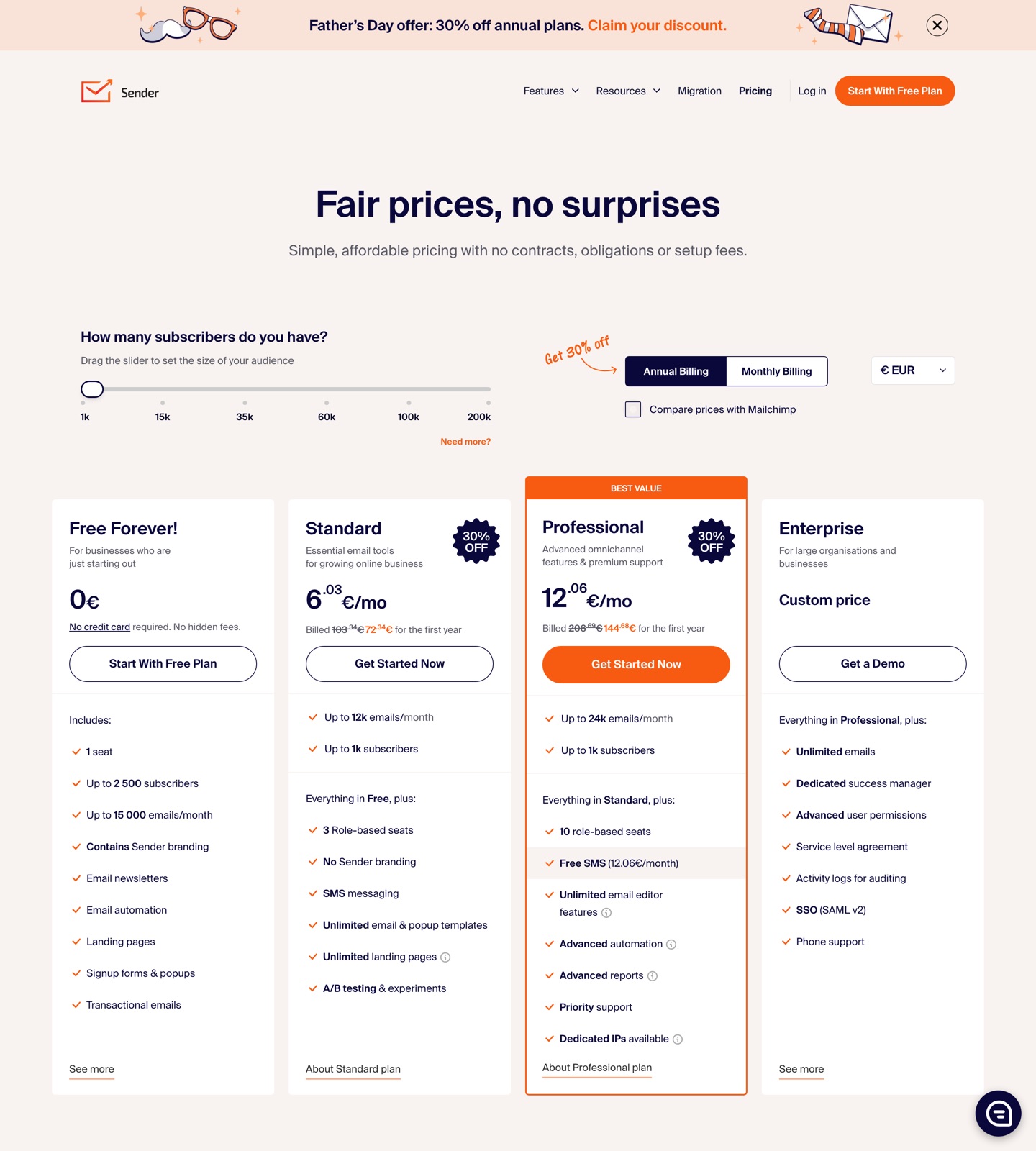
Buying shortcut
Which Sender plan should you choose?
Start here
Free Forever
Small lists, early stores, and basic newsletters. It is the first tier to check when you only need the core Sender workflow. Watch for: Sender branding on emails and forms
Public price
$0
Up to 2,500 subscribers and 15,000 emails/month.
Main upgrade
Standard
Growing teams that need unbranded email and more campaign tools. Inspect this tier when the lower tier starts blocking reporting, automation, collaboration, or support needs. Watch for: Advanced automation and ecommerce reports are Professional features
Public price
$10/mo+
Reviewed pricing starts at $10/month; live page scales by subscriber count.
High-volume or advanced
Enterprise
Larger senders that need governance and support. Treat this as the serious-operations tier, especially if the first two plans leave key limits or add-ons unresolved. Watch for: Sales-led pricing
Public price
Custom
Custom pricing for large organizations.
Cost scenarios
Pricing pages show the entry point. These scenarios show what the plan means in real buying situations.
Small list under 2,500 subscribers
Sender: Free if branding is acceptable.. Sequenzy: Better once SaaS lifecycle automation is the core need.. Sender is hard to beat for low-cost basic email.
Ecommerce team needing revenue reports
Sender: Professional is the realistic tier.. Sequenzy: More SaaS lifecycle focused than ecommerce focused.. Sender Professional is where ecommerce reporting gets serious.
SaaS company sending onboarding emails
Sender: Sender can handle email and automation, but not SaaS-specific sequence strategy.. Sequenzy: Built for activation and retention sequences.. Use Sender for affordable general automation; use Sequenzy for SaaS lifecycle depth.
What to watch for
Free emails and forms include Sender branding.
Standard and Professional prices depend on the subscriber slider and may load dynamically.
Dedicated IPs are primarily a Professional/high-volume concern.
Sender pricing is generous for basic email marketing
Sender gives small teams a lot before requiring payment. The free plan includes newsletters, automation, forms, landing pages, and transactional email, which makes it a legitimate long-term option for simple programs.
The upgrade question is branding and depth. Once you need unbranded email, SMS, experiments, advanced automation, ecommerce reports, or dedicated IP control, Standard or Professional becomes the real comparison point.
Sender is strongest when the program is broad but not deeply specialized: newsletters, popups, landing pages, simple automations, transactional messages, SMS, and ecommerce reporting. The free tier is generous enough that small teams can learn the product without committing. The tradeoff is that more sophisticated lifecycle work still requires you to design the strategy and data model yourself.
If you are comparing a low-cost all-around tool with SaaS lifecycle software, use the Sender alternatives guide and the Sender comparison. The decision should include what happens after you remove branding: who writes the sequences, who maps user states, and who maintains automation logic as the product changes.
Sender vs Sequenzy
Sender is a broad, affordable email marketing suite. Sequenzy is a SaaS lifecycle email platform. If your workflows are simple, Sender can be cheaper; if your workflows are activation and retention driven, Sequenzy is more focused.
Choose Sender when value, generous free limits, and general marketing features matter most. Choose Sequenzy when every email should map back to product adoption, account state, billing events, and retention outcomes.
Sender vs Sequenzy
How Sender compares with Sequenzy, which bills on emails sent rather than contact count.
How Sequenzy prices the same volume
Sequenzy price per 1k emails
$0.82 / 1k at $49/mo for 60k emails
Verdict
Sender is a strong value pick for general email marketing, especially with its free limits. Sequenzy is better when SaaS lifecycle content, product-event strategy, and focused sequence generation matter more than broad low-cost email tooling.
FAQ
Sources checked · Jun 17, 2026