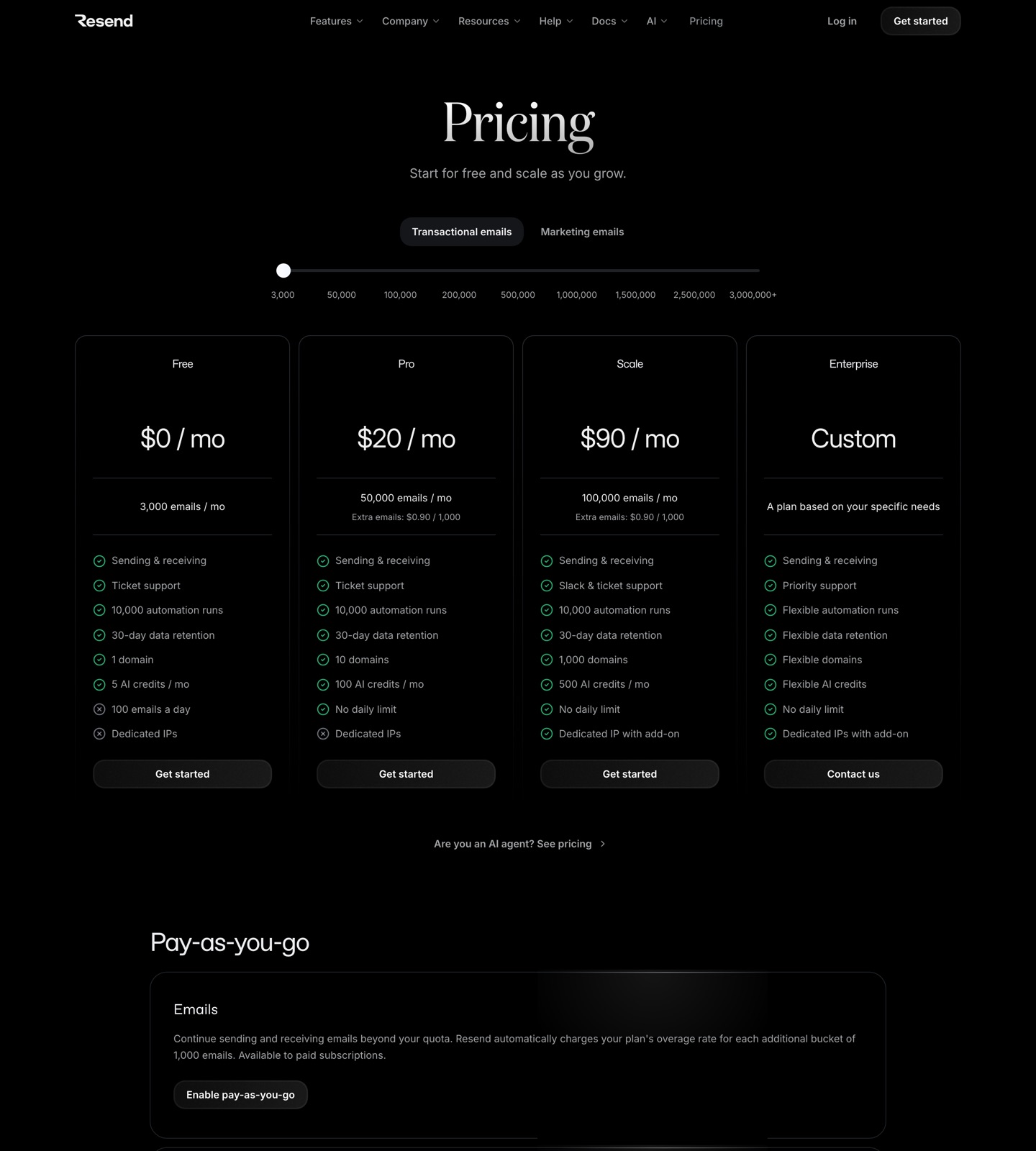
Resend's pricing page
Captured from resend.com. Pricing changes often, so confirm the current numbers on the live page.
Buying shortcut
Which Resend plan should you choose?
Start here
Free
Developers testing email sending or small projects. It is the first tier to check when you only need the core Resend workflow. Watch for: Daily limit
Public price
$0/mo
3,000 emails/month and 100 emails/day.
Main upgrade
Pro
Startups and products sending regular transactional email. Inspect this tier when the lower tier starts blocking reporting, automation, collaboration, or support needs. Watch for: Ticket support only
Public price
$20/mo
50,000 emails/month; extra emails $0.90 per 1,000.
High-volume or advanced
Enterprise
Teams needing flexible volume, data retention, support, and domain limits. Treat this as the serious-operations tier, especially if the first two plans leave key limits or add-ons unresolved. Watch for: Sales-led pricing
Public price
Custom
Custom plan based on requirements.
Cost scenarios
Pricing pages show the entry point. These scenarios show what the plan means in real buying situations.
Developer sending transactional product email
Resend: Free or Pro depending on volume. Sequenzy: Email-volume pricing with more lifecycle workflow tooling. Resend is excellent infrastructure. Sequenzy adds SaaS lifecycle product workflows on top of sending.
SaaS founder who wants AI-generated onboarding and churn flows
Resend: Resend handles delivery, but workflow strategy is on you. Sequenzy: Built for sequence generation and SaaS automation. Sequenzy is better if you want the marketing layer, not just the API.
High-volume sender needing dedicated IP control
Resend: Scale plus dedicated IP add-on. Sequenzy: Depends on email volume and lifecycle needs. Resend is a strong choice for developer-controlled sending infrastructure.
What to watch for
Resend is infrastructure-first, so marketers may need more workflow tooling elsewhere.
Dedicated IPs require eligibility and are an add-on.
Broadcast and audience tooling exist, but the product is still more developer-led than lifecycle-marketer-led.
Resend pricing is developer-friendly
Resend's pricing is easy to reason about because email volume is the main meter. The API-first product is strongest when developers want reliable sending, inbound email, SMTP, webhooks, and React Email support.
That clarity is useful, but it does not automatically solve lifecycle marketing. You still need to decide which emails to send, when to send them, and how to update sequences as your SaaS changes.
Resend is especially attractive when the email system is owned by engineering. The plan math is clear, React Email support is developer-friendly, and the API workflow fits modern product teams. Pro is the obvious production step for many startups because it removes the daily limit and raises volume substantially. Scale matters when domains, support, and dedicated IP eligibility become operational issues.
The gap is not quality. Resend is a strong infrastructure choice. The gap is that infrastructure is only one layer of a SaaS email program. If the team needs lifecycle strategy, generated onboarding copy, customer-state flows, or billing-aware campaigns, compare the Resend alternatives and the Resend comparison before treating the API bill as the total cost.
Resend vs Sequenzy
Resend is better as email infrastructure. Sequenzy is better as a SaaS lifecycle email platform. Many teams could use one or the other depending on whether they want a sending API or a workflow layer.
Choose Resend when developers want clean primitives for sending, receiving, tracking, and webhooks. Choose Sequenzy when the business need is to plan and operate lifecycle messages without building every campaign workflow around an API.
Resend vs Sequenzy
How Resend compares with Sequenzy, which bills on emails sent rather than contact count.
How Sequenzy prices the same volume
Sequenzy price per 1k emails
$0.82 / 1k at $49/mo for 60k emails
Verdict
Resend is one of the best developer-first email infrastructure products. Sequenzy is better when you want SaaS lifecycle automation and content workflows rather than just a clean sending API.
FAQ
Sources checked · Jun 16, 2026