New: WhatsApp integration and Meeting Notetaker. ͏  ͏  ͏  ͏  ͏  ͏  ͏  ͏  ͏  ͏  ͏  ͏  ͏  ͏  ͏  ͏  ͏  ͏  ͏  ͏  ͏  ͏  ͏  ͏  ͏  ͏  ͏  ͏  ͏  ͏  ͏  ͏  ͏  ͏  ͏  ͏  ͏  ͏  ͏  ͏  ͏  ͏  ͏  ͏  ͏  ͏  ͏  ͏  ͏  ͏  ͏  ͏  ͏  ͏  ͏  ͏  ͏  ͏  ͏  ͏  ͏  ͏  ͏  ͏  ͏  ͏  ͏  ͏  ͏  ͏  ͏  ͏  ͏  ͏  ͏  ͏  ͏  ͏  ͏  ͏  ͏  ͏  ͏  ͏  ͏  ͏  ͏  ͏  ͏  ͏  ͏  ͏  ͏  ͏  ͏  ͏  ͏  ͏  ͏  ͏  ͏  ͏  ͏  ͏  ͏  ͏  ͏  ͏  ͏  ͏  ͏  ͏  ͏  ͏  ͏  ͏  ͏  ͏  ͏  ͏ ­ ­ ­ ­ ­ ­ ­ ­ ­ ­ ­ ­ ­ ­ ­ ­ ­ ­ ­ ­ ­ ­ ­ ­ ­ ­ ­ ­ ­ ­ ­ ­ ­ ­ ­ ­ ­ ­ ­ ­ ­ ­ ­ ­ ­ ­ ­ ­ ­ ­ ­ ­ ­ ­ ­ ­ ­ ­ ­ ­ ­ ­ ­ ­ ­ ­ ­ ­ ­ ­ ­ ­ ­ ­ ­ ­ ­ ­ ­ ­ ­ ­ ­ ­ ­ ­ ­ ­ ­ ­ ­ ­ ­ ­ ­ ­ ­ ­ ­ ­ ­ ­ ­ ­ ­ ­ ­ ­ ­ ­ ­ ­ ­ ­ ­ ­ ­ ­ ­ ­ ­ ­ ­ ­ ­ ­ ­ ­ ­ ­ ­ ­ ­ ­ ­ ­ ­ ­ ­ ­ ­ ­ ­ ­ ­ ­ ­ ­ ­ ­ ­ ­ ­ ­ ­ ­ ­ ­ ­ ­ ­ ­ ­ ­ ­ ­ ­ ­ ­ ­ ­ ­ ­ ­ ­ ­ ­ ­ ­ ­ ­ ­ ­ ­ ­ ­ ­ ­ ­ ­ ­ ­ ­ ­ ­  

View in browser
Recruit CRM – Candidate chats and meetings in one place

Hello [First name],

Chances are you’ve experienced at least one of these moments:

  • A candidate replied on WhatsApp while you were on a call, and you forgot to get back to them
  • You spent your time trying to remember what your client asked for in a meeting

Our two biggest product announcements are built for those moments.

Keep every candidate conversation in one place

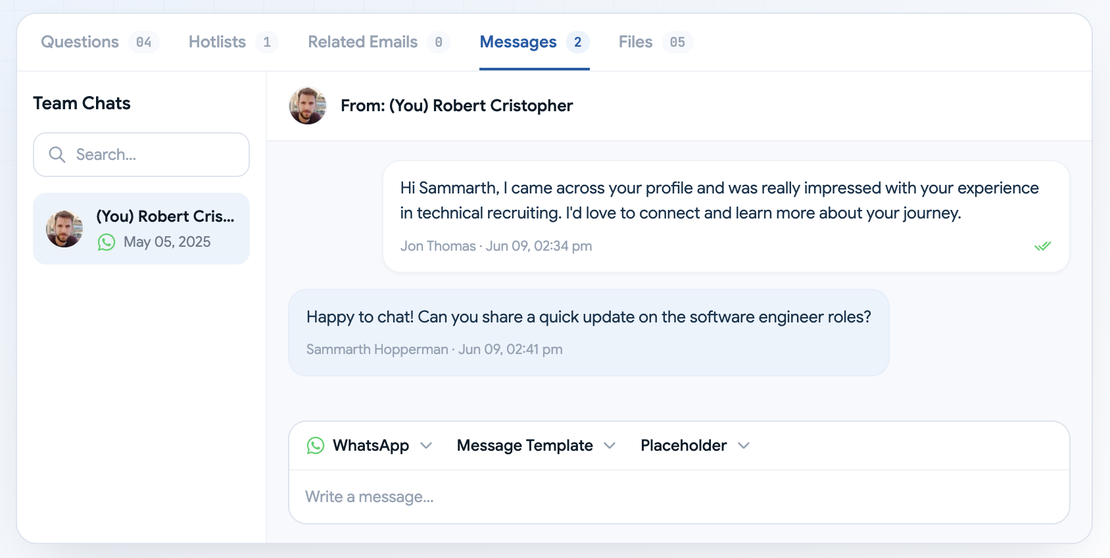
With the WhatsApp integration, you can message candidates and contacts from their Recruit CRM profiles, alongside your LinkedIn chats.

WhatsApp messages on a Recruit CRM candidate profile
  • You reply from the record - You can send messages to candidates right from their profile
  • You know when to follow up - You get an alert when someone replies, and you can see whether your message was delivered and read.
  • You send what the candidate needs - Attach a file or record a voice note without leaving Recruit CRM.
  • You write faster - AI Assist drafts WhatsApp and LinkedIn messages for you.
  • You choose who sees your chats - A setting lets you hide your WhatsApp messages from teammates.

To connect, scan a QR code from your WhatsApp account. The candidate or contact needs a WhatsApp-linked number saved in the default phone field.

Stay in the meeting, not in your notes

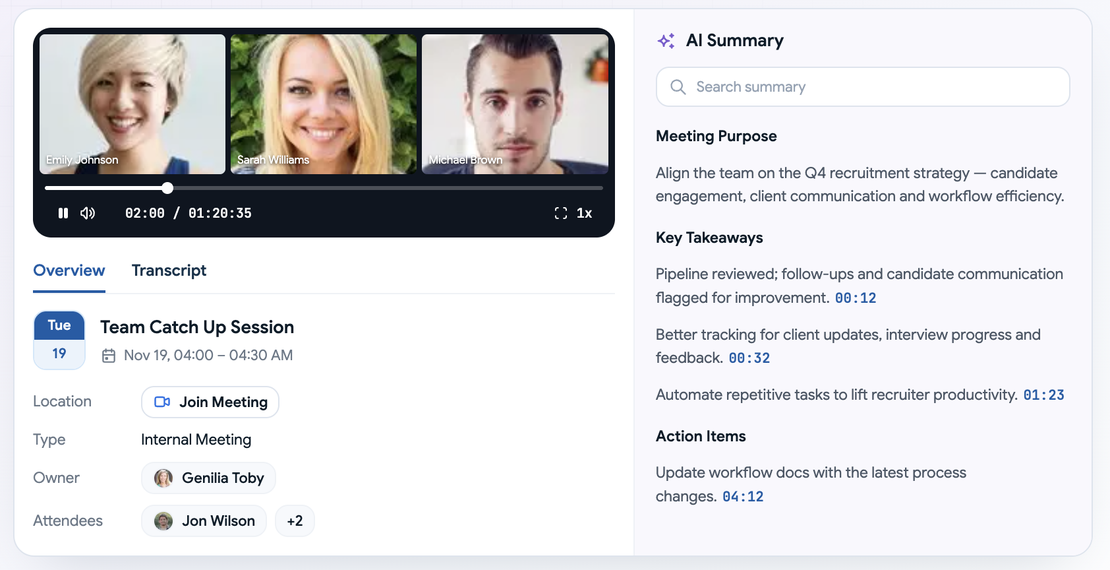
With our Meeting Notetaker, connect your calendar and the notetaker can join your meetings, record them, transcribe them, and write a summary.

Meeting Notetaker recording with AI summary in Recruit CRM
  • You listen instead of typing - Give the candidate or client your full attention.
  • You can skip the re-watch - Read the AI summary to catch up quickly.
  • You keep it with the record - Each meeting is linked to the candidate, contact, job, deal, or company it belongs to.
  • You choose how much is captured - Pick audio and video, audio only, or transcript and summary only.

Good to know

Both features run on Recruit CRM credits. WhatsApp uses 100 credits per connected user per month, and the notetaker uses 9 credits per hour of meetings.

The quickest way to see what these would change in your own week is a live walkthrough.

Book a demo, and we'll show you both features and what they'd cost for your team.

Book a demo

Cheers,
Team Recruit CRM

What would these change in your hiring process? See it live
Facebook
LinkedIn
X
Instagram

Recruit CRM, Workforce Cloud Tech, Inc. 28, Mohawk Avenue, Norwood NJ 07648

Manage preferences

Did a friend forward this to you? Subscribe now for exclusive insights and updates.

© 2026 Recruit CRM. All rights reserved