|
|
|
|
|
We've made more improvements to help you manage your team, review AI decisions, and keep daily work organized.
|
|
|
|
This release introduces a new home for team access settings, easier approval reviews, task reminders, and parent and child tasks to help you break larger jobs into manageable steps.
|
|
Here's what's new and where to find it.
|
|
|
🗂️ Organize Work with Parent and Child Tasks
|
|
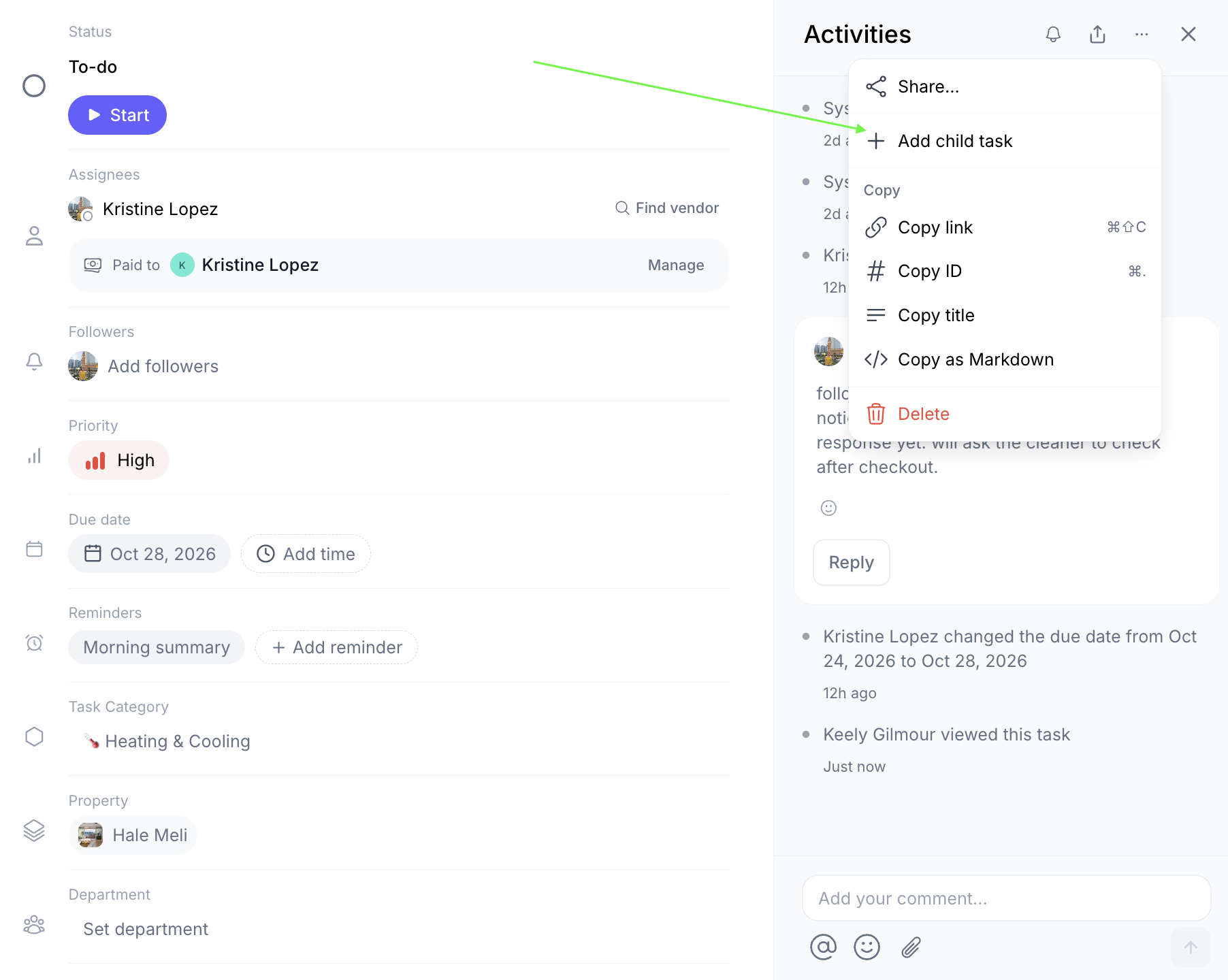
You can now break larger tasks into smaller child tasks and track their progress from the parent task. This helps keep related work connected and makes it easier to see what's completed.
|
|
|
|
Where to find it: Tasks → Open a task → Add child task, or use the task's options menu (•••).
|
|
|
|
Child tasks automatically inherit the parent task's listing. Open the parent task to see its child tasks and completion progress, or use the breadcrumb at the top of a child task to return to its parent.
|
|
|
|
Only one level of child tasks is supported. Deleting a parent also deletes its children.
|
|
|
|
Availability: Available on web for users with permission to create and edit tasks. Native mobile support is expected in the next app release.
|
|
|
|
|
|
|
⚙️ Manage Team Access in the New Team Settings Tab
|
|
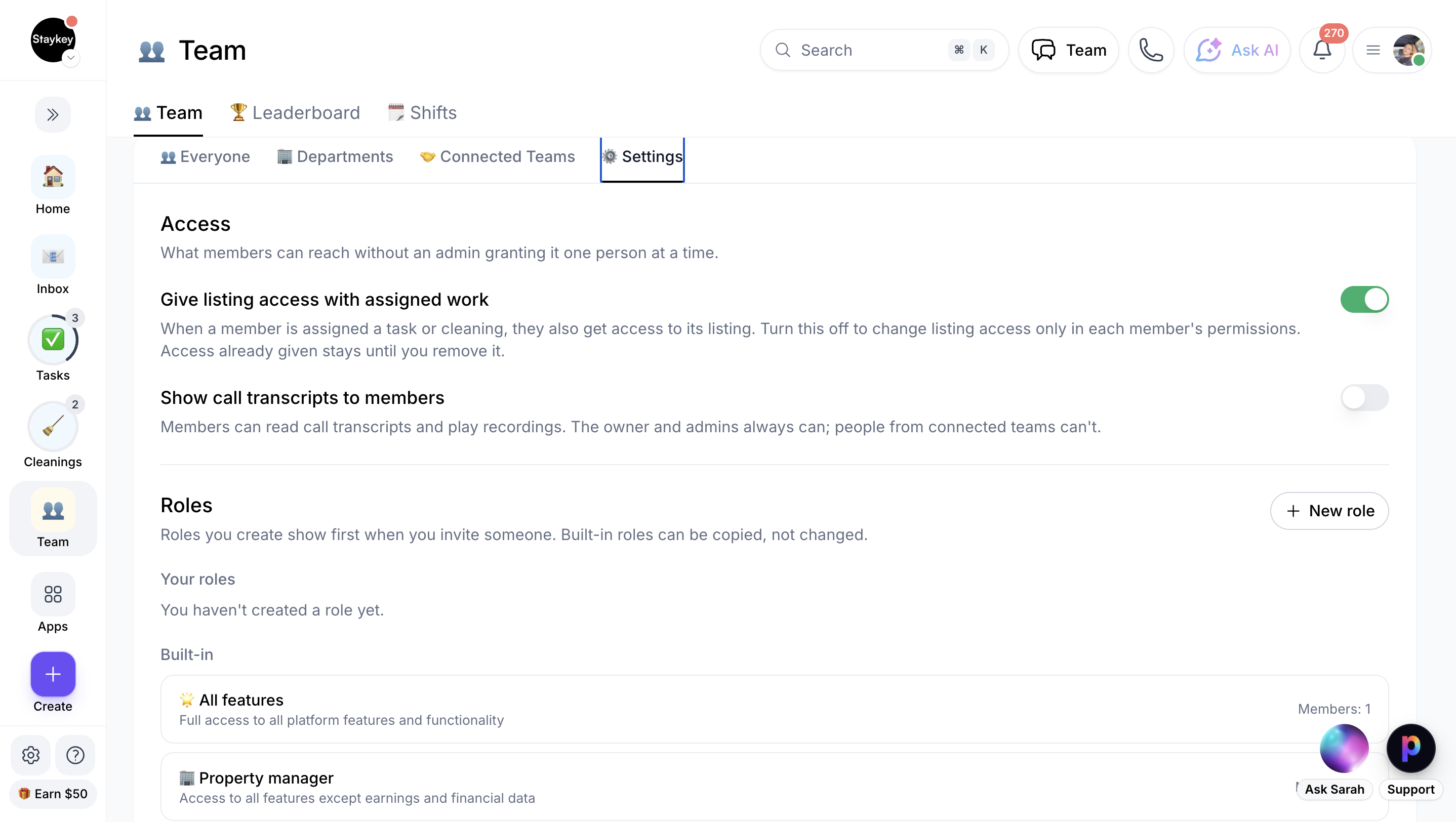
Workspace admins now have a dedicated place to manage team access, review roles, configure new member defaults, and find former team members.
|
|
|
|
Where to find it: Team → Settings.
|
|
|
|
From here, you can review listing access, call transcript permissions, custom roles, and new member settings.
|
|
|
|
To reinstate a former team member:
|
-
Go to Team → Settings → People who left.
|
-
Select View former members.
|
-
Choose Reinstate… → Send invite.
|
|
|
|
Reinstatement is available for 90 days after someone leaves. The person must accept the invitation before their access is restored.
|
|
|
|
Availability: Web, workspace admins only. No additional setup required.
|
|
|
|
|
|
|
✅ Review and Decide Approval Cards in Context
|
|
You can now review and respond to AI Employee approval requests directly from the team chat thread where they appear. You can also open the full approval card for more details.
|
|
|
|
For GitHub pull request approvals, open review threads can appear directly on the card, making it easier to review feedback before deciding.
|
|
|
|
Where to find it:
|
-
Team chat: Open the relevant AI Employee conversation and select the approval card.
|
-
All approvals: Go to Agents → Approvals.
|
-
Full details: Select Review & approve.
|
|
|
|
Depending on the request, you can approve, reject, always allow, or provide different instructions. Your decision updates across all copies of the approval.
|
|
|
|
AI Employee push notifications are also being adjusted to reduce repeated alerts. When enabled, notifications are grouped after the first push within a 30-minute window, while urgent requests and messages from people still come through immediately.
|
|
|
|
Availability: Approval cards are available on web. The notification improvement is being rolled out gradually and may not yet be enabled for every account.
|
|
|
📱 Stay on Top of Tasks with Reminders and Daily Summaries
|
|
Task reminders help you keep track of upcoming work, while morning summaries make it easier to plan your day. On supported mobile devices, Live Activities can also show your upcoming tasks and progress without needing to open the app.
|
|
|
|
Where to find it: Settings → Notifications → Tasks → Due-date reminders.
|
|
|
|
You can customize reminders for timed and all-day tasks, choose your morning summary time, and set reminders on individual tasks through Task details → Reminders.
|
|
|
|
You can also set up to three reminders per task. Supported notifications let you mark a task done, snooze it, or move it to tomorrow.
|
|
|
|
Important: The settings and backend are live, but native task reminders and Live Activities aren't in the current iOS or Android store builds. These features are expected in the next mobile app release.
|
|
|
💬 Need Help Getting Started?
|
|
Have questions about these updates or want help getting the most out of ProhostAI? Our team is happy to help.
|
|
|
|
Book a call with our team and we'll help you get set up and answer your questions. Calls are free and unlimited.
|
|
|
|
|
|
|
|
🚀 More improvements are on the way
|
|
|
|
We're continuing to make ProhostAI easier to use, helping your team stay organized and spend less time on repetitive work.
|
|
|
|
Have a feature idea or something you'd like to see improved? We'd love to hear from you.
|
|
|
|
Some features are being rolled out gradually and may not yet be available on every account. Mobile task reminders, Live Activities, and native parent/child task support require the upcoming mobile app release. Please let us know if you are missing a feature and we will enable it for you where available.
|
|
|
|
|
|
|