|
October 2026 Product Releases
|
|
|
[Shipped last month]
Your packages in Git, promoted by pull request
Last month, packages started syncing to GitHub, Job Insights put every dataflow run on a timeline, and new connectors arrived, from Outlook and NetSuite REST to Oracle Fusion and Square. Your team can now review pipeline changes like code, find a slow step at a glance, and load data from more of the systems you already run. |
| New features and enhancements |
| |
|
|
Sync Packages to GitHub and Promote Them by Pull Request
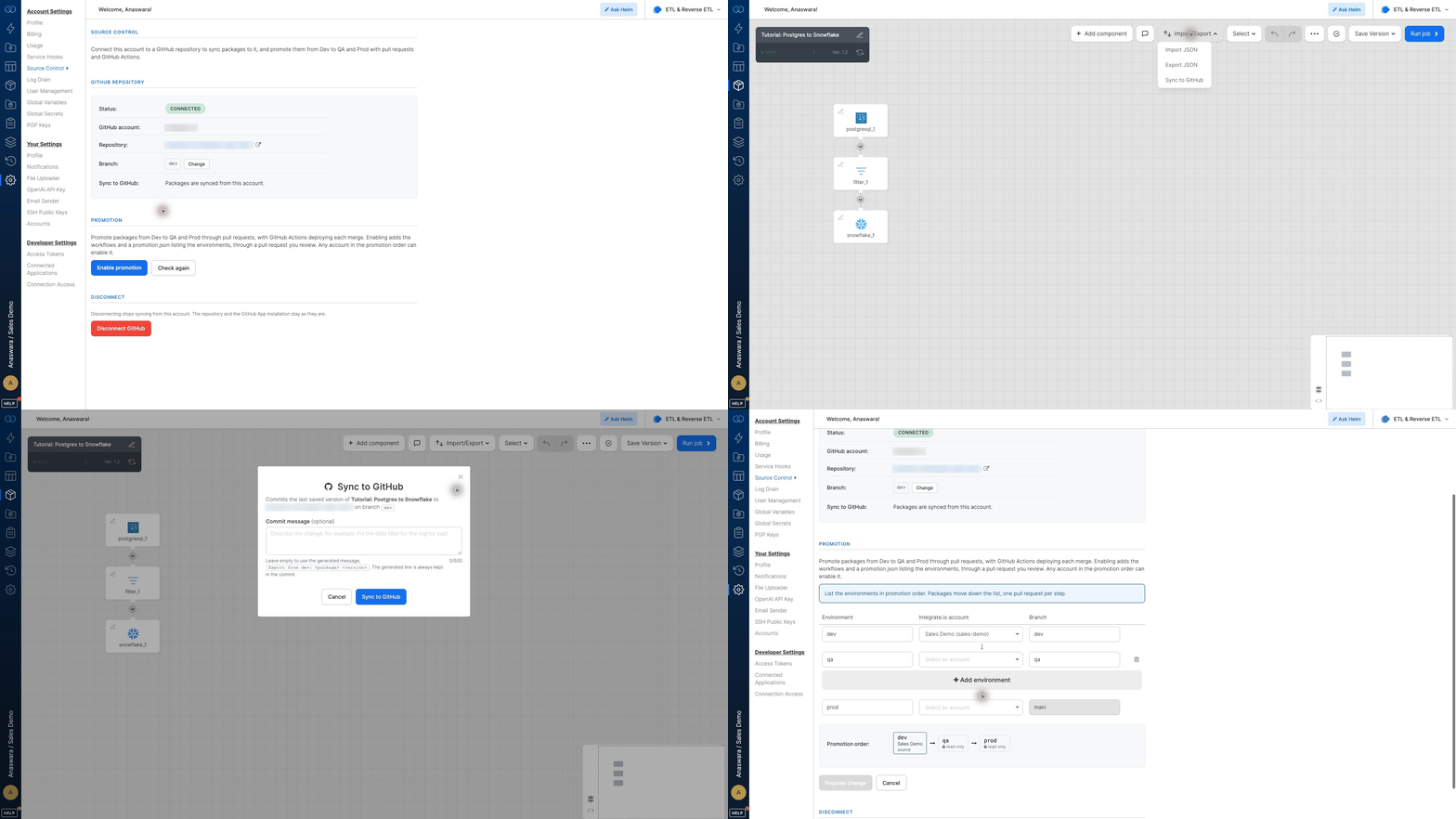
The GitHub integration syncs your packages and workflows to a repository you choose, so every saved version is tracked in Git instead of exported as JSON by hand after every change. Teams with separate Dev, QA, and Prod accounts can use package promotion to carry changes forward through reviewed pull requests, so Prod changes only after someone approves. Let our team know if you'd like it enabled on your account. The documentation covers setup. |
|
Job Insights Shows Where Every Run Spends Its Time
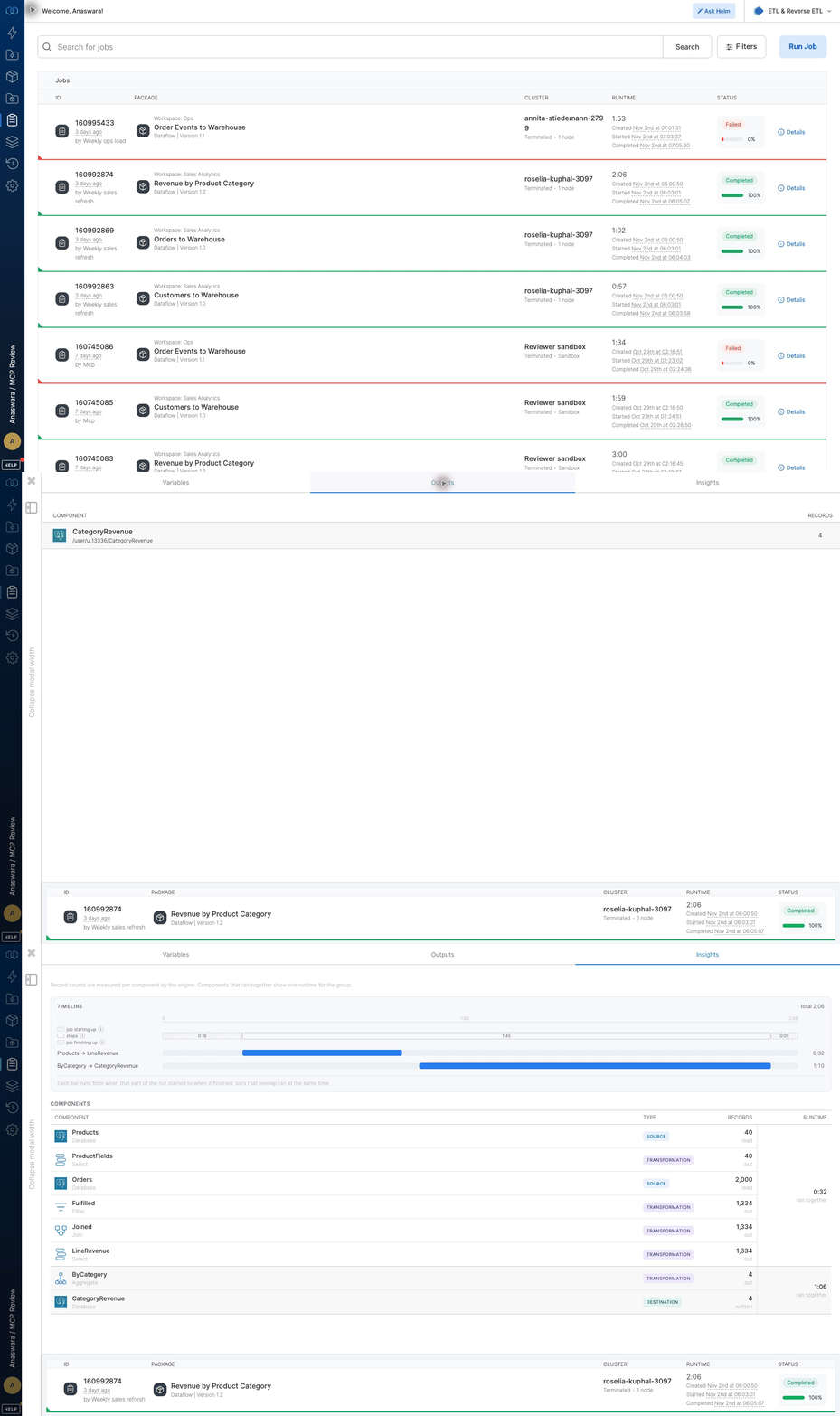
Job Insights lays out each completed dataflow run as a timeline, with record counts for every component, so a slow step or a source that read fewer rows than expected stands out at a glance. It replaces reading through logs and guessing from the totals at the end, so tuning a package or answering a data question starts from evidence. See the documentation for what each part of the view reports. |
|
Filters Put Advanced Search One Click Away in Every List View
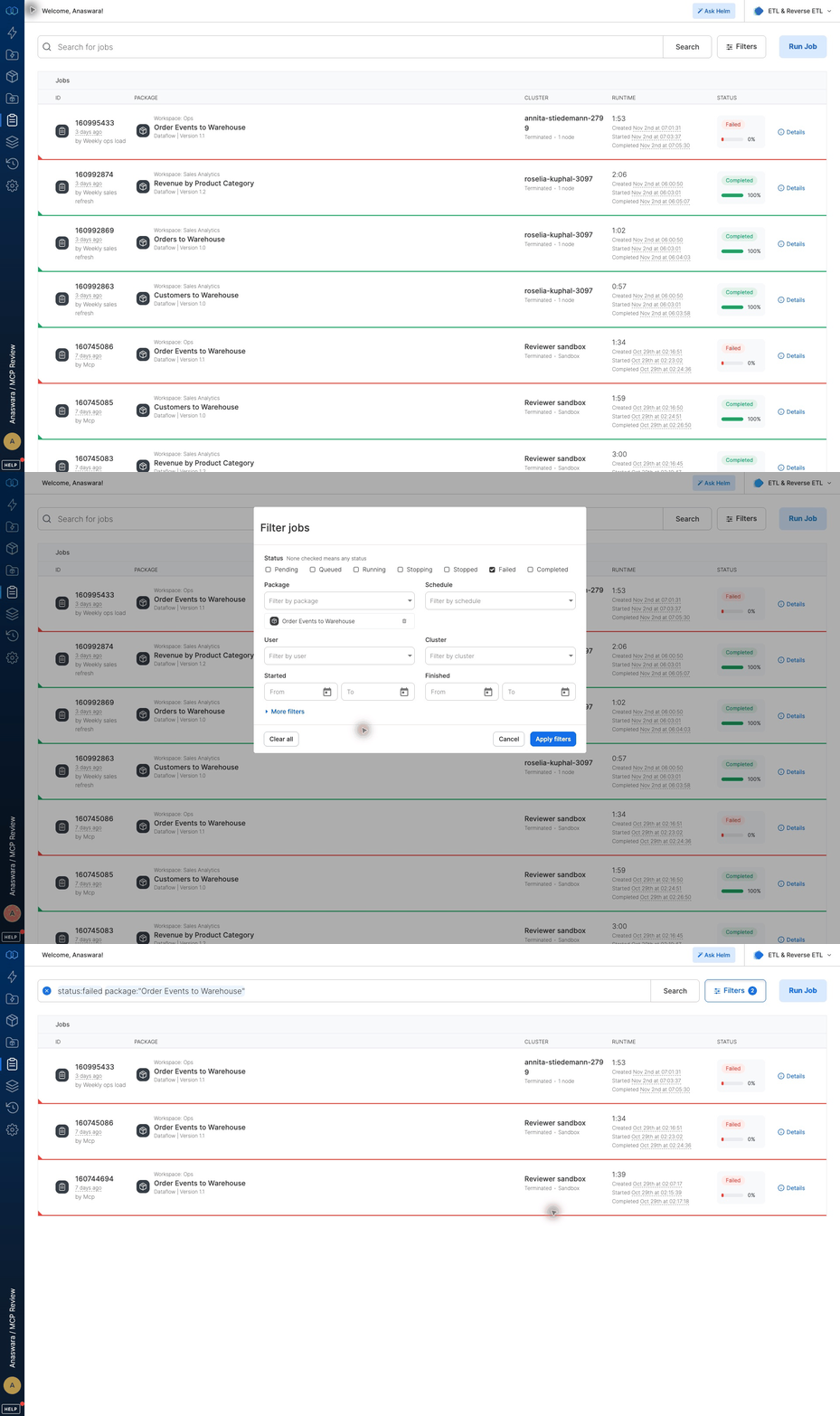
A Filters button beside the search bar puts search modifiers on screen in seven list views, from Jobs and Packages to Connections and Clusters, so anyone can pull up failed runs on one package without knowing the syntax by heart. Each choice lands in the search bar as a modifier, so typed searches keep working as before. The documentation lists the filters each view offers. |
- Replicate straight into Azure Databricks: The Databricks destination now supports Azure Databricks, so CDC pipelines replicate straight into Delta tables in the workspace your analysts already query. Teams on Azure no longer route output through intermediate cloud storage first, or keep the second copy of the data it left behind (documentation).
- Salesforce Pipelines Decide How Deletes and Syncs Behave: A deleted-record setting lets you soft-delete rows, kept and marked deleted for audit and history, or hard-delete them so the table matches Salesforce, and pipelines can switch between Full Sync and Incremental Sync. Deleted records no longer need cleaning up downstream, and you decide where a full reload is worth its cost; our team enables the sync mode choice on request (documentation).
- ZIP Extraction in File Mover: File Mover can unpack ZIP archives at the destination and deliver the extracted files, into one folder per archive or all into one folder. Partner drops that arrive zipped reach their folder ready to load instead of waiting on a separate unzip step (documentation).
- Excel Output on File Storage Destinations: SFTP, Amazon S3, Google Cloud Storage, and Azure Blob Storage destinations write Excel (.xlsx) files. Teams that expect a spreadsheet get one straight from the job instead of converting a CSV by hand.
- Job Load Sync Method for BigQuery: The BigQuery destination can load data through BigQuery load jobs as an alternative to streaming inserts. Large initial syncs and backfills get a load path built for volume instead of relying on the streaming API alone.
- Automatic PostgreSQL Publications: When the connecting user holds the needed rights, PostgreSQL pipelines create and maintain their own publication. New tables join the publication as the pipeline grows instead of waiting on a DBA to update it by hand (documentation).
|
- Outlook Source and Destination: The Outlook source reads calendar events and mail from a signed-in or shared mailbox, and the Outlook Calendar destination creates and updates events from pipeline records. Dates from a CRM or database land on a shared calendar and stay in step with their source instead of being copied over by hand (source and destination documentation).
- NetSuite REST Destination: The NetSuite REST destination completes the pair with the existing NetSuite REST source and writes standard and custom records, transactions with line items included, by insert, update, or upsert. Upserts match on external ID, so a load can run again after a failure instead of leaving duplicate records to clean up (documentation).
- ServiceNow Destination: The ServiceNow destination completes the pair with the existing ServiceNow source and writes records into an import set table or straight into a table over the same connection. Import sets run through your instance’s transform maps, so records land under the rules your ServiceNow team already set instead of a parallel load path (documentation).
- Oracle Fusion Source: The Oracle Fusion source reads objects across Financials, Procurement, CRM, HCM, and more from payables and receivables invoices to suppliers, purchase orders, customer accounts, and workers, all with incremental loads. Fusion data reaches the warehouse on a schedule instead of through report exports saved as CSV files (documentation).
- Square Source: The Square source reads 14 objects, including payments, refunds, payouts, customers, and catalog items, with incremental loads on payments and refunds. Sales and customer data from Square joins the rest of your reporting on a schedule instead of through a manual export (documentation).
- Fundraise Up Source: The Fundraise Up source reads nine objects, including donations, recurring plans, supporters, and the event log, with incremental loads on six of them. Donation and supporter data sits in the same warehouse as your CRM and finance data instead of in a separate export (documentation).
- OneTouch Health Destination: Following September’s OneTouch Health source, the destination creates and updates carer records through the OneTouch API over the same connection. Carer records maintained in another system reach OneTouch from a pipeline instead of being re-entered by hand (documentation).
- Grubhub Source: The Grubhub source replicates order and reporting data from Grubhub’s Connect and Reporting APIs into your warehouse on every sync. Grubhub revenue sits next to point-of-sale, inventory, and finance data, so channel comparisons and reconciliation run on current figures instead of last week’s export.
|
|
- File Storage destinations default to intermediate storage, with a copy into an existing directory as the destination action.
- Downstream Field Propagation shows a compact summary of fields not carried into child components, and newly added source fields appear in full until the next refresh.
- Source and destination editors collapse Advanced settings by default, with a header that shows which options are switched on, and every component shares one settings layout.
- File sources replace three header checkboxes with a single Header choice and add Semicolon and Pipe as delimiters.
- Import and Export JSON is available to custom roles on accounts that have Source Control enabled.
- Helm builds Salesforce to Snowflake pipelines, including packages that move several Salesforce objects at once.
- The MCP server adds a save_package_version tool, so an agent can save a package’s draft as a new version.
- The MCP get_run_summary tool returns the records each source read and each destination wrote, per flow and in total, in one call (documentation).
- BigQuery destinations move rows larger than 10 MB to a load job automatically, so oversized rows arrive instead of hitting the streaming size limit.
- Salesforce History objects load OldValue and NewValue as JSON, so values of any field type land in one consistent format.
|
|
What is coming next
November is here, and so is a packed product roadmap. Here's a look at some of what we're building right now. If any of these are on your wishlist, or you'd like early access, we'd love to hear from you.
- Package development lifecycle: promote packages between accounts from the dashboard
- Spark processing engine
- Audit logs
- SchemaFlow wizard: build a client’s pipeline in guided steps, starting from the destination schema
- Helm & MCP updates
- ELT & CDC MCP
- And lots more!
|
|
| |
|
Want a walkthrough of anything here?
Book 30 minutes with a solutions engineer. They will set it up against your own source, live on the call.
2 min average first response. 92% customer satisfaction.
|

|
|
Sent monthly. Reply to this email and a data engineer will answer.
|
|