|
|
|
|
|
We've introduced five updates to help you get more from meetings, manage AI credit usage, work with spreadsheets on mobile, and control team access.
|
|
|
|
Here’s what’s new and where to find it.
|
|
|
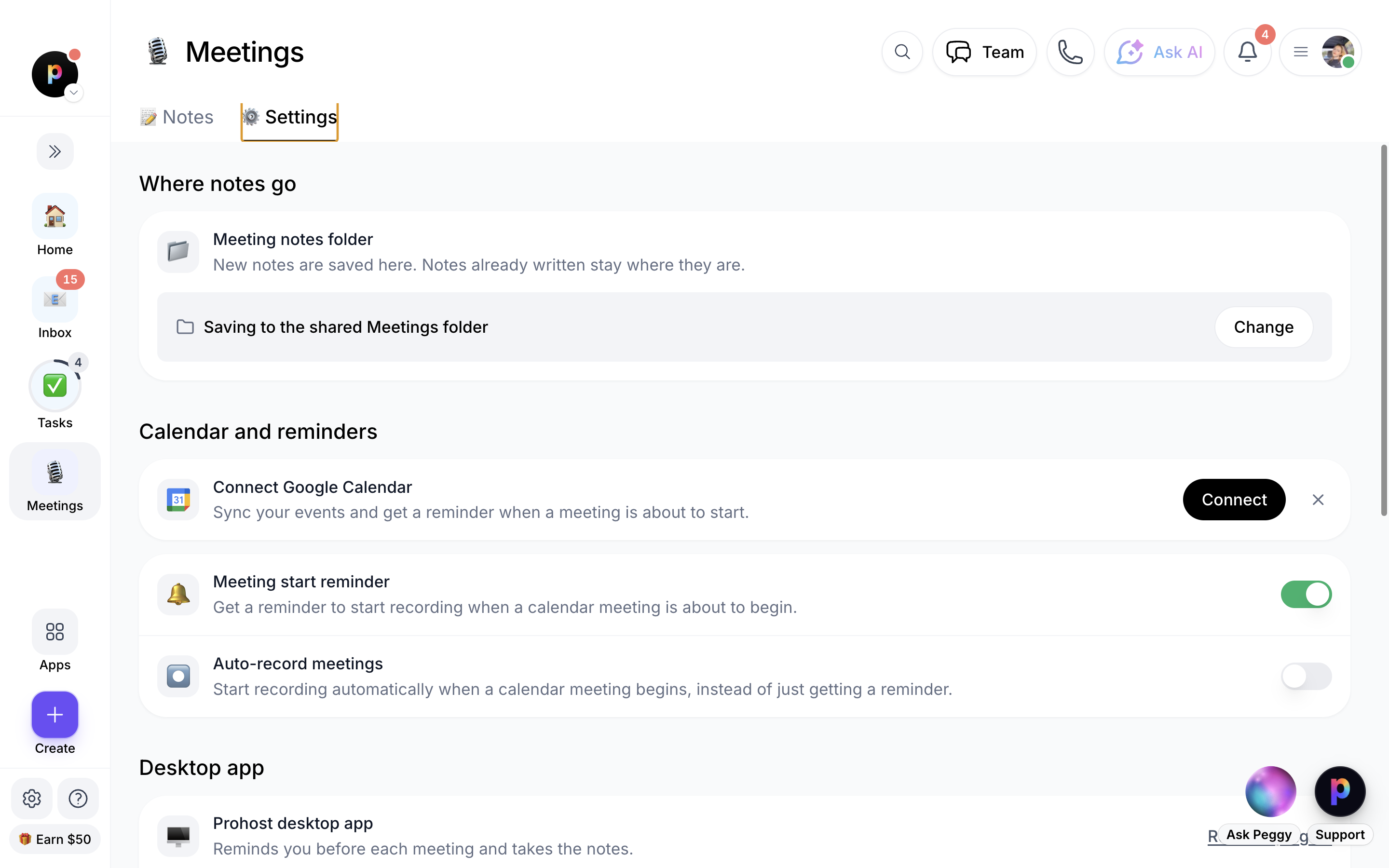
📝 Meetings: Notes and Settings in One Place
|
|
|
|
Meetings now has dedicated Notes and Settings tabs, making it easier to manage recordings and configure your meeting preferences.
|
|
|
|
Where to find it: Apps menu → Meetings
|
-
Notes: View upcoming meetings with video links, join meetings, and access past recordings, transcripts, and AI notes.
|
-
Settings: Connect Google Calendar, choose which meetings to record automatically, set meeting reminders, and configure desktop app preferences.
|
-
AI notes: Review decisions, commitments, and open questions captured from your meetings.
|
|
|
|
Important: Recording requires the ProhostAI desktop app on Mac or Windows. AI proofreading uses AI credits and is skipped when your workspace runs out of credits.
|
|
|
|
|
🎙️ Better Meeting Controls
|
|
You can now manage recordings and meeting notes more easily.
|
|
|
-
Delete recordings: Remove a recording, transcript, AI notes, and associated Drive document from the meeting page or Notes list. Only the person who recorded the meeting can delete it, and deletion cannot be undone.
|
-
Automatic calendar matching: ProhostAI matches recordings to events on your connected Google Calendar when possible, adding the event title and attendees.
|
-
Resume after auto-stop: On supported desktop app versions, resume a recording for 30 seconds after it automatically stops because the call ended.
|
-
Start notes from your phone: Use the iOS Lock Screen meeting card to start recording on your online desktop app, with the required desktop version installed.
|
|
|
💳 Control AI Credit Usage and Overage Billing
|
|
Set monthly credit limits for individual AI employees and choose whether your workspace can continue using AI after its included credits run out.
|
|
|
|
Where to find it:
|
-
Set a limit when hiring: AI Employee → Hire → Start now → Set a limit.
|
-
Edit an existing limit: AI Studio → select an employee → Access → Monthly credit budget.
|
-
Manage overage billing: Settings → Billing → Allow overage billing.
|
|
|
|
Overage billing is off by default. When it remains off, AI pauses when credits run out. When enabled, additional usage can incur overage charges.
|
|
|
|
Workspace admins also receive notices at 75% and 95% of monthly credits, plus alerts when credits run out or overage begins.
|
|
|
🔎 Search Spreadsheet Rows on Mobile
|
|
Finding information in Drive spreadsheets is now easier on your phone. Search across the entire sheet without manually loading more rows.
|
|
|
|
Where to find it: More → Drive → Open a spreadsheet → Search rows
|
|
|
|
This works on both iOS and Android through the app's Drive view, as well as in mobile browsers. No app update is required.
|
|
|
👥 Custom Roles and Invite Defaults
|
|
Admins can create custom roles and set default permissions for new team members, helping make team onboarding more consistent.
|
|
|
|
Where to find it: Team → Settings
|
|
|
-
Custom roles: Create a role from a built-in role or start from blank, then configure feature permissions and listing access.
|
-
Invite defaults: Choose the default role for new invites and whether new listings are automatically shared with new members.
|
-
Access settings: Manage listing access and whether team members can view call transcripts.
|
-
Reinstate former members: Re-invite people who left within the past 90 days, restoring eligible previous access once they accept the invitation.
|
|
|
|
Only admins can access Team Settings. API keys, connected app integrations, and door codes are not restored when reinstating former members.
|
|
|
💬 Need Help Getting Started?
|
|
If you'd like help setting up any of these features:
|
|
|
|
|
|
|
|
Calls are free and unlimited.
|
|
|
✨ More Improvements Are on the Way
|
|
|
|
Have an idea for a feature that would make your work easier? Let us know. Your feedback helps shape what we build next.
|
|
|
|
Some features may depend on your role, desktop app version, or device. Availability may vary by platform.
|
|
|
|
|
|
|