Build workflows through MCP, manage app versions from chat, and join our October 20 app-building webinar. ͏  ͏  ͏  ͏  ͏  ͏  ͏  ͏  ͏  ͏  ͏  ͏  ͏  ͏  ͏  ͏  ͏  ͏  ͏  ͏  ͏  ͏  ͏  ͏  ͏  ͏  ͏  ͏  ͏  ͏  ͏  ͏  ͏  ͏  ͏  ͏  ͏  ͏  ͏  ͏  ͏  ͏  ͏  ͏  ͏  ͏  ͏  ͏  ͏  ͏  ͏  ͏  ͏  ͏  ͏  ͏  ͏  ͏  ͏  ͏  ͏  ͏  ͏  ͏  ͏  ͏  ͏  ͏  ͏  ͏  ͏  ͏  ͏  ͏  ͏  ͏  ͏  ͏  ͏  ͏  ͏  ͏  ͏  ͏  ͏  ͏  ͏  ͏  ͏  ͏  ͏  ͏  ͏  ͏  ͏  ͏  ͏  ͏  ͏  ͏  ͏  ͏  ͏  ͏  ͏  ͏  ͏  ͏  ͏  ͏  ͏  ͏  ͏  ͏  ͏  ͏  ͏  ͏  ͏  ͏ ­ ­ ­ ­ ­ ­ ­ ­ ­ ­ ­ ­ ­ ­ ­ ­ ­ ­ ­ ­ ­ ­ ­ ­ ­ ­ ­ ­ ­ ­ ­ ­ ­ ­ ­ ­ ­ ­ ­ ­ ­ ­ ­ ­ ­ ­ ­ ­ ­ ­ ­ ­ ­ ­ ­ ­ ­ ­ ­ ­ ­ ­ ­ ­ ­ ­ ­ ­ ­ ­ ­ ­ ­ ­ ­ ­ ­ ­ ­ ­ ­ ­ ­ ­ ­ ­ ­ ­ ­ ­ ­ ­ ­ ­ ­ ­ ­ ­ ­ ­ ­ ­ ­ ­ ­ ­ ­ ­ ­ ­ ­ ­ ­ ­ ­ ­ ­ ­ ­ ­ ­ ­ ­ ­ ­ ­ ­ ­ ­ ­ ­ ­ ­ ­ ­ ­ ­ ­ ­ ­ ­ ­ ­ ­ ­ ­ ­ ­ ­ ­ ­ ­ ­ ­ ­ ­ ­ ­ ­ ­ ­ ­ ­ ­ ­ ­ ­ ­ ­ ­ ­ ­ ­ ­ ­ ­ ­ ­ ­ ­ ­ ­ ­ ­ ­ ­ ­ ­ ­ ­ ­ ­ ­ ­ ­  
ToolJet

Product updates
October 2026

New / Workflow building through MCP

Prompt it.
Build the workflow.

Your coding agent can build more than the app. Describe a process in Claude Code or Codex and turn it into a ToolJet workflow with data queries, conditions, loops and AI steps.

Available on self-hosted ToolJet. Coming soon to ToolJet Cloud.

Want early access on Cloud? Reply to this email to request access.

From an instruction to connected steps

“Tell the team when stock runs low.”
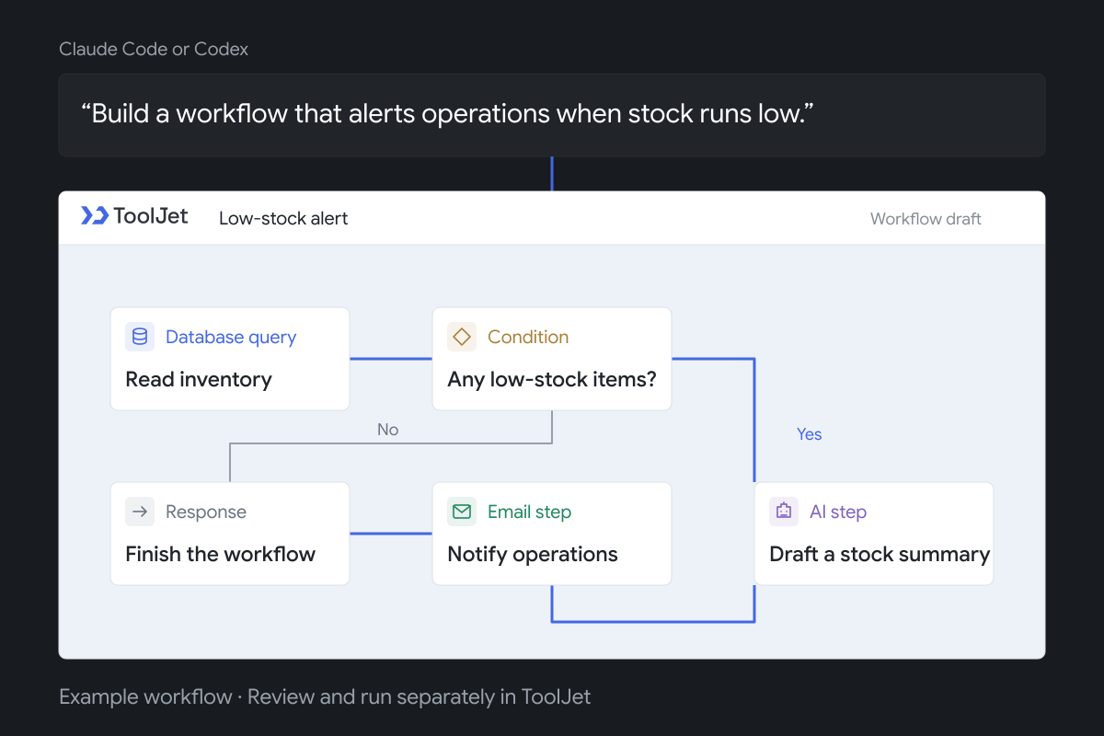
A prompt for a low-stock alert becomes an example ToolJet workflow with database, condition, AI summary, email and response nodes.

Example workflow using connected database, AI and email services. Saving it does not run it.

Your agent builds it.
Your team can keep editing it.

Create a workflow from scratch or update an existing draft. Open it in ToolJet to inspect the queries, adjust the logic and make visual changes. Validation checks help catch missing connections before you run it.

Give it a try

“Build a low-stock alert workflow. Check my inventory database, summarize products that need reordering with AI, and prepare an email to operations. Use my connected services. Save it for review without running it.”
Explore ToolJet MCP

New / ToolJet AI & MCP

Manage app versions from chat.

Create, switch and release app versions directly in ToolJet AI chat or through your coding agent using MCP.

New models / App generation

Meet Claude Haiku 5.5
and Gemini 3.8 Flash.

We’re adding Claude Haiku 5.5 and Gemini 3.8 Flash to ToolJet app generation. In our first ToolJet test, Haiku built a three-page app in about 5 to 7 minutes using clear instructions for the features on each page.

Explore how models compare on feature completion, build time and credit usage.

Compare AI models

Watch / ToolJet AI in action

Watch the demo: build a Databricks sales dashboard with ToolJet AI.

From Databricks data to a sales dashboard.

See how to connect your data, generate an app with ToolJet AI, and refine it in the visual builder.

Watch the 3-minute demo

Join us / Online webinar

October 20

9:00 to 10:00 AM PDT

2026
Online

Your next app.
Four ways to start.

Join us to explore how to generate apps with AI in ToolJet. Here’s what we’ll cover:

Build from a prompt

Describe the app you need and refine it through chat.

Build through MCP

Create ToolJet apps from your coding agent.

Start with a screenshot

Use a UI reference to guide the app’s layout.

Start with Figma

Bring your designs into the app-building process.

RSVP for the webinar

Need help getting started? Talk to us on Slack.

The ToolJet team

ToolJet Solutions Inc, 1160 Battery St, #100, San Francisco, California 94111, United States

Unsubscribe Manage preferences