|
|
|
|
|
We've released more updates to help you automate daily tasks, manage workflows, and customize your ProhostAI experience.
|
|
|
|
Here's what's new and where to find it!
|
|
|
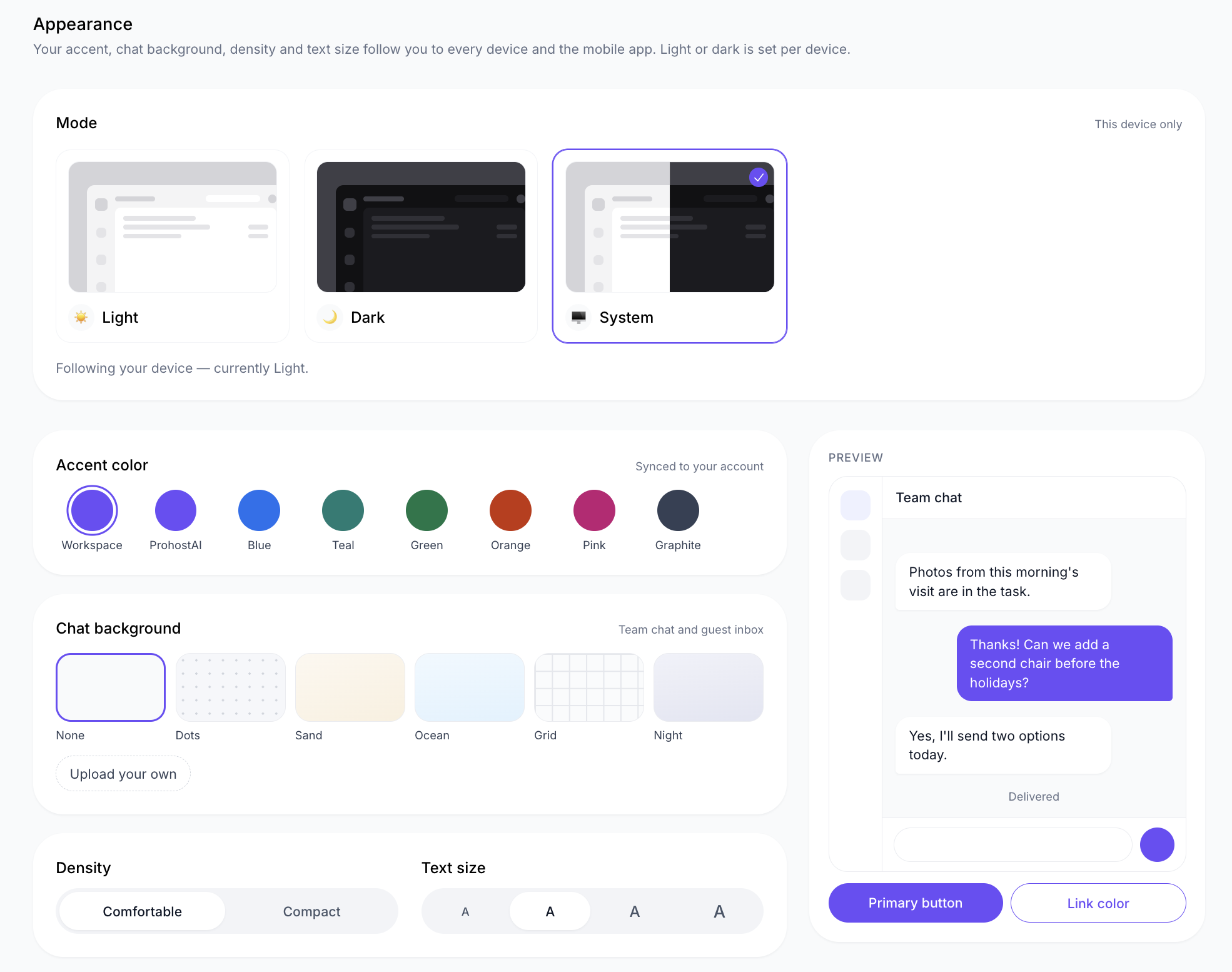
🎨 Customize Your Workspace Appearance
|
|
Personalize ProhostAI with your preferred colors, chat backgrounds, text size, and display density.
|
|
|
|
Where to find it: Settings → You → Appearance
|
|
|
|
You can also switch between Light, Dark, and System mode.
|
|
|
|
Workspace owners and admins can customize the workspace logo and brand colors under Settings → Workspace → Workspace brand.
|
|
|
|
|
🔄 Workflow Version History
|
|
You can now review previous versions of your AI Workflows and restore an earlier version whenever needed.
|
|
|
|
Where to find it: AI Workflows → Workflows → Open a workflow → Version history
|
|
|
|
Each save creates a version, making it easier to review changes and undo unwanted edits.
|
|
|
|
You can also include direct task links in task-triggered workflows using the new Task Link variable.
|
|
|
🔔 More Control Over Assignment Notifications
|
|
Choose how you want to be notified when conversations are assigned to you.
|
|
|
|
Where to find it: Profile → Notifications → Assignments
|
|
|
|
Enable push notifications and email reminders for assigned conversations. You can also choose whether to receive notifications when you're added as a co-assignee.
|
|
|
|
For eligible workspaces, recurring notification pauses can also allow selected teammates to reach you during quiet hours.
|
|
|
📝 Create Tasks From Comments
|
|
Turn a task comment into a new task without copying and pasting information.
|
|
|
|
Where to find it: Tasks → Open a task → Comment menu (⋯) → Create task
|
|
|
|
ProhostAI automatically fills in the title, description, property, and a link to the original task.
|
|
|
👥 Set Default Task Assignees by Category
|
|
Automatically assign tasks to the right people based on their category.
|
|
|
|
Where to find it: Tasks → Auto-assignment
|
|
|
|
Set default assignees for each task category, including AI employees. Property-specific assignment rules will continue to take priority.
|
|
|
🤖 Manage Tasks and Cleanings With Ask AI
|
|
Ask AI can now help you manage tasks, cleaning schedules, and recurring work using simple instructions.
|
|
|
|
Where to find it: Ask AI in 'Apps' or from the floating widget.
|
|
|
|
For example, ask AI to cancel a cleaning, delete a task, or pause a recurring schedule. Deletions require your confirmation before anything is removed.
|
|
|
|
Some cleaning automation features require the Operations plan.
|
|
|
Need Help Getting Started?
|
|
If you'd like help setting up any of these features,
|
|
|
|
|
|
Our office hours calls are free and unlimited!
|
|
|
More Improvements Are on the Way
|
|
We're continuously improving ProhostAI based on your feedback. Have an idea for what we should build next?
|
|
Some features require specific permissions, integrations, or plans.
|
|
|
|
|
|
|