Hi [First name], 


We've shipped two updates that I think you'll find useful.


1. See exactly where each citation comes from.

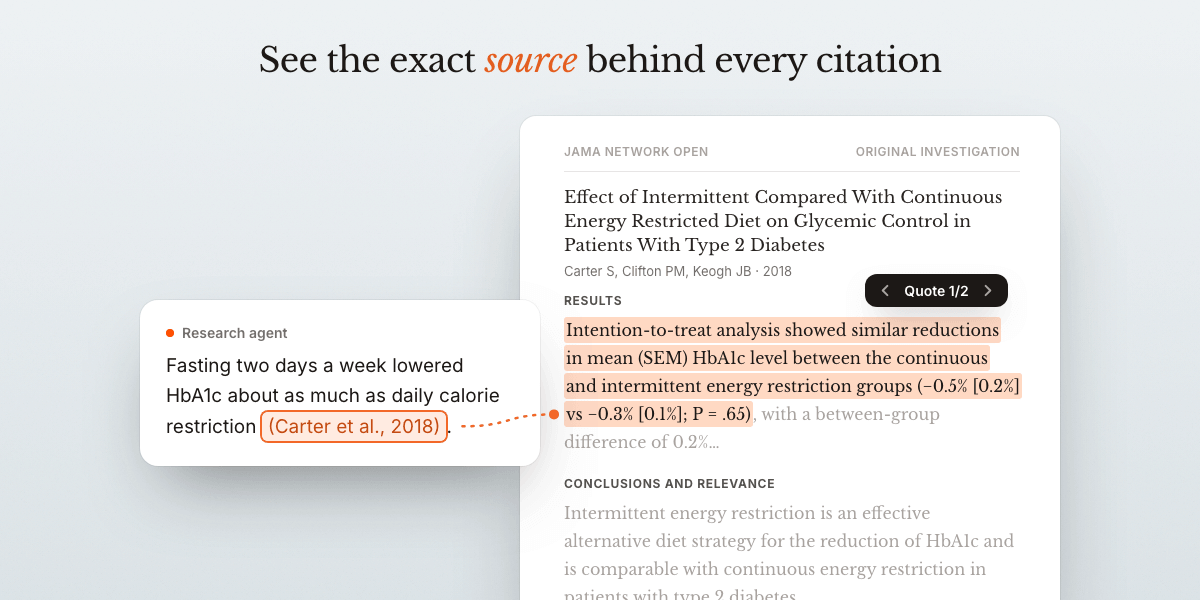
When the agent gives you an answer, you can now click any citation to see the statement that supports it.


• If the support comes from the abstract, we highlight the exact text in the abstract.
• If it comes from the full text, we open the PDF and highlight the supporting passage.


This makes it much faster to check a claim, so you don't have to search through the paper yourself.

2. Choose your report type in Systematic Review

You can now choose the type of report you want from the systematic review:


• Systematic review: a narrative synthesis of the included studies, organized by outcome.
• Rapid review: a shorter report on a focused question, with fewer screening criteria.
• Scoping review: maps what evidence exists on a topic, charting sources by category instead of judging effects.
• Qualitative evidence synthesis: brings findings from qualitative studies together into themes.


You pick the type when you set up a review, and you can change it later in Settings.

Try it now

If you try either update, I'd love to hear how it went. Just reply to this email.


Ravi
Product team, Paperguide

Click here