Hi [First name],


It's been a busy few weeks for the Runway team: many of us have been on the road at mobile conferences around the world, and we had our entire team together in one place for an offsite in Ireland. Of course, we’ve also been hard at work shipping new features and we’re excited to share the latest highlights below.

✨ New in Runway

ICYMI: Introducing Triage by Runway


We recently launched Triage to help mobile teams ensure nothing slips through the cracks even as product and release velocity accelerate, and to help humans and agents collaborate better to keep app quality high.


Triage is a unified inbox that automatically consolidates incoming issues across all kinds of sources: test results, beta feedback, user reviews in the app stores, crash reports, unhealthy metrics, and more. Duplicates are de-duped, related issues and possible root causes are flagged, and best-suited owners are assigned. From there, you can shepherd work as it makes its way into a release using Runway's Fixes flow, which integrates with Triage.


Check out the full announcement here, or feel free to reply here to request a live tour!


triage-main (1)

Assign Triage issues to agents


As a quick-follow addition to our Triage launch, you're now able to assign a Triage issue to one of your team’s internal agents to investigate and resolve. Runway provides all of the context it gathered on the issue so that the agent is best positioned to handle the fix. And once a resulting PR is opened, the work can be associated with a fix or fix request in Runway to make the end-to-end lifecycle traceable and to ensure any required approvals are gathered along the way.

Integrate directly with Expo EAS to manage OTA alongside app store releases


As some React Native teams lean into OTA with Expo, we've seen a growing need for the same release visibility and orchestration that Runway already brings to binary releases. With more stakeholders in the loop and more dependencies to manage, predictable, low-risk OTA calls for a real release framework rather than ad hoc CLI commands.


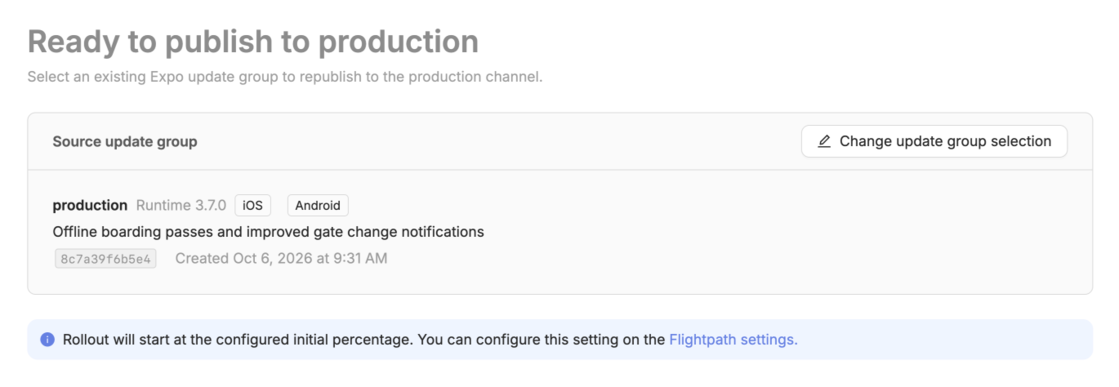
Our new native Expo EAS integration allows your team to coordinate and manage OTA releases alongside your app store releases, with a unified overview for tracking status across everything in flight. You can put OTA releases on a recurring cadence, and Runway will auto-select the latest update group and ship it on schedule. Once updates are live, you can manage rollouts from Runway, or automate incremental staged rollouts entirely. And as with the rest of your releases, Runway keeps everyone looped in with notifications on release progress and reminders for anything upcoming or overdue.

expo-eas-release-step

Support for GitHub stacked PRs and merge queues


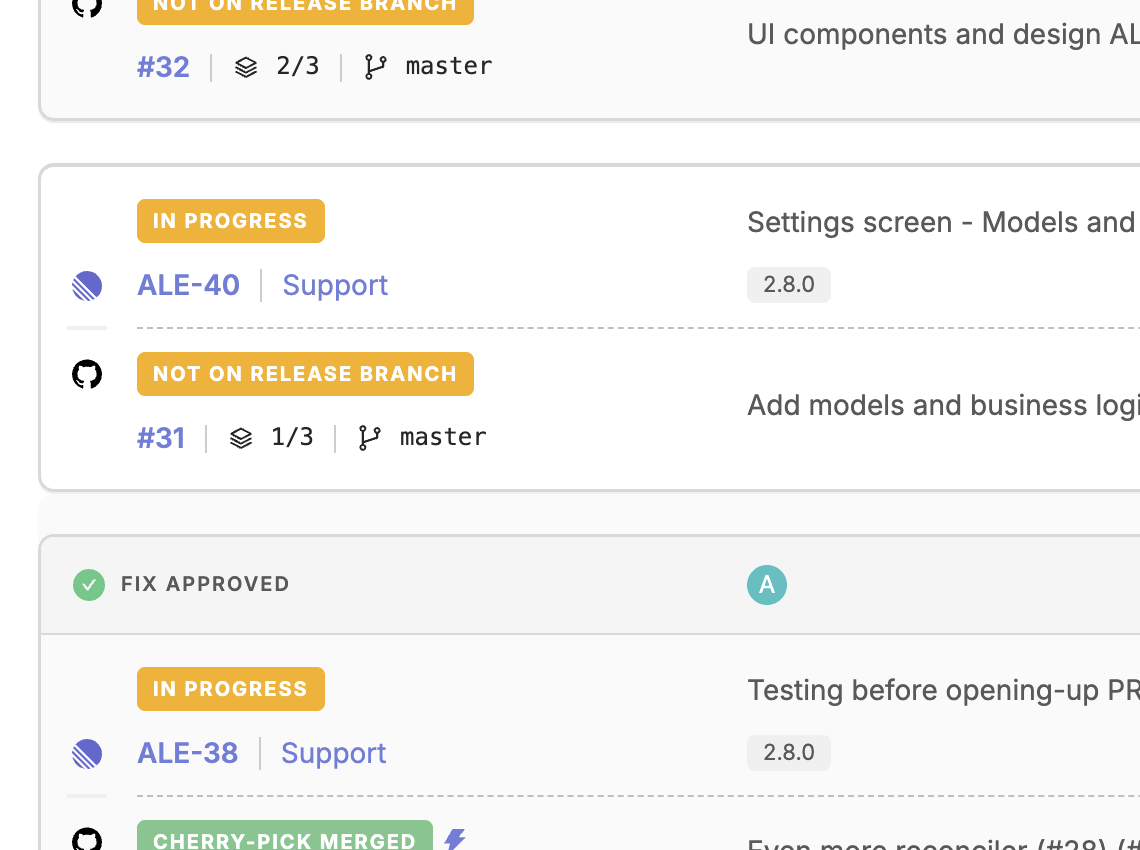
Runway now recognizes stacked pull requests in GitHub, and we surface visual references to stacks and PR ordering within stacks on Feature Readiness items. Importantly in the fix request context, Runway understands that each PR in a stack ultimately lands on the base branch at the bottom of the stack, so you can create fixes based on stacked PRs and cherry-pick them just like the non-stacked case.

stacked prs focus

When merging PRs (if you’ve enabled the corresponding automation), Runway can now take into account whether your repo enforces a merge queue and will add Runway PRs to the queue instead of trying to merge them directly. These PRs will merge in the order they joined the queue, and only after their checks and approvals pass.

Even more control over how and when fixes can be pulled into releases


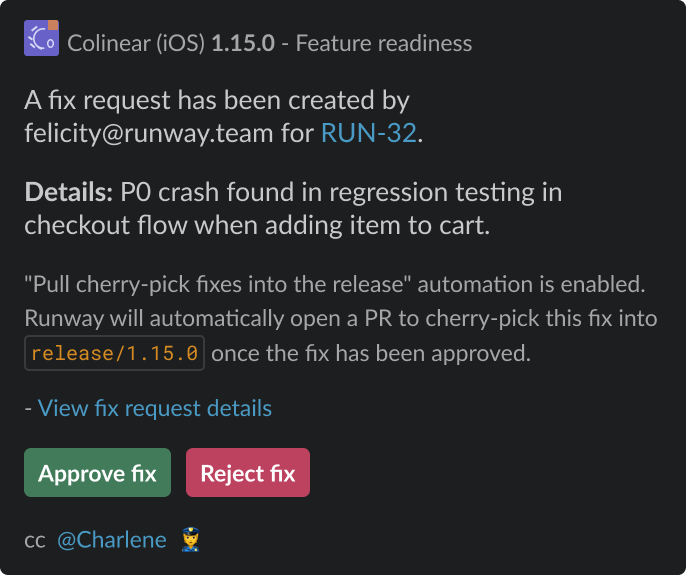
Runway’s fix request flow and approval settings are now even more flexible. If you don’t necessarily want to require approval for every fix, you can apply conditional approval requirements. For example, if your team is okay with ungated cherry-picks early in release cycles, you can require approvals only once you’re within a certain number of days or hours of your target submission date. You can also now name specific user groups or individuals as required approvers. And, authorized approvers can now approve or reject fix requests directly from the request’s corresponding Slack or Teams notification.

fix slack approval

To help your team provide the context you want them to provide alongside fix requests, we’ve introduced the ability to add descriptions to your fix request form fields (markdown supported). As a reminder, the fix request form is entirely customizable, allowing you to control the information you collect as well as certain validation on that info.

fix description v2 (1)

Self-serve Flightpaths configuration


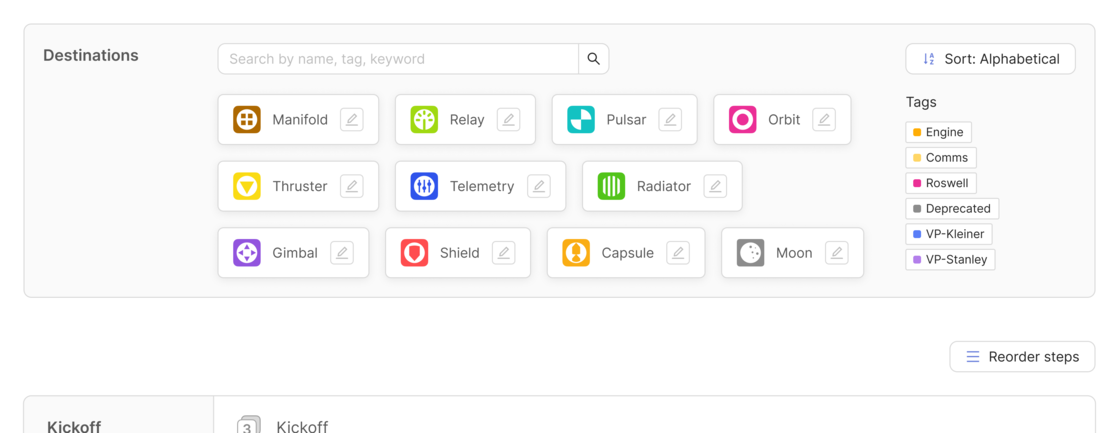
Our launch of Runway’s new Flightpaths architecture brought with it a wide range of new functionality and ways to set up release workflows. Now, you can self-serve Flightpaths setup, with the ability to add and remove workflow steps, adjust step ordering and dependencies, customize the names of steps, step groups, integrations, and more.

flightpaths-self-serve

Set the right bar for hotfixes with a new request flow


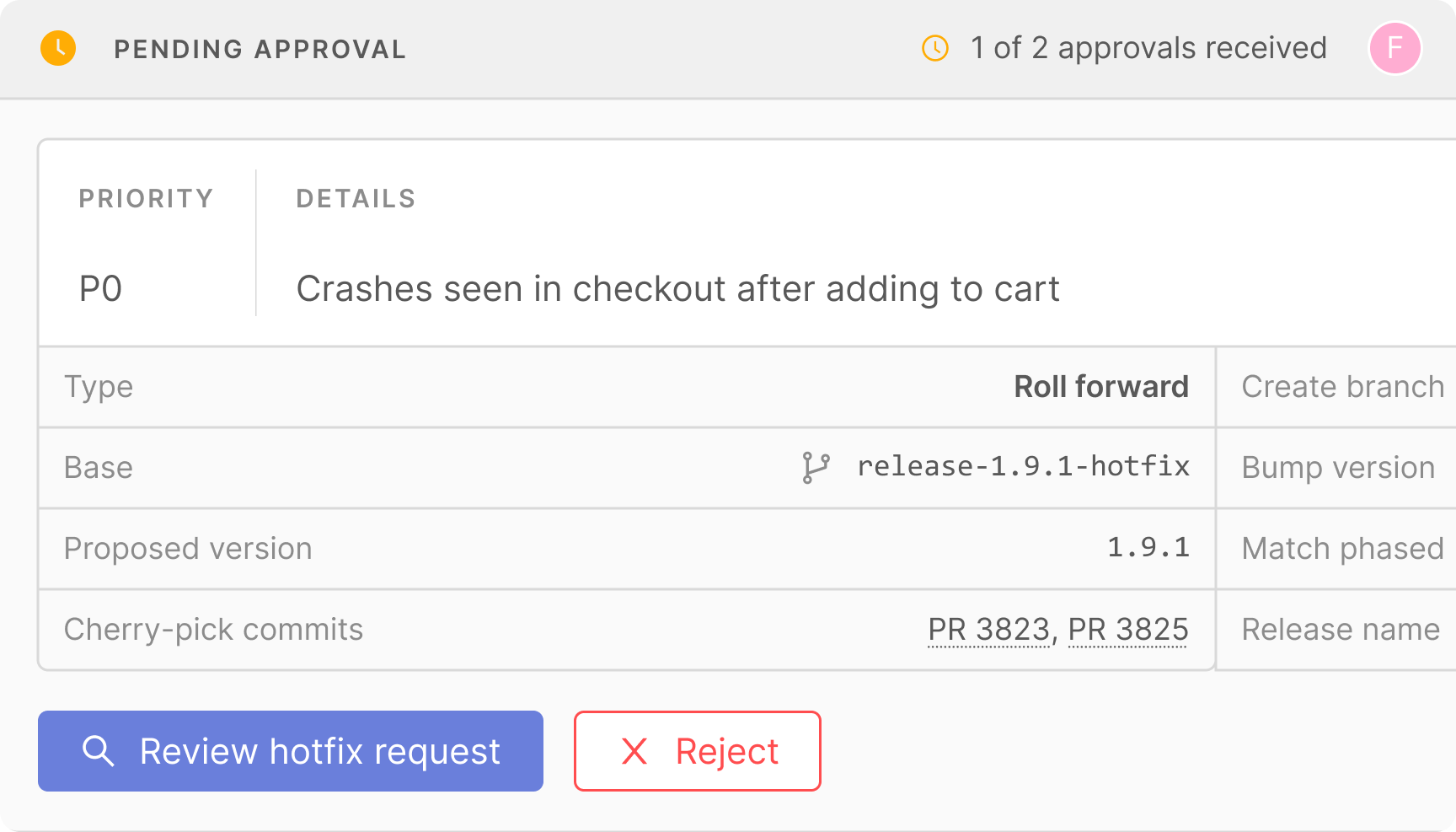
We brought Runway’s fix request model to our hotfix flow so that you can add guardrails and improve accountability around hotfixes. With the new flow enabled, team members and agents will be prompted with a (fully customizable) form in which to provide any context or rationale for the hotfix as they spin it up. You can also require one or more approvals from designated users or user groups before the hotfix can progress.


If approvals are required, once a hotfix request is submitted, it is called out with a special treatment in the release timeline. Approvers can open the usual hotfix creation form, already filled in with the request details, and progress the hotfix from there. If other teams want to get a hotfix out at the same time, they can easily add onto the existing hotfix request, so everything stays consolidated.

hotfix-request

New integrations across Feature flagging, Observability & analytics, Stability monitoring, and Calendar


We’ve expanded the Feature flagging integrations available in Runway to now include Firebase Remote Config and Amplitude Experiment. Once integrated, Runway pulls in all your flags and surfaces their status, variations, and targeting rules, highlighting flags most relevant to a given release based on specific changes and values, so you don’t have to hunt through a single laundry list of flags on the provider side. We also diff flag data over time then overlay that info on top of rollout metrics charts to help you spot app health issues that are caused by flag updates, not just new binaries, and leverage diffed context when identifying potential causes within issues surfaced in Triage.


Additionally, Luciq is now available for both Stability monitoring and Observability & analytics integration types in Runway. Use these to track adoption rates across releases and pull a variety of Luciq metrics like crash- and trouble-free session rates, Apdex, dropoffs, and much more into the Rollout context in Runway, powering comprehensive alerting and rollout automations.


Finally, Outlook has been added as an additional Calendar integration in the platform. With this integration type, you can sync release and rollout milestones from Runway to a shared team schedule, both as events occur and predicted out into the future based on your defined release cadence.

Release pilot rotation improvements


We’ve introduced a number of changes around the release pilot functionality in Runway to make managing your rotations even more flexible. Firstly, you can now swap the pilot for a specific future release “in place” for one-off adjustments, without shifting everyone else's turns. And you now have the ability to mark any user group (whether a custom group or Runway default group) as eligible for the release pilot rotation, meaning that users don’t necessarily need to be a member of the default Release Pilot group in order to be part of your rotation.


Additionally, you can now connect multiple Incident management & scheduling integrations at once and specify which one Runway should use for your release pilot rotation (and which one to use for incident reporting functionality). If your team only uses this type of integration for incident management, then you can opt out of the pilot rotation use case completely and manage your rotation manually in Runway instead.

Transition project management tickets based on release milestones


Runway already supported the ability to automatically move project management tickets to a done status at the end of release cycles, but we’ve expanded this functionality significantly to allow for transitions to multiple different statuses based on multiple different triggers. Specifically, you can now move tickets to any status of your choosing based on events like kickoff, a new build becoming available for testing, app store approval, etc.

PM milestone auto v4 (1)

App Store Connect enhancements: easier (and earlier) screenshot updates, and stay on top of age rating declarations


You can now drag, drop and reorder screenshots in Runway, and for teams who wish to start prepping screenshots earlier in their release process, you can now upload and adjust screenshots for any upcoming release, even before the given version exists in App Store Connect. We save all your changes alongside the release in Runway and then automatically apply them in App Store Connect once that version is next-up in App Store Connect.


To help teams navigate Apple’s ever-changing age rating requirements, you can now set default age rating responses within Runway and we’ll ensure those get synced into App Store Connect for all of your apps. Runway continuously pulls Apple's latest age rating requirements and will flag any new items that need responses to ensure that your submissions are not blocked.

PR-based triggers for new CI builds


We expanded Runway’s Trigger CI workflow automation to allow for recurring build triggers that are based on specific kinds of code changes. For example, now your team can choose to trigger a new build any time items of work associated with fixes are merged in. This allows you to be more selective in terms of when new builds are created, saving build time and avoiding unnecessary noise for testers on the receiving end.

trigger CI (1)

New Dependencies step for Android releases


Similar to what’s already available on the iOS side, Android releases now include a new section that captures the state of your project's dependencies. Runway continuously scans your project’s dependencies per release and displays them in a table, surfacing which versions you're currently on, highlighting OS requirements, and helping you catch anything that’s out-of-date. For teams shipping multiple apps within one Flightpath, there's a separate tab per app so you can review dependencies for each.

Android dependencies (1)

🔮 Coming soon

Config as code

Soon you'll be able to manage your Runway setup via YAML, allowing you to easily copy settings and check your config into source control so changes can be reviewed and tracked.


Interact with Runway Release ATC within the platform

Many of you are already familiar with Runway’s Release ATC via our Slack chatbot, which can provide all sorts of release info and take actions on releases on your behalf. We’re expanding access to Release ATC by embedding it within the Runway UI. As you navigate the platform, you’ll be able to ask it for guidance on what to do next in the release process or even have it take action on your behalf based on the screen you’re currently looking at.


AI-powered rollout pattern and metric detection

Rather than needing to explicitly tell Runway which metrics you want to track and set appropriate thresholds for those, Runway will scan all the available events and metric types in the monitoring tools you integrate and highlight discrepancies and trends release to release. Over time, Runway will learn which metrics are most useful or impactful for your team and product and will suggest adding them to your regular tracking.


Even more new integrations

Look out for Testmo, our latest regression testing integration, which will allow you to pull in a full breakdown of status for both manual and automated test runs against each release. And Unleash will be available soon at Runway’s feature flagging integration point.

Thanks for reading! As always, please feel free to reach out with any questions, requests, or feedback.


Cheers,


Gabriel & the Runway team

Runway, 169 Madison Ave, #11098, New York, NY 10016, United States

Unsubscribe