

October 2026
|
What's your Halloween costume? We're going as the most reliable AI platform for Ops and Finance teams.
Featured this update: a page that tracks every Prowork Table, skills that teach Prowork how your team works, and an early look at a new way to build integrations.
An easier way to manage your Prowork Tables
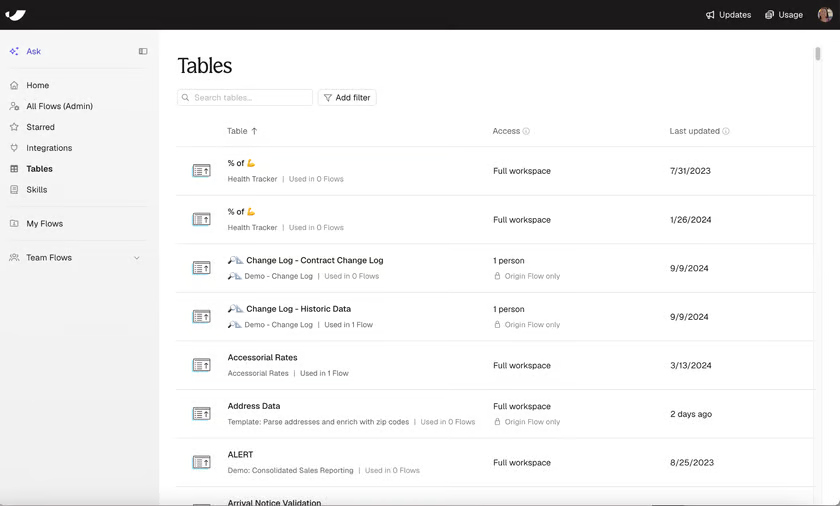
Every Table in your workspace, with the Flow that writes it, who can see it, and when it last changed.
Prowork Tables let one Flow's output feed another, build history over time, and hold reference data. As your workspace grows, it gets hard to track which Tables exist, which Flow writes each one, and what reads from them. The Tables page puts all of it on one screen.
Click Used in N Flows to see every Flow that pulls from a Table, who owns it, and whether it's live or still a draft. Click the Access value to see who can view or edit the origin Flow.
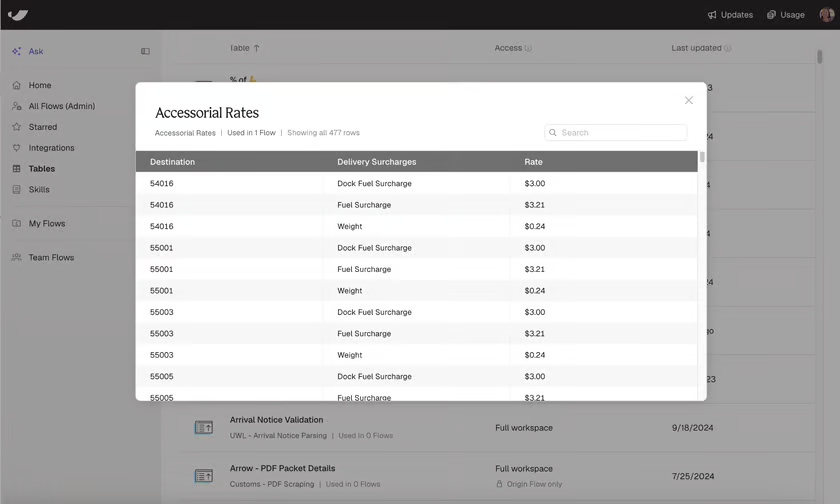
Open a Table to preview its rows and see how many Flows pull from it.
How customers are using it:
- Skip duplicate work. Check whether someone already built the Table you need.
- Check impact before a change. Open Used in N Flows to see what a column change will affect.
- Clean up. Filter by Not updated in 90+ days to find Tables nothing reads or writes.
- Review access. Filter by Full workspace to see what everyone can read.
- Trace a Table. Click through to the Flow that writes it.
Teams are putting Skills to work
Skills have been live about a month and teams have already found uses we didn't expect. A few favorites:
- Teaching Prowork to understand your data. Teams are spelling out what their raw data fields actually mean, so Prowork reads them the way they do. It can also read your existing definitions straight from Snowflake or Databricks.
- Product mapping for month-end allocations. Accounting teams are using Prowork to encode their product categorization rules as a skill, so every allocation flow applies the same mapping.
- Getting new builders up to speed. Teams are packing the house rules into one skill: SLAs, output formats, the fiscal calendar, artifact branding, even which admin to ask for access to each integration.
Want to beta test more powerful integrations?
We're developing a new feature that enables Prowork to build out custom integrations using the credentials that exist in your team's workspace. These integrations are quicker to set up, more powerful, and more flexible than traditional integrations, while carrying the same oversight, controls, and security.
This one's an open beta. To get in, talk to your account rep or your Applied AI engineer.
Other featured releases
|
You can now organize your flows in a personal folder. See how folders work |

|
Pull from Logiwa to bring warehouse data into your flows Read how it works |

|
Arrows now route around steps and cards instead of through them |

|
Artifacts can now be up to 10MB, up from 5MB |

Customer quote of the week
|
“
Why would I use PowerPoint when Prowork makes insane dashboards? This is life-changing.
Logistics User
|