
|
|
|
Call tracking is in. CallRail and CTM (CallTrackingMetrics) join Reporting Ninja, so the calls your clients get can sit in the same report as the ads, SEO and website that brought them. Each one comes with a client report already built in the template catalog.
|
|
|
CallRail – calls, forms and texts, from the source to the lead. |
|
|
CTM – CallTrackingMetrics, for one account or a whole agency. |
|
|
Alerts on calls – a note the morning after calls drop. |
|
|
|
|
CallRail: every call, from the source to the lead
|
|
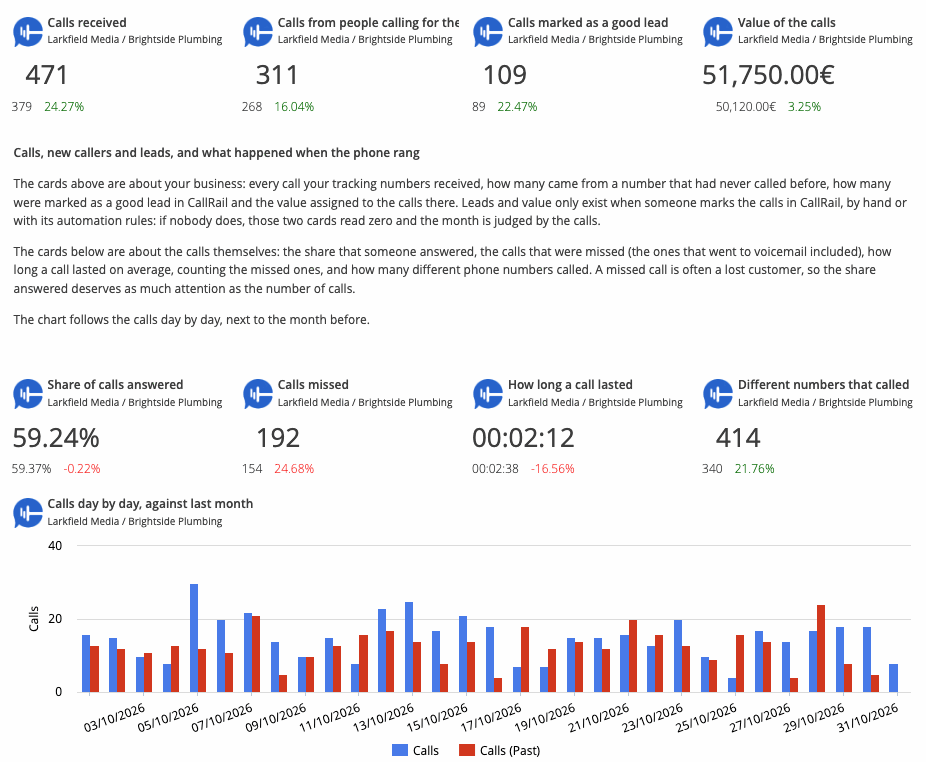
Paste a CallRail API key and report on the calls, form submissions and text conversations of one company or of all the companies of an account. Calls by source, campaign, keyword, landing page and tracking number, in the same report as the Google Ads, Meta Ads or GA4 sections that brought them.
|
|
|
|
A report that is already written. The CallRail report in the template catalog opens with the calls, first-time callers, good leads and their value, then where the calls came from, whether someone picked up and the calls one by one. |
|
|
Answered, missed and voicemail. The answer rate and the missed calls as CallRail counts them, voicemails included, by day, week or month. |
|
|
A call log with the recordings. Every call with its caller, source, outcome and duration, and a Listen link to its recording. |
|
|
|
|
Preview the CallRail report ›
|
|
|
|
|
|
CTM: calls, forms and texts from CallTrackingMetrics
|
|
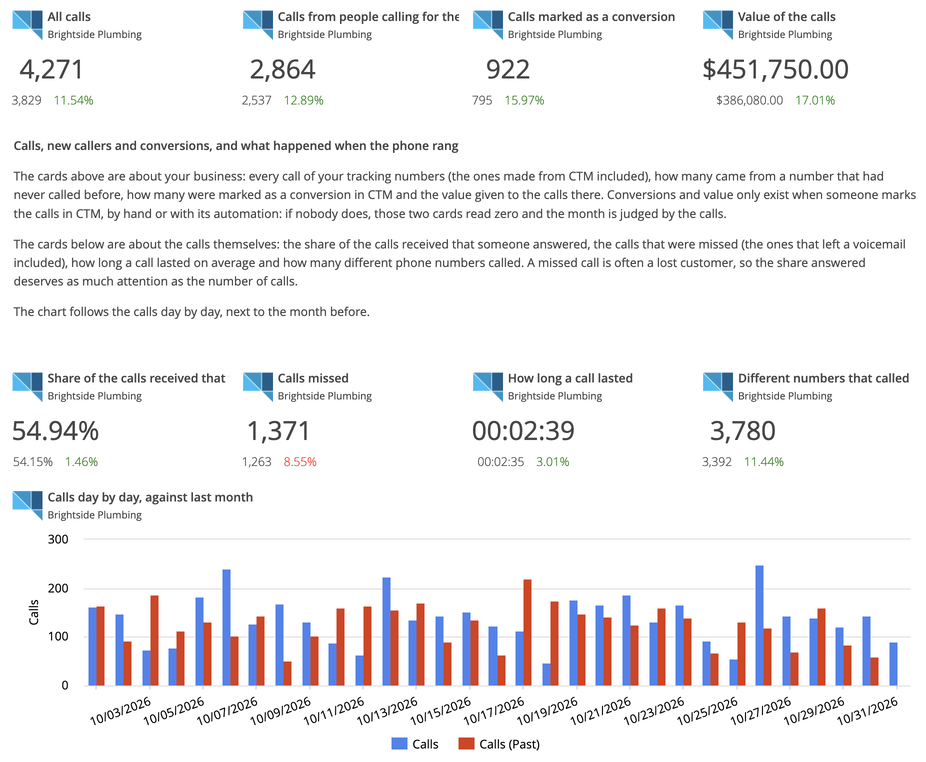
Paste the Access Key and the Secret Key of a CTM account, or of an agency to connect all its accounts at once. Report on inbound and outbound calls, form submissions and text messages, with the source, campaign, keyword and landing page behind each one.
|
|
|
|
A report that is already written. The CTM report in the template catalog opens with the calls, first-time callers, conversions and their value, then when people call and the missed calls to call back. |
|
|
When and where people call. Calls by hour of the day, day of the week and caller location, to plan schedules and budgets. |
|
|
Conversions and revenue. The scores, conversions and revenue your team sets in CTM, next to the calls and forms that earned them. |
|
|
|
|
Preview the CTM report ›
|
|
|
|
Know the morning after when calls drop
|
|
Set an alert on the calls, answered calls or missed calls of a CallRail or CTM account. Reporting Ninja checks it every day and, when the threshold is crossed, emails you a short note written by AI: before a quiet week turns into a quiet month, and while there is still time to call back.
|
|
|
|
Read the announcement ›
|
Which platform should come next? If a client of yours tracks or sells somewhere we do not report on yet, reply to this email or write to support@reportingninja.com. We read every message.
The Reporting Ninja team
|
|
|
Connect once, report everywhere
One connection feeds your reports and client portal, Data Studio, Google Sheets, the REST API and your AI assistant. All of it is included in your plan.
|
|
|
|
You are receiving this email because you signed up for Reporting Ninja.
Unsubscribe from these emails.
Reporting Ninja
Avenida Séptima 23, 3º9, Madrid, 28022, Spain
|
|