|
|
|
NOVEMBER 2026
|
MCP’s next wave is enterprise scale
|
|
|
|
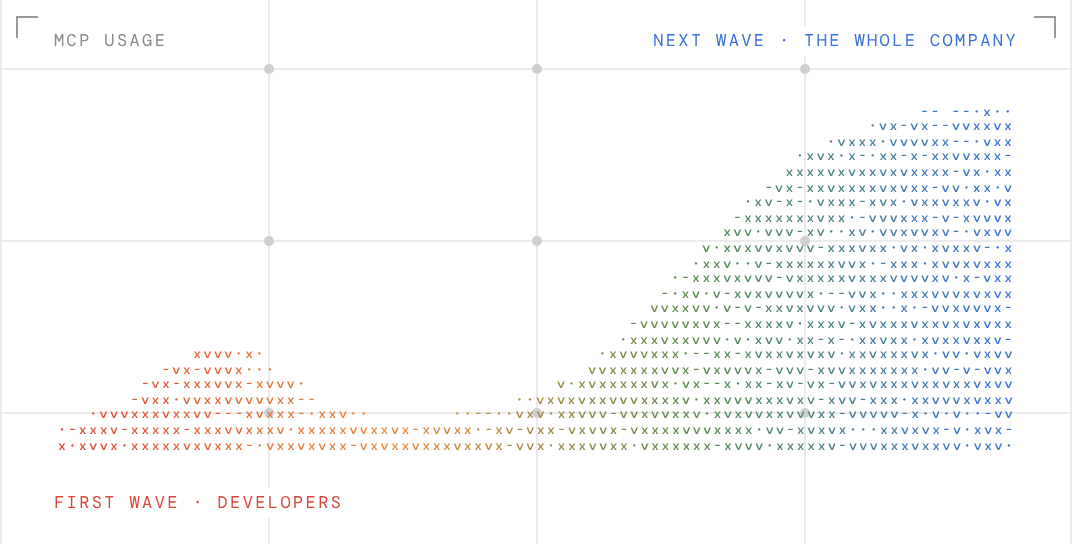
MCP launched with initial excitement, then faced inevitable backlash. And then it just kept organically growing person by person, client by client. At this point nearly everyone who uses AI has interacted with MCP, whether they know it or not. But there's still much more room for MCP to grow. Developers have led the way on MCP adoption, but there are still thousands of employees in sales, support, finance and operations who are limited by their inability to connect their agents to the systems they work with daily.
|
|
|
|
|
|
|
|
The protocol doesn’t need to change to unlock this next wave of usage. There's just a bit of usability work required to ramp up enterprise usage. From our research, we found two area of pain:
|
|
|
-
The authentication process for MCP is still painful
|
-
The most useful applications have some of the worst MCP servers
|
|
That's what we set out to solve
|
|
|
Twenty MCP servers, twenty consent screens
|
|
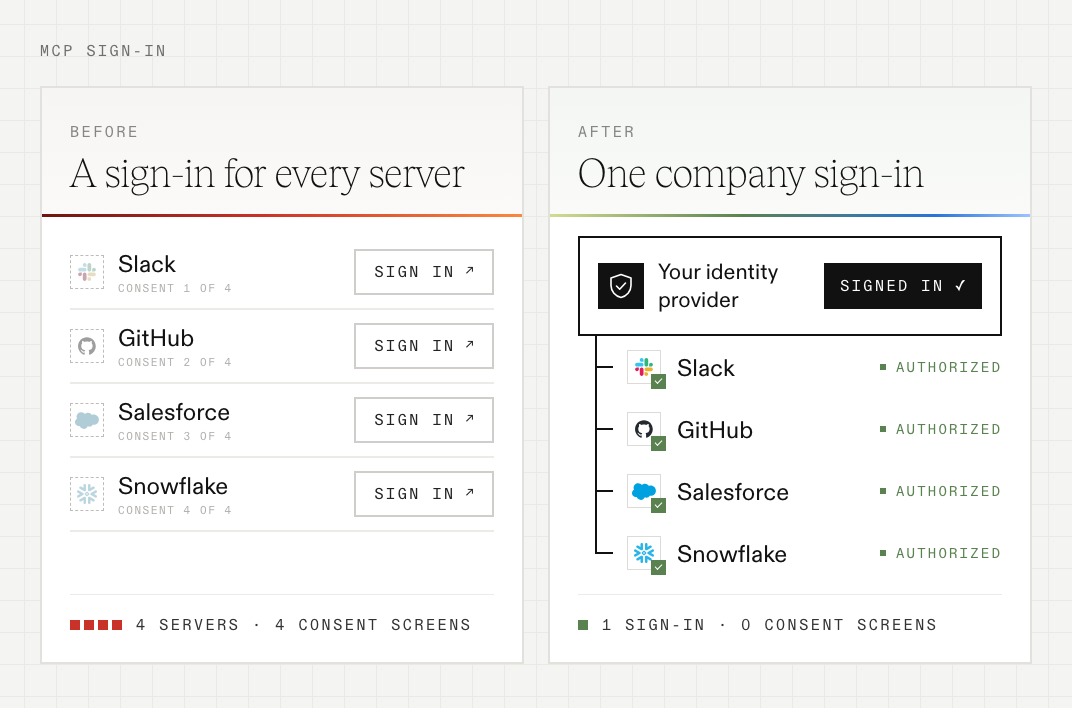
People using MCP go through a shared journey. You connect a server, ask your agent to do something real, and think: “wow, this is amazing.” Then you connect the next one, and the next, and the thought changes: “wow, consent screens are really irritating.” Connecting your agents to the 20 servers you actually use means 20 sign-ins and 20 consent screens, then the same again in every other AI client you use.
|
|
|
Fortunately, the MCP maintainers have a plan for this: Enterprise-Managed Authorization (EMA), an official extension to the protocol. EMA puts your company’s identity provider in charge. An employee signs in to their AI client once, with their work account. When their agent needs a server, the client asks the identity provider for a signed grant for that server. The identity provider checks your policy, and the server swaps the grant for an access token. There’s no redirect and no consent screen. Who can reach what is managed in the identity provider you already run, and removing someone there cuts off their MCP access in every client at once.
|
|
EMA only works when three parties support it: the AI client, your identity provider, and the authorization server in front of each MCP server. You can’t wait for every server’s vendor to add it. Speakeasy fills that gap.
|
-
Every server, from day one. The gateway is the authorization server for every MCP server behind it, so Slack, GitHub, Salesforce and your internal servers all accept your identity provider’s grants, whether or not the vendors support EMA.
|
-
Works with your IdP. You connect your identity provider to Speakeasy once and EMA works for all your employees. Speakeasy only asks for read access to your apps.
|
-
Every refusal explained. Rejected grants are logged with the reason, and EMA follows the client admission rules you’ve already set.
|
|
|
|
|
|
|
Caught in SaaS’s mid-life crisis
|
|
The big SaaS providers (Slack, Salesforce, GitHub, etc.) have an uneasy relationship with AI. On the one hand, they potentially have a lot to lose. On the other, AI could drive skyrocketing usage. As these businesses work through their mid-life crises, real users are caught in the crossfire with crappy, painfully complex MCP setups.
|
|
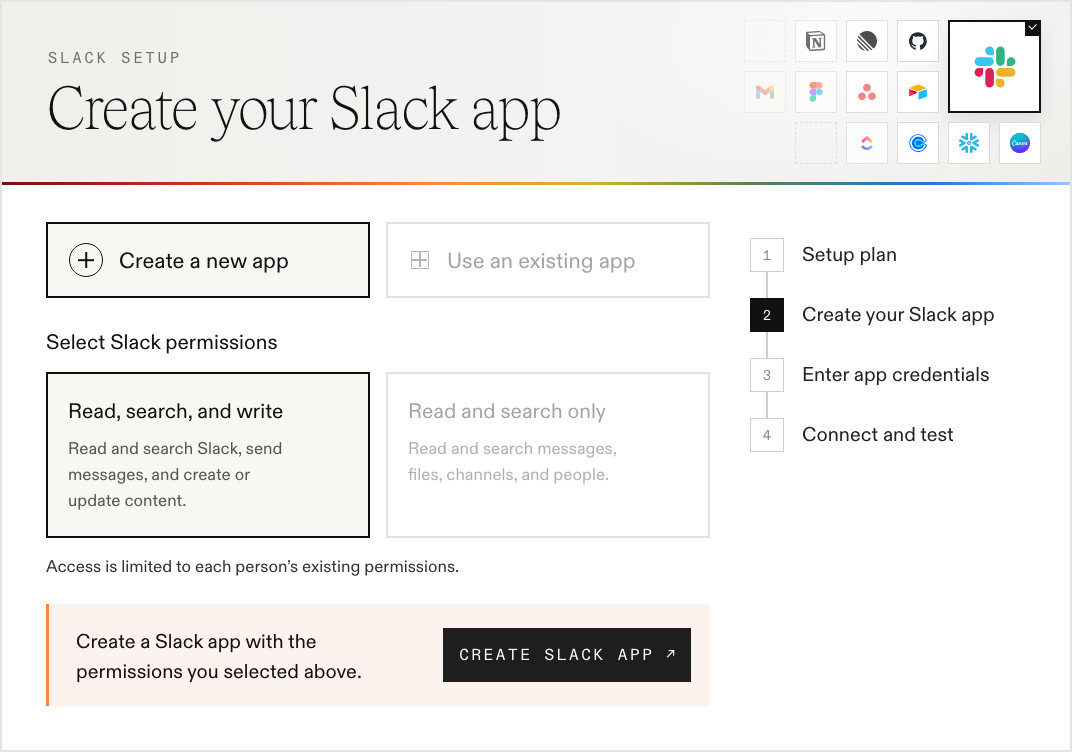
Connecting Slack means creating an app in your workspace. Salesforce needs an OAuth app and an “Enable MCP Server” setting switched on in your org. Snowflake needs SQL to create the server, its permissions and OAuth. GitHub and Okta each want an OAuth app of their own. The servers people want most are so complicated, even IT admins sometimes give up.
|
|
|
|
|
|
Our MCP catalog now has guided setup for all five. Each one tells you up front what access you’ll need, walks you through the vendor’s side with the instructions next to the fields they refer to, and has you sign in and test the connection before you finish.
|
|
|
|
Whatever the vendors decide next, your admins get a working server without opening a support ticket.
|
|
|
Also new in the MCP Gateway
|
Secure OpenClaw
|
Install the Speakeasy plugin for OpenClaw and its sessions and tool calls show up alongside every other agent’s. Your risk policies check prompts and tool calls before they run, so a blocked call never happens, and the device agent can roll the plugin out across your fleet.
|
|
|
|
Gateway Code Mode
|
Switch a gateway to Code Mode and it exposes a single execute tool. Agents search for tools and call them from short scripts, without loading every server’s full tool catalog up front.
|
|
Gateway Code Mode
|
Switch a gateway to Code Mode and it exposes a single execute tool. Agents search for tools and call them from short scripts, without loading every server’s full tool catalog up front.
|
|
|
|
|
|
|
Make signing in and setting up easy for every employee, and that is what unlocks explosive growth. To see the gateway running against your own IdP, follow the links below.
|
|
|
|
|
|
|
|
|
|
|