Run Mitzu's AI on your own Claude key, from Anthropic or any Anthropic provider. ͏  ͏  ͏  ͏  ͏  ͏  ͏  ͏  ͏  ͏  ͏  ͏  ͏  ͏  ͏  ͏  ͏  ͏  ͏  ͏  ͏  ͏  ͏  ͏  ͏  ͏  ͏  ͏  ͏  ͏  ͏  ͏  ͏  ͏  ͏  ͏  ͏  ͏  ͏  ͏  ͏  ͏  ͏  ͏  ͏  ͏  ͏  ͏  ͏  ͏  ͏  ͏  ͏  ͏  ͏  ͏  ͏  ͏  ͏  ͏  ͏  ͏  ͏  ͏  ͏  ͏  ͏  ͏  ͏  ͏  ͏  ͏  ͏  ͏  ͏  ͏  ͏  ͏  ͏  ͏  ͏  ͏  ͏  ͏  ͏  ͏  ͏  ͏  ͏  ͏  ͏  ͏  ͏  ͏  ͏  ͏  ͏  ͏  ͏  ͏  ͏  ͏  ͏  ͏  ͏  ͏  ͏  ͏  ͏  ͏  ͏  ͏  ͏  ͏  ͏  ͏  ͏  ͏  ͏  ͏ ­ ­ ­ ­ ­ ­ ­ ­ ­ ­ ­ ­ ­ ­ ­ ­ ­ ­ ­ ­ ­ ­ ­ ­ ­ ­ ­ ­ ­ ­ ­ ­ ­ ­ ­ ­ ­ ­ ­ ­ ­ ­ ­ ­ ­ ­ ­ ­ ­ ­ ­ ­ ­ ­ ­ ­ ­ ­ ­ ­ ­ ­ ­ ­ ­ ­ ­ ­ ­ ­ ­ ­ ­ ­ ­ ­ ­ ­ ­ ­ ­ ­ ­ ­ ­ ­ ­ ­ ­ ­ ­ ­ ­ ­ ­ ­ ­ ­ ­ ­ ­ ­ ­ ­ ­ ­ ­ ­ ­ ­ ­ ­ ­ ­ ­ ­ ­ ­ ­ ­ ­ ­ ­ ­ ­ ­ ­ ­ ­ ­ ­ ­ ­ ­ ­ ­ ­ ­ ­ ­ ­ ­ ­ ­ ­ ­ ­ ­ ­ ­ ­ ­ ­ ­ ­ ­ ­ ­ ­ ­ ­ ­ ­ ­ ­ ­ ­ ­ ­ ­ ­ ­ ­ ­ ­ ­ ­ ­ ­ ­ ­ ­ ­ ­ ­ ­ ­ ­ ­ ­ ­ ­ ­ ­ ­  

Mitzu_logotype_box_melon_gradient (1)

Today's drop: Bring Your Own Key 🔑

Hi there,


Day 3 of Mitzu Launch Week.


Today: Bring Your Own Key. Plug your own Claude key into Mitzu, from Anthropic directly or from any Anthropic provider.


Many teams already have an agreement with Anthropic, or route Claude through a cloud provider or an internal gateway. Now Mitzu's AI runs on that account, under your own terms and data controls.

1. Every AI call runs on your key

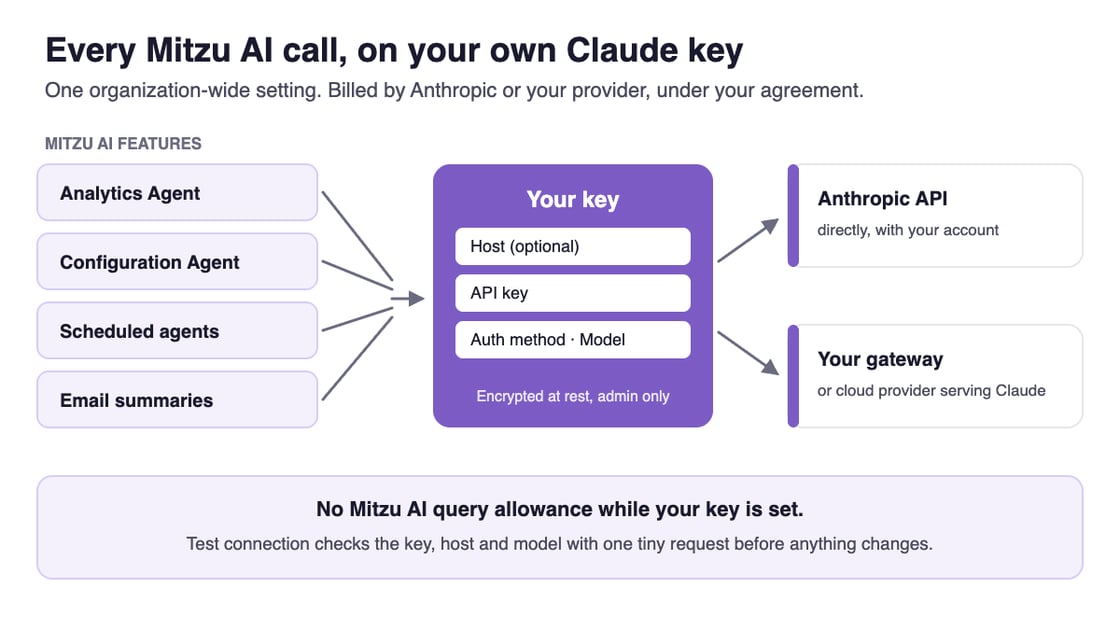
Once your key is saved, every AI call Mitzu makes for your organization uses it: the Analytics Agent and its subagents, the Configuration Agent, scheduled agents and the summaries behind their emails. Usage is billed by Anthropic or your provider, and Mitzu's AI query allowance no longer applies.

Diagram: the Analytics Agent, Configuration Agent, scheduled agents and email summaries all call Claude through your own key (host, API key, auth method and model), either directly on the Anthropic API or through your gateway or cloud provider

2. One setting for the whole organization

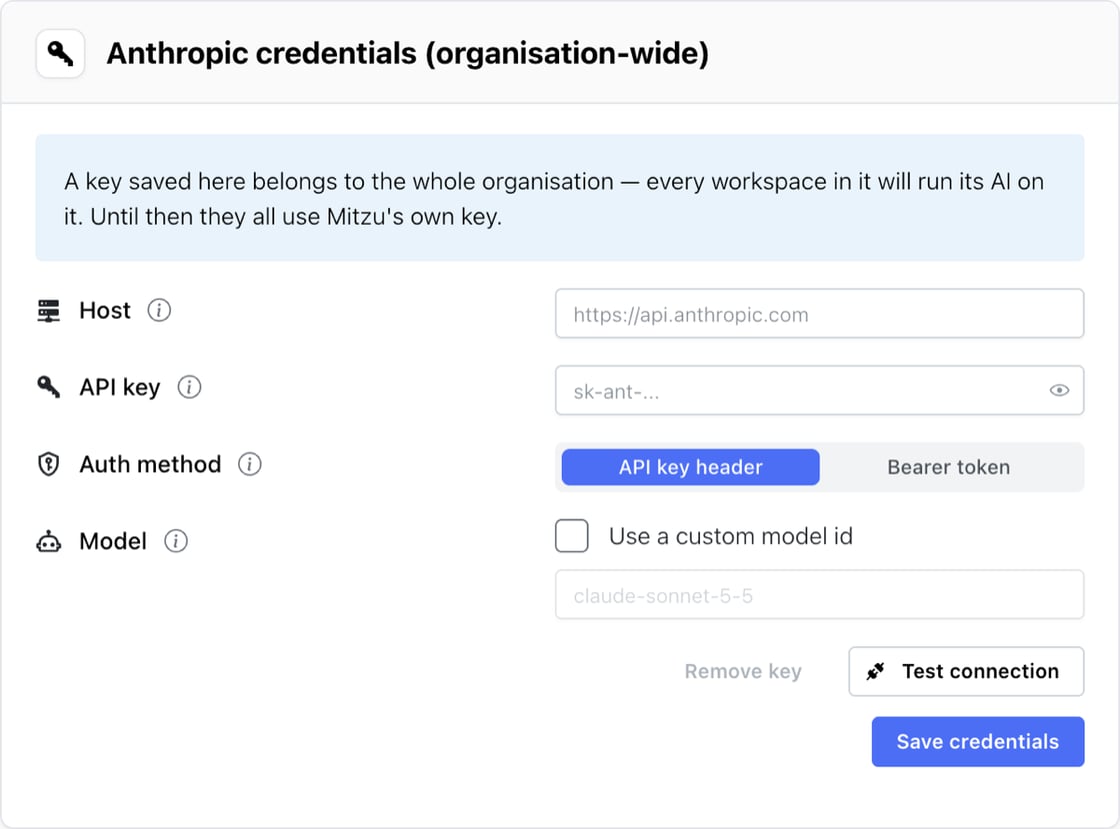
An admin adds the key once, under Settings → Organisation → AI credentials, and every workspace runs on it. Leave the host empty to call the Anthropic API, or point it at the gateway or cloud provider you already use, pick how the key is sent, and set a custom model id if your provider names Claude differently. Keys are encrypted at rest and never shown again after saving.

The Anthropic credentials settings card in Mitzu: Host, API key, Auth method (API key header or Bearer token) and Model fields, with Test connection and Save credentials buttons

3. Test before you switch

Test connection sends one tiny request with the values in the form and tells you whether the key, the host and the model were accepted, before anything is saved. If your gateway rejects something, its raw response is one click away for your support ticket.

To turn it on for your organization, reply to this email or write to support@mitzu.io.

See it in action

📖 The full story is on our blog: [PLACEHOLDER: blog post link]


Every setting is covered in our docs.


Two more drops this week. Tomorrow: an agent that remembers.

Set up your key

Mitzu, Inc., 3500 South Dupont Highway, Dover, Delaware 19901, United States

Unsubscribe Manage preferences