This release makes Payroll Hub generally available, with one-off payments and overtime pay inside each run. New people now set up their own account in a short welcome wizard. Recruiters can add a whole stack of CVs at once, Time gets a public API for clock-ins, and requests can bring the right people in as collaborators. More settings and list pages move to the new design, and most lists now open straight away. Here’s what’s new.
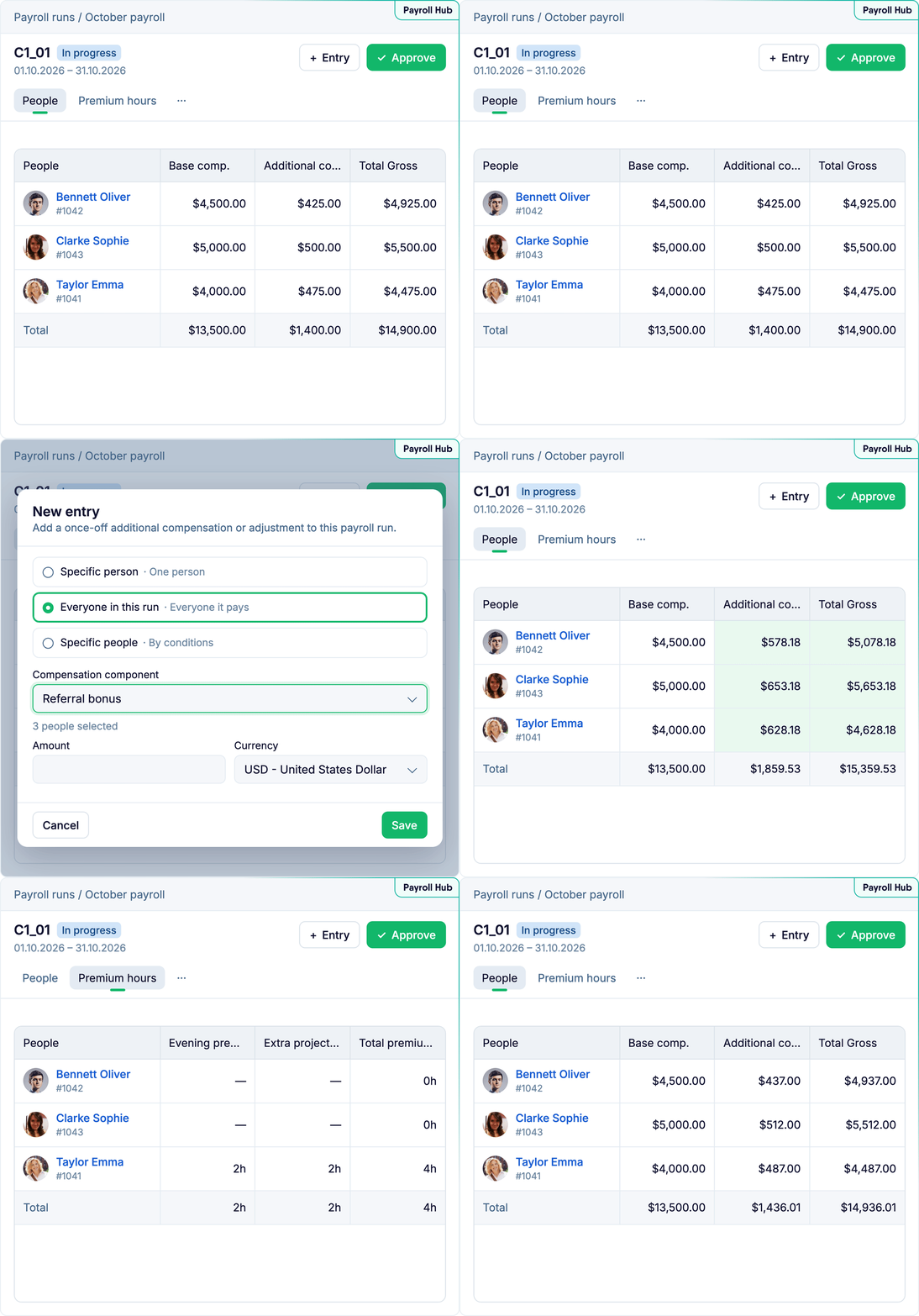
Payroll Hub is now generally available. You can add one-off payments, such as a referral bonus or a correction to someone’s pay, straight into a payroll run, for one person or for everyone in it, without going through a request. They count in the run right away, can be changed until the run is approved, and then go onto each person’s profile.
Overtime and other hours paid at a higher rate, such as evening or night work, now appear on a new Premium hours tab in the run. The hours come from approved timesheets and overtime requests in Time. Each type is paid at the person’s hourly rate times its multiplier, under the compensation component you link to it in the attendance policy.
A payroll manager adds a referral bonus for two people straight to the October run, then checks their evening and overtime hours on the Premium hours tab before approving it.
ℹ️ Find it under Payroll Hub, Payroll runs. Adding one-off payments needs the Manage payroll permission and rights to edit compensation. To pay premium hours, link each overtime or special-hours type to a compensation component in Settings, under Attendance policies. Payroll Hub is a separate product: to add it to your account, please contact your CSM.
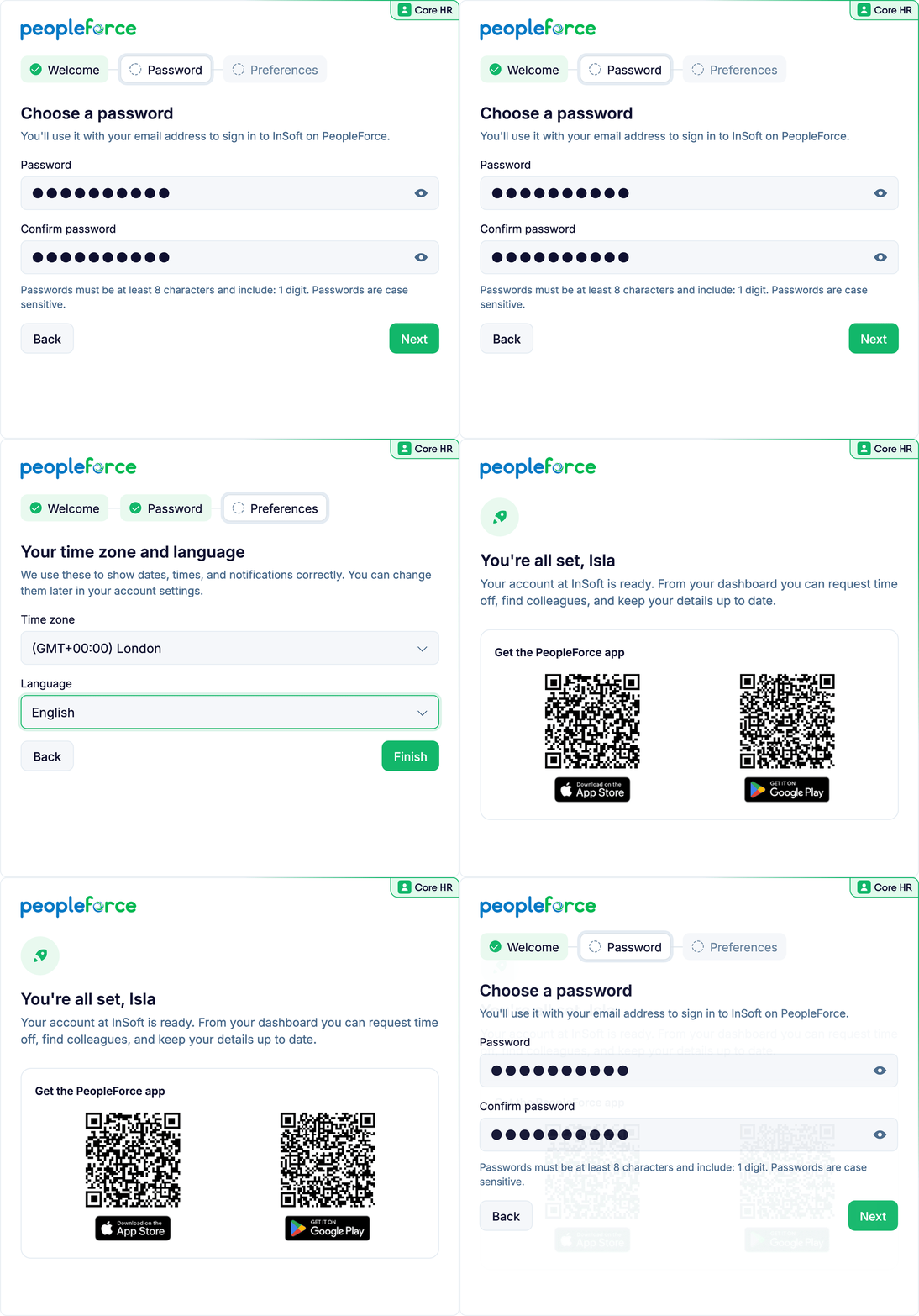
Invitations no longer contain a password or a reset link that can expire before anyone opens it. Instead, new people get a Set up your account link that opens a short welcome wizard, where they choose their password, time zone and language, and set up two-factor authentication if your company requires it. If your company uses single sign-on, the password step is skipped, and the last step invites people to download the PeopleForce mobile app.
Account owners get a few extra steps: they can add the company logo and brand colour, set the default time zone, language, name format and date format, and invite other admins to help set things up. On each profile, you can now see whether an invitation has been opened, and Send welcome letter is now called Invite person.
HR invites the new warehouse team the week before they start, sees on Monday which two invitations are still unopened, and sends them again.
ℹ️ Send invitations with Invite person on the person’s profile. Only people who can invite others see the invitation status. People who already use two-factor authentication still get a password reset email instead.
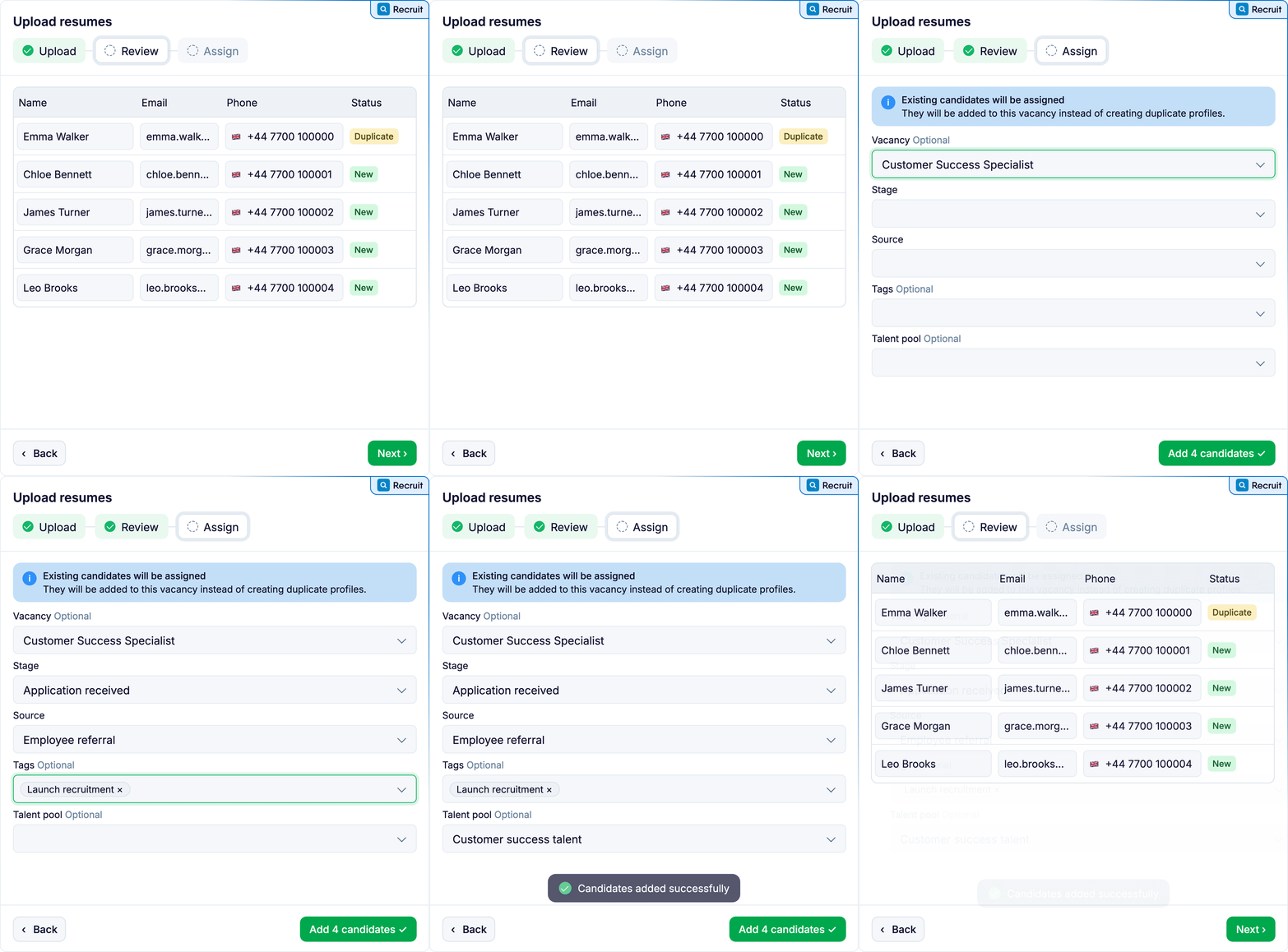
You can now add a whole batch of CVs at once (PDF, DOC, DOCX or RTF) from Candidates, a vacancy or a talent pool. Each CV fills in the candidate’s name, email and phone, which you check and correct in the Review step. Anyone already in your database isn’t created twice: they’re added to the vacancy, or skipped if you’re not uploading to one. In the Assign step, you pick the source, tags, vacancy, stage and talent pool for the whole batch.
After a job fair, a recruiter drops a folder of CVs into Upload resumes, fixes one misread email in Review, and adds everyone to the Warehouse Operator vacancy at the Applied stage, tagged Job fair.
A new Prospector (in beta, on request). The Prospector browser extension has a new look. From it you can now update duplicates, assign candidates to other vacancies and add them to talent pools.
ℹ️ Find it under Recruit, Candidates (or on any vacancy or talent pool): Add candidate, then Upload resumes. You need permission to add candidates. CVs are read by AI when AI resume parsing is on in Settings, under Features. To try the new Prospector, please contact your CSM.
The public API (v3) gets clock-in, clock-out, start-break and end-break endpoints. Your IT team can use them to send attendance from another system, such as a kiosk or a card reader, straight into Time with a company API key, so nobody has to type it in.
A factory’s IT team links its swipe-card system to the new endpoints, so every shift’s clock-ins and breaks reach PeopleForce and nobody types attendance in by hand.
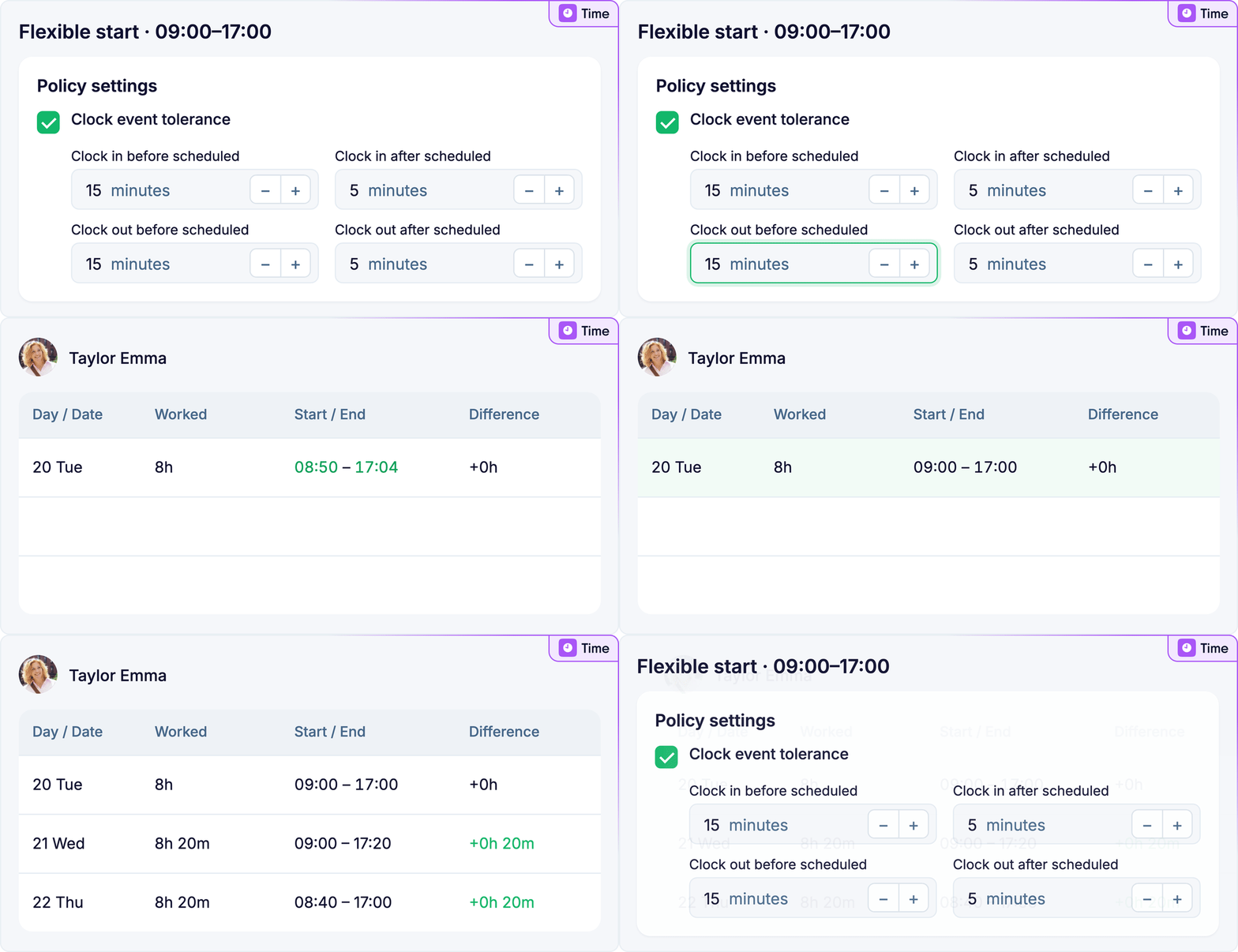
A grace window for clock-ins (on request). Attendance policies get a Clock event tolerance setting: how many minutes before or after the scheduled time still count as on time. On fixed-time work patterns, the day’s first time-tracker clock-in, or a clock-out, that falls inside the window moves to the scheduled start or end, so a few early or late minutes no longer turn into overtime to fix.
ℹ️ The clock-in endpoints are part of the public API (v3) and use a company API key from Settings, under API keys. Clock event tolerance is in Settings, under Attendance policies. Please contact your CSM to switch tolerance on for your account.
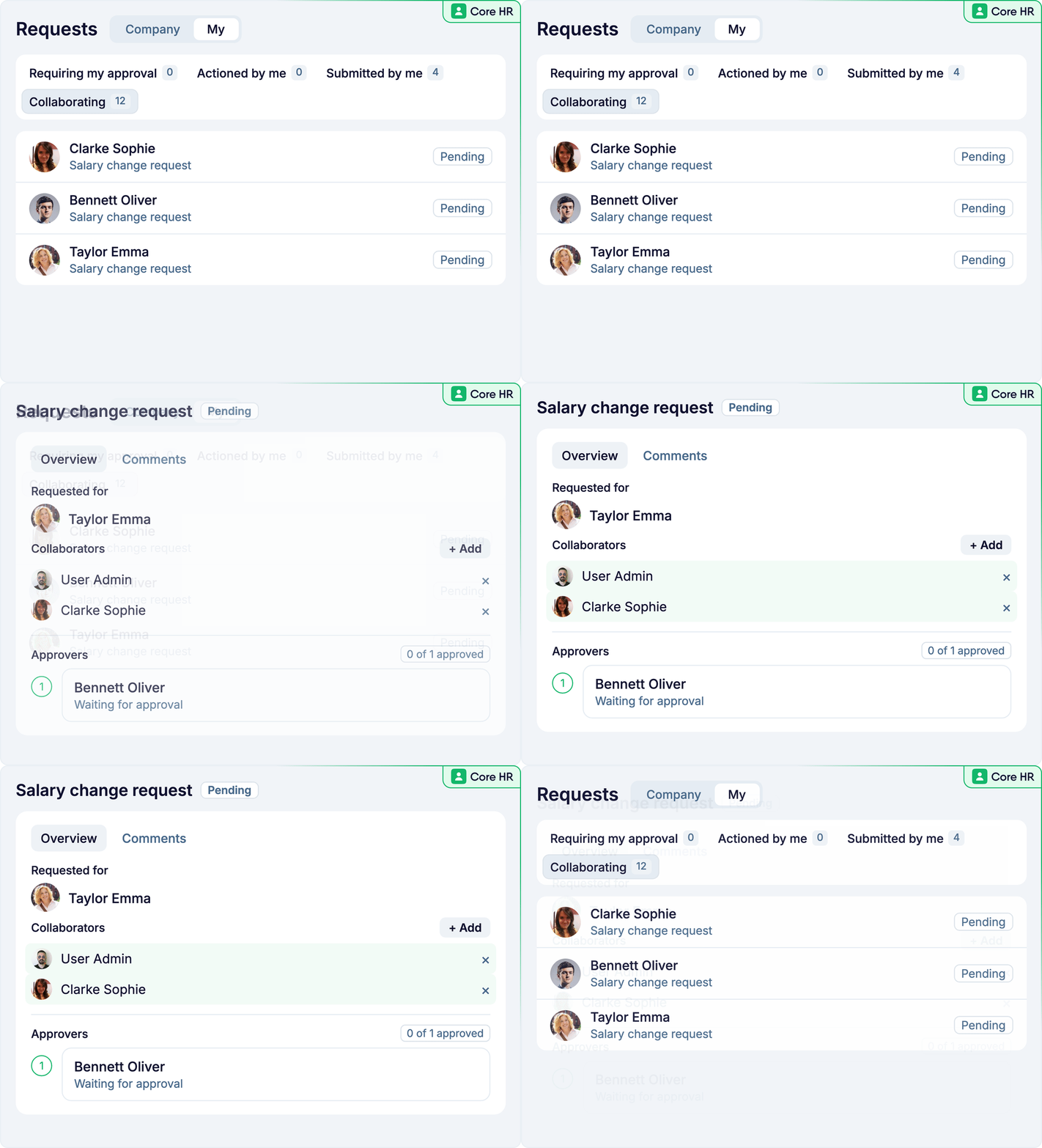
Requests can now bring in people who need to follow a request without approving it, such as payroll, a team lead or a manager’s manager. Admins set this up once per form, and those people are added to every new request automatically. You can also add someone to a single request, and when you @mention a colleague in a comment, PeopleForce asks whether to add them. Everything you follow is on a new Collaborating tab in your requests.
Change request forms are more flexible too. Admins can make sections like Position or Salary optional, so a salary-only change no longer creates an extra position record. On self-service and people data change forms, they can also stop changes from being backdated.
HR adds a payroll specialist as an automatic collaborator on the salary change form. When a manager submits a raise from the first of next month, it shows up on the specialist’s Collaborating tab, with nothing to forward.
ℹ️ Set it up in Settings, under Forms: open a form template, then the Approvals tab for collaborators, or its tables for Required and Allow past dates. Collaborators can view and print a request, but they can’t approve it.
✅ Department and Division filters on the org chart – narrow down a large org chart by department or sub-department, or by division, and your filters are saved for next time
✅ Custom task titles in workflows – form request and document signing steps take their own task title and description, with placeholders, shown in Tasks, the inbox and emails
✅ Smarter Companion answers (on request) – Companion, our AI assistant, now answers questions about what's waiting for your action or approval, leave requests, who's out and your 1:1s
Documents:
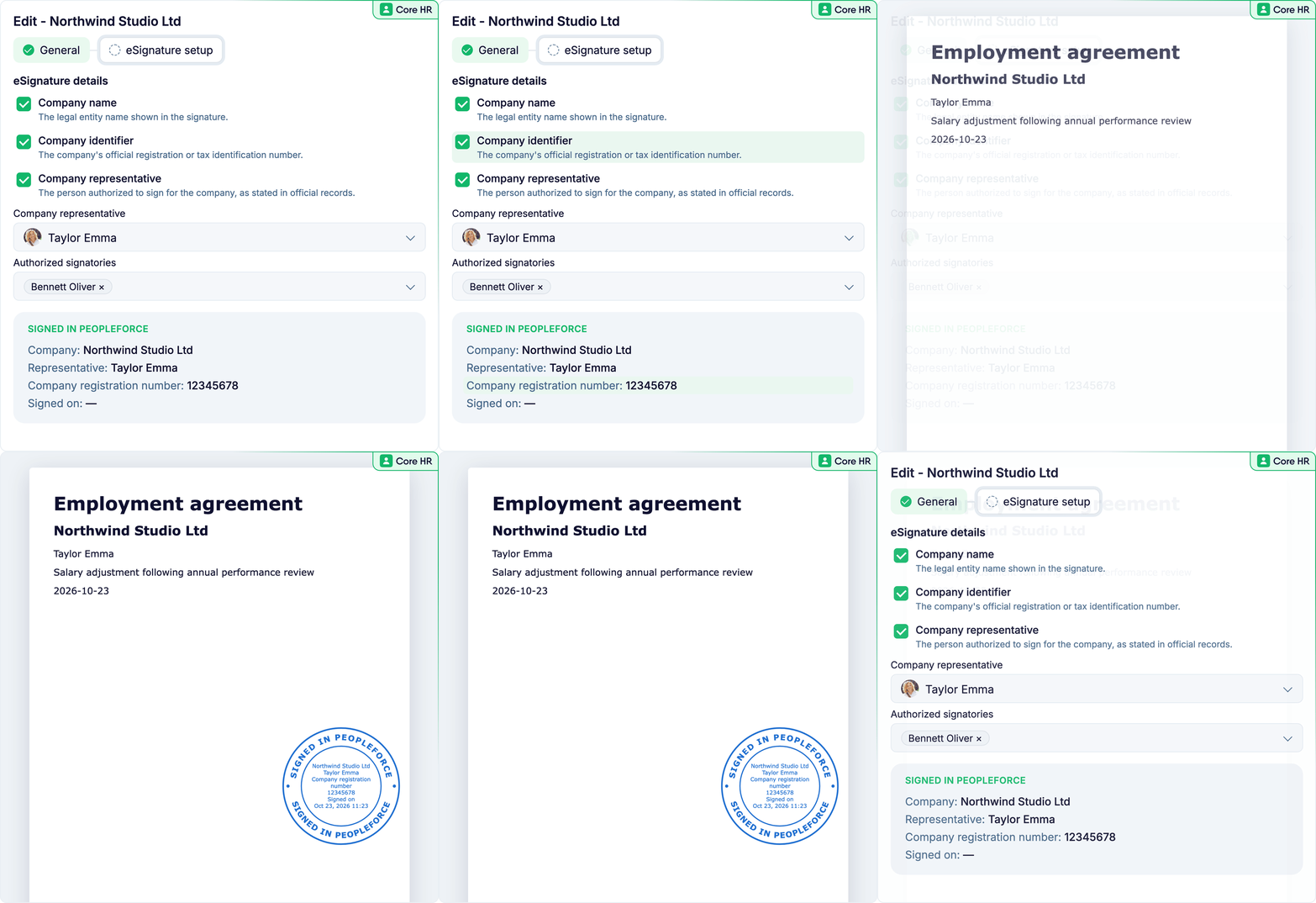
✅ Legal entity stamp for PeopleSign (on request) – a new Legal entities settings page, and documents signed with PeopleSign Simple can carry your legal entity’s stamp, and an authorised signatory signs them last
✅ Legal entity permission – roles now control who can see and change a person’s legal entity, as with division and location
✅ Placeholders in Word headers – placeholders in the header of a Word document template are now filled in when a document is generated
Recruit:
✅ Delete candidates in bulk from a vacancy – for people with the Delete candidates permission; it removes them from Recruitment entirely
✅ Automations that send the latest template – Send email automations can link an email template, so every send uses its latest version
✅ Shorter vacancy board cards – candidate cards now show only the fields that have a value
✅ Candidate location on vacancy board cards – add Location to the cards under View settings, Manage fields, to see where each candidate is based
Integrations:
✅ Approve and Reject always visible in Slack – approval messages for leave, requests and overtime now show the Approve and Reject buttons straight away, without expanding the message
API:
✅ Locations and job levels in API v4 – manage locations and job levels through API v4
✅ Compensation additions and deductions – manage employee compensation additions and deductions through the public API
Across the platform:
✅ More pages in the new design – Documents, Candidates, Billing, Payroll cycles, Exports, Webhooks, Asset categories, Calendars, Probation policies, Recruit tags, candidate sources, Objective tags and 1:1 types, and most list pages now open straight away while their rows load