WHAT'S NEW IN RECURPOST - NOVEMBER 2026
Find things faster. Run your team with less effort. Keep your account secure.
The best tools get out of your way.
Last month we rebuilt the parts of RecurPost you move through every day: the menu, your team and workspace pages, and your account settings. We also added two-factor authentication, so your account, and every brand you manage through it, stays protected.
Here's everything new inside RecurPost this month, and why it matters for your workflow.
|
A Cleaner Menu That Gets You There Faster
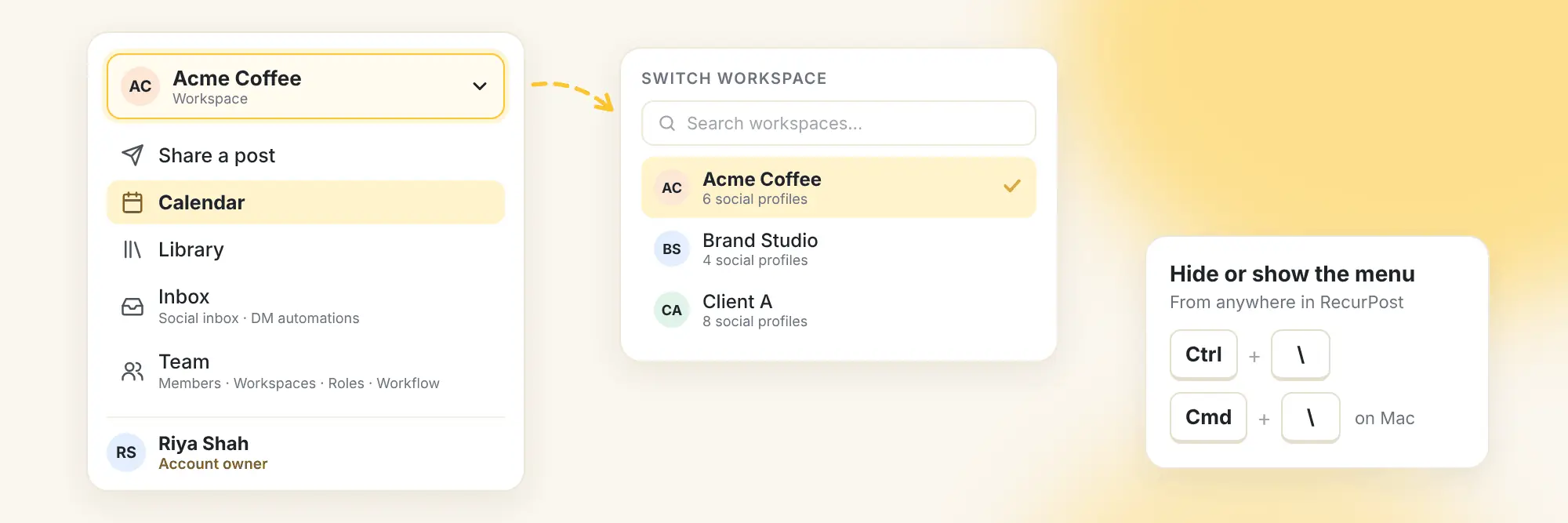
The menu on the left is the first thing you use every day, so we redesigned it to be cleaner and easier to scan. Nothing has been removed. Every page is still there, just better organised.
What changed
- Switch workspaces from the top. Your workspace name now sits at the very top of the menu. Click it to see all your workspaces, search them, and switch in one click.
- Inbox and DM automations together. Click Inbox to find both your social inbox and your DM automations.
- A new Team menu. Members, Workspaces, Roles and Workflow are grouped under Team (visible to account owners).
- Your account at the bottom. Your role shows under your name, and the account menu is shorter and easier to scan.
- Hide or show the menu from anywhere with Ctrl + \ (Cmd + \ on a Mac).
- Better on phones. Menus open neatly inside the menu, so nothing gets hidden or cut off.
Why this matters
If you manage several brands or clients, the workspace you need is now one click away from any page. Less hunting for menus means more time on the work itself.
|
Manage Your Team and Clients From One Place
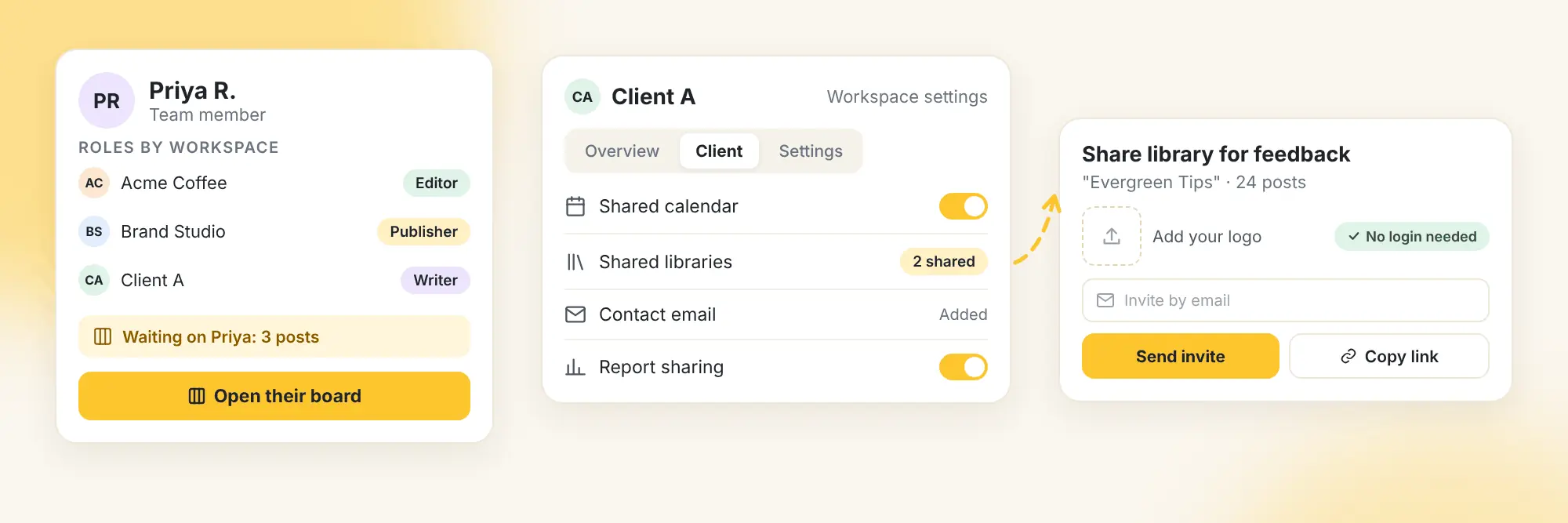
Everything under Team (workspaces, workspace settings, members and invites) has been redesigned, and it comes with a few handy new features.
Everything for your client in one place
Each workspace now has a Client section that brings together your client's shared calendar, shared libraries, contact email and report sharing.
Share a library for feedback
Share a library with a client so they can review every post in it, with no login needed. Add your logo, then invite them by email or simply copy the link.
See who's doing what
Every team member now has their own page showing their role in each workspace, what they can do, which notifications they get, and any work waiting on them. Change their role or remove them right from there, or click Open their board to see the Kanban board with only that person's posts.
Faster setup
- Workspaces has its own page, with every workspace, its social profiles and its team members at a glance
- Workspace settings are grouped into three simple sections: Overview, Client and Settings
- Add people who are already on your team to a workspace in one step, with a role, and no new invite email
- Filter the Members page by workspace or role
Why this matters
Clients can review your evergreen content without creating an account, and you can spot what's waiting on whom before it holds up a campaign. Onboarding a new client or teammate now takes far fewer steps.
Fewer clicks. Clearer roles. Faster client sign-off.
|
Protect Your Account With Two-Factor Authentication
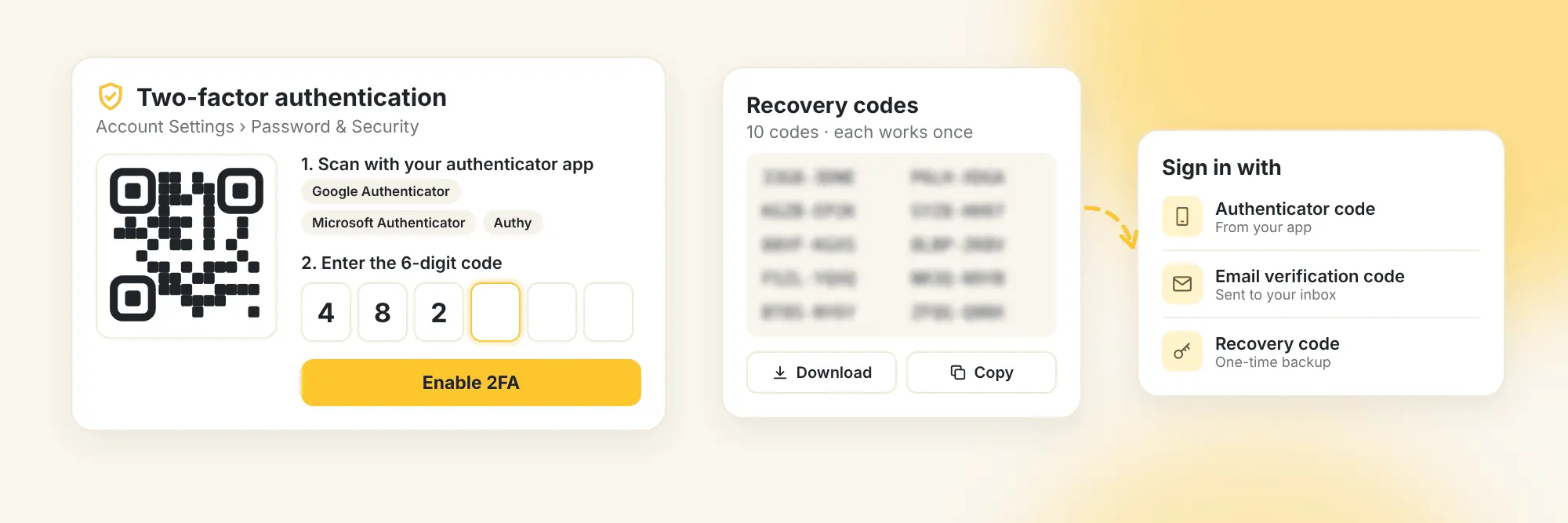
Your RecurPost account is connected to every social profile you manage. Now you can add a second layer of protection to it.
What changed
- Turn it on from Account Settings > Password & Security
- Works with authenticator apps such as Google Authenticator, Microsoft Authenticator and Authy
- Get 10 one-time recovery codes during setup. Each works only once, so keep them somewhere safe.
- Sign in with an authenticator code, an email verification code or a recovery code
Why this matters
A password alone is no longer enough to get into your account. For agencies managing client profiles, it's one of the simplest ways to protect every brand you're trusted with.
|
Account Settings, Rebuilt Around What You Need
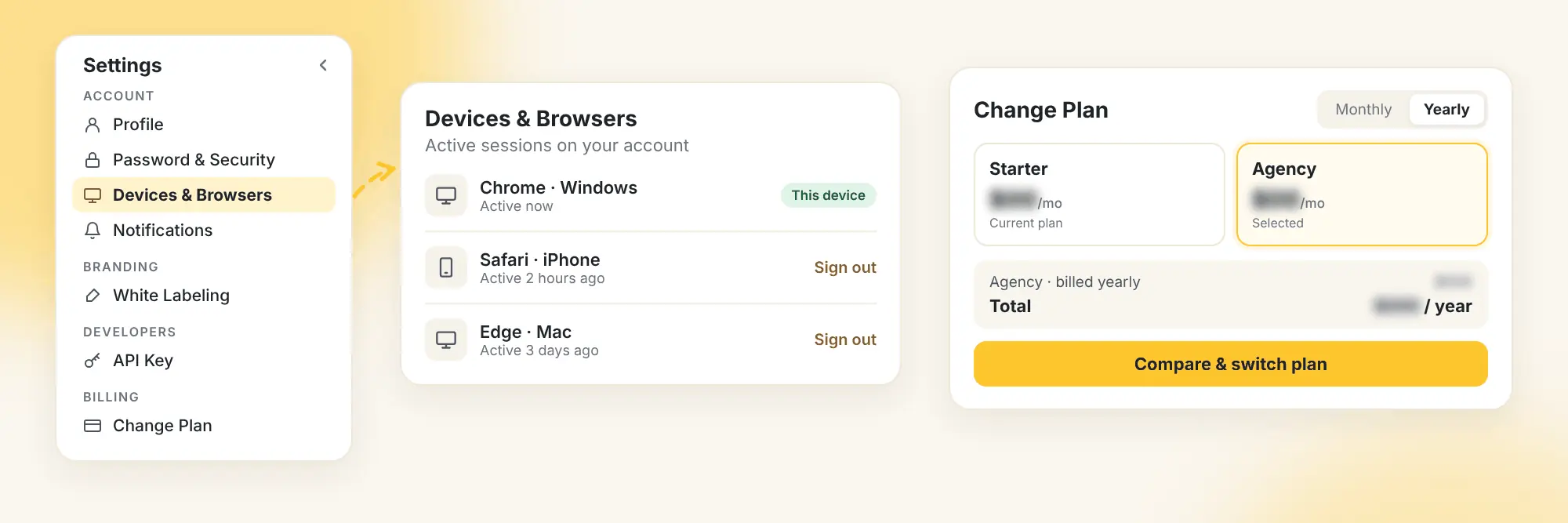
We've redesigned every Account Settings page, so you can find what you need and understand what each setting does.
What changed
- A collapsible side menu with settings organised into clear categories
- Helpful descriptions for individual settings on the Profile page
- A password strength indicator and checklist
- Devices & Browsers shows your active sessions, and you can sign out of any single device
- Time zone and working hours in one place
- Notification preferences grouped into clear sections
- A live logo preview in White Labeling
- API key management on its own page under Developers, hidden until you choose to show it
- "Permit Repeated Tweets" now lives in your X settings
Choosing a plan is clearer too
The new Change Plan view lets you compare plans side by side, switch between monthly and yearly billing, and see a price summary.
Why this matters
Lost a laptop? Sign it out from anywhere. Setting up white labeling? See your logo as your clients will. Less digging through settings, more confidence that everything is set up right.
|
Ready to Try What's New?
Log in, turn on two-factor authentication, share a library with a client for feedback, and let us know what you think.
We're already working on what's coming next, and we can't wait to share it with you.
|
|
Explore all November updates
Thank you for being part of the RecurPost community.
P.S. Don't forget to support us! Like and follow the RecurPost LinkedIn Page for expert social media, AI automation, and content strategy insights.
Unsubscribe is always an option.
|
|
|
|
|
|

