WEEKLY UPDATE November 9 to 22, 2026 The last two weeks were about making simulated callers sound like the people who actually call you. You can now tell a caller exactly when to cut in, how they feel and where they are, and put them on a bad phone line while you pace a run like a real dialer. A single flow can also hand the phone to another persona mid-call. Two things I wanted to put in front of you. |
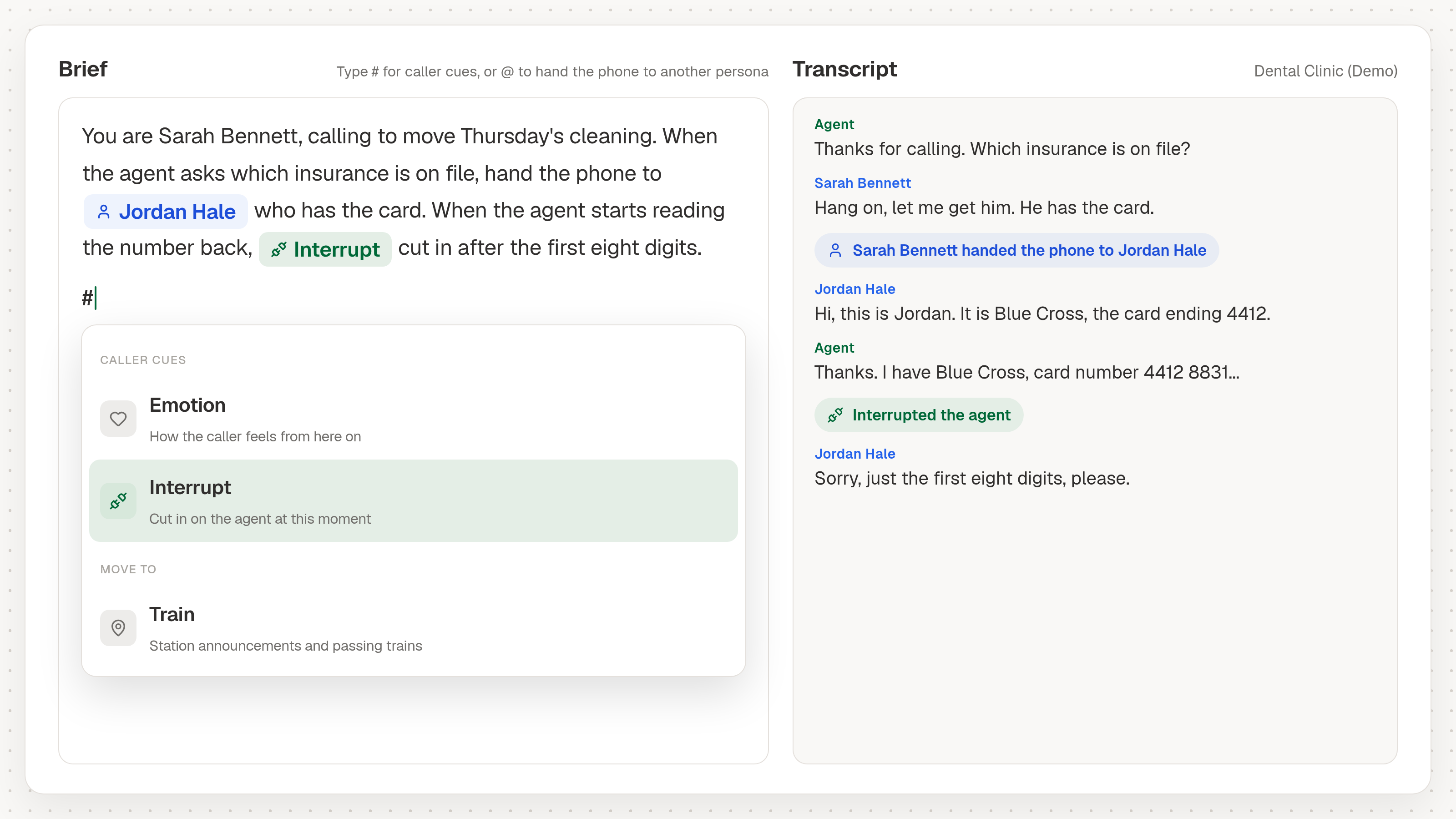
Nº 01 💬 Caller cues: steer a simulated caller mid-call from your flowsTell a simulated caller exactly when to cut in on your agent, how they feel and where they are, right from a flow. Type # in a brief or a scripted step and drop a cue in at the moment it should happen, for example cut in as soon as the agent starts reading back the appointment time, or move the caller onto a train halfway through. A single customer flow can also include more than one persona: type @ in the brief to hand the phone to someone else mid-call, like a caregiver taking over from a patient.
What's new:
- Interrupt: the caller cuts in on the agent at that point. On a strict scripted Agent step, they cut in while the agent is saying that line.
- Hand the phone to another persona: type
@ in a brief, or add a Hand over step in a scripted flow, and another persona takes the call from that point. One caller speaks at a time.
- Emotion: the caller feels this from here on, for example anxious, frustrated or cheerful. You hear it on ElevenLabs v3 and v4 voices, and it changes the caller's wording on any other voice.
- Move to an environment: the background switches to one of your project's environments, like a train or a coffee shop.
- Language: the caller switches language from here on, up to eight languages per call.
- See where each cue landed: fired cues show in the transcript, like "Interrupted the agent" or "Emotion changed to anxious". Handovers show too, like "Sarah Bennett handed the phone to Jordan Hale".
In the API and config as code, cues are tokens in the flow's text, like #{interrupt} and #{emotion:anxious}. A handover in an improv brief is @{persona:...}, and in a scripted flow it is a CUSTOMER_HANDOFF step. Cues and handovers apply to voice simulations.
👉 Read the caller cues guide · Read the multiple callers guide
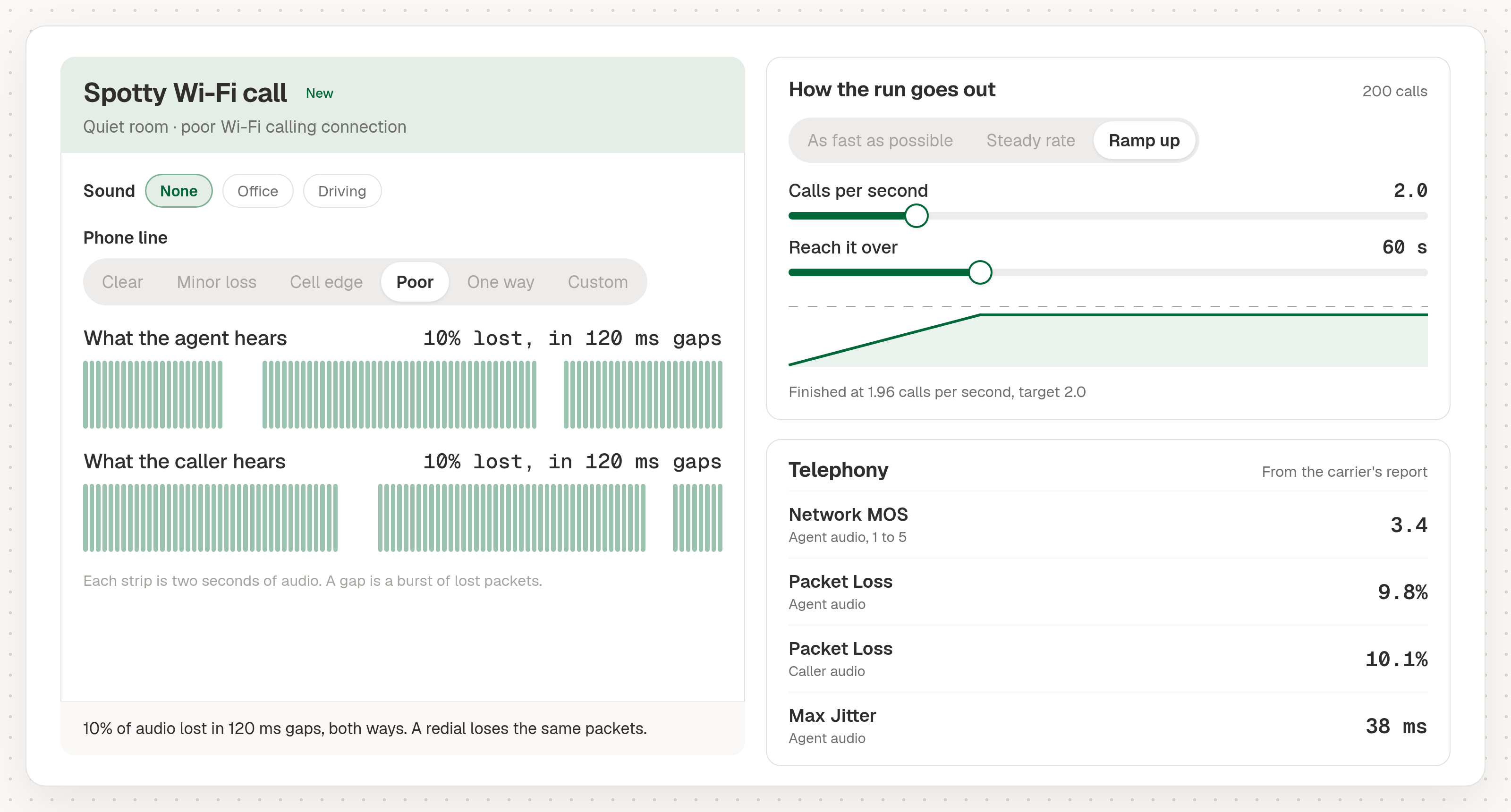
Nº 02 📞 Put the caller on a bad phone line, and pace runs at a real dial rateTest what a real phone network does to your agent: put your simulated caller on a bad line, pace a run at a target calls per second, and score every simulated phone call on what the carrier measured.
What's new:
- Bad phone lines: set the line on an environment, next to its background sound: Clear, Minor loss, Cell edge, Poor, One way, or Custom (0 to 20% loss in each direction, with gaps of up to 200 ms). New ready-made environments include Cell edge, Car on Bluetooth, Spotty Wi-Fi call and Breaking up one way. A redial loses the same packets, so a failure is easy to reproduce.
- Calls per second dial rate: pace a run at 0.01 to 10 calls per second, steady or ramping up, and see the rate you achieved against the target when it finishes.
- Telephony metrics: Network MOS, Packet Loss for each side and Max Jitter on simulated phone calls, taken from the carrier's own report and shown beside Call Quality's DNSMOS scores.
- Fairer Call Quality scores: when a recording keeps each side on its own channel, Call Quality now scores the agent's channel alone, so noise added on the simulated caller's side no longer lowers your agent's scores.
- Longer silence timeouts: "Hang up after silence of" now goes up to 300 seconds, for IVR navigation and warm transfers.
Also in config as code and the API: lineQuality and lineCustom on environments, callsPerSecond and rampUpSeconds on run plans.
👉 Read the guide
|
|